
Check which endpoint should receive the event
Open Settings → Integrations → Webhooks. Confirm the endpoint is enabled and subscribed to the event you need. Account-webhook permission covers endpoints, secrets and delivery logs for the whole account; CRM permission alone does not grant this access.
For SMS, review the Sender ID selection. All Sender IDs includes every subscribed SMS event for the account; a selected list matches the original message sender. Other event types are unaffected.
Changing a filter does not replay history
Sender selections are checked for each delivery attempt, including retries. Changing them does not replay old events or redirect already queued deliveries.
Read the delivery attempt
The Delivery log shows time, status, event, endpoint, HTTP response and error. Match the event and endpoint to the attempt you are investigating, then compare it with your receiver’s logs.
No matching attempt
Check event subscriptions, endpoint state and SMS Sender ID filters before investigating receiver code.
A failed attempt
Use the HTTP response or network error to identify the receiving layer that rejected or missed the request.
A successful acknowledgment
Check your application processing separately. An HTTP acknowledgment does not prove every downstream action completed.
Use the current delivery-IP list in account settings if your firewall restricts incoming requests. Verify signatures even when an IP allowlist is in place.
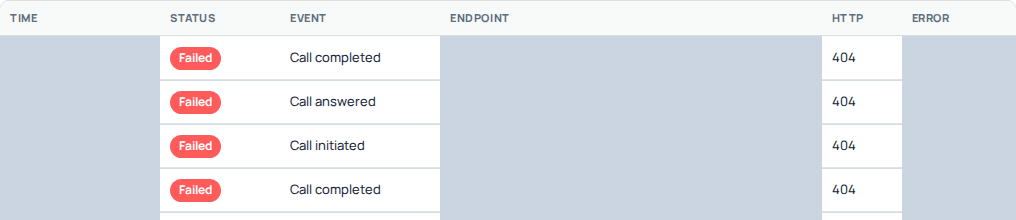
A cropped delivery-log example shows failed call-event deliveries with HTTP 404. Timestamps, endpoint addresses and error details are hidden. These rows illustrate how to read a recorded response; they do not identify the cause of a different delivery problem. Open the image for a larger view.
Separate loading the log from retrying a delivery
If the endpoint list or Delivery log cannot load, use its Retry control to reload that view. This is not a request to replay an old event. Once the log loads, match the actual event, endpoint and attempt time before diagnosing the receiver.
An empty filtered view is different from a loading error. Check the selected endpoint and event scope. If an expected event has no matching attempt, verify that the corresponding operation actually produced that event; do not infer delivery from a browser action alone.
Check signature verification first
IllyVoIP sends JSON POST requests with an Illyvoip-Signature header. Verify it using the webhook secret and the original raw request body before processing the event.
The signed input is the timestamp, a period and the raw body. Parsing and re-encoding JSON before verification can change that input. Use the current reference for the exact HMAC SHA-256 procedure.
A webhook signing secret is separate from your customer API key. If the secret was rotated, update the receiver through your normal credential-change process. Do not reveal either secret in support logs.
Understand the HTTP response
Any 2xx
Acknowledges delivery. An empty 200 response is sufficient.
Network failure, no response, 408, 429 or 5xx
Eligible for retry under the documented retry policy.
3xx or other 4xx
Stops delivery. Check redirects, access rules and receiver validation rather than waiting for an automatic retry.
Acknowledge valid events promptly and queue slow work separately. Keep your receiver safe to run more than once for the same event.
Work through common receiving failures
- 404 response: compare the saved endpoint path with the receiver's deployed route. The server may be reachable while that particular path is missing.
- Redirect: supply the final receiving URL when creating the endpoint. Do not assume a browser redirect will be followed as a successful webhook delivery.
- Authentication or signature rejection: check the webhook secret, original raw bytes and synchronized server time. Keep the API key out of signature verification.
- Rate limit or server error: inspect receiver capacity and the recorded response. Read the retry policy before taking another action.
- 2xx but missing business result: trace the event ID through your own queue and processing logs. Delivery acknowledgment and completed application work are separate.
Correct the receiver before relying on later attempts. An event already stopped by a terminal response is not guaranteed to be sent again merely because the endpoint was repaired. Do not repeat a paid call or SMS just to recreate a missing notification.
Use the event ID to avoid duplicate work
Store the body’s id as the stable deduplication key. The Illyvoip-Delivery header identifies the delivery job; it is not a replacement for the event ID.
For SMS correlation, follow the current send-response and webhook documentation. Delivery-job IDs and message identifiers serve different purposes.
If you need help, provide the event ID, attempt time and timezone, response code and a sanitized receiver error. Keep signing secrets, API keys and unrelated event contents private.
Create, edit and retire an endpoint
In Integrations → Webhooks, choose Add webhook, enter the receiving HTTPS URL and select only the events needed. Review SMS sender filters where applicable and save. Store the displayed signing secret securely when it is shown; it is not your account API key.
Use Edit on the correct endpoint to change its label, event subscriptions, filters or enabled state. The URL is read-only: create a new endpoint for a different URL, update its signing secret on the receiver and retire the old endpoint when ready. Confirm the saved row before testing. Duplicate endpoints can send separate notifications to the same receiver. Remove an obsolete endpoint only after checking which application uses it; deleting an endpoint does not undo events already processed there.
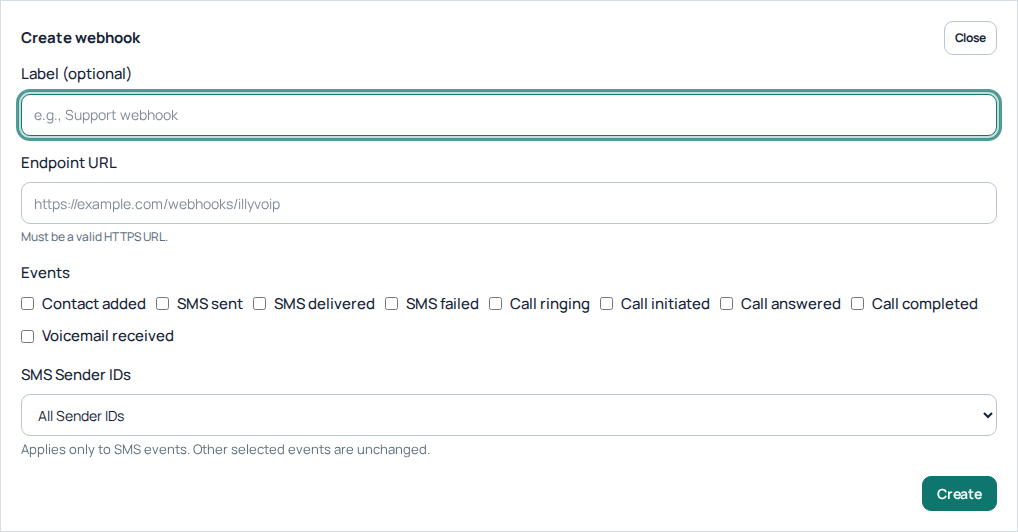
Add webhook opens the endpoint URL, event subscriptions and SMS Sender ID scope. This is an unsubmitted form; no endpoint or signing secret was created. Open the image for a larger view.
Coordinate signing-secret changes
Rotate the secret only when ready to update the receiving application. Read the confirmation, securely capture the new secret and update the receiver before relying on further deliveries. Do not assume an old secret keeps working indefinitely or that rotation replays historical events. The delivery log is a recent troubleshooting window, not a complete event archive; keep your own safe event and processing records.
Move an endpoint or rotate its secret deliberately
For a new URL, create and configure the replacement endpoint, then coordinate the transition with the receiving application. Store each endpoint's own secret. Retire the old endpoint only when you understand which events the application still expects there. Deduplicate by event ID throughout the transition.
For secret rotation, prepare the receiver update first, select Rotate secret and read its confirmation. The receiver must start using the new secret immediately. If the response is lost, inspect the current state before starting another rotation. Never assume repeated rotations recover the same credential or replay events.
Prepare a useful support report
Include the event ID, delivery-attempt time and timezone, HTTP response, the relevant endpoint label and a sanitized receiver error. Explain whether the problem is missing attempts, delivery failure or processing after acknowledgment. Keep secrets and unrelated event payloads out of screenshots and tickets.
Reviewed 10 October 2026 against the current IllyVoIP Portal and service implementation. Available controls depend on account access and service state.