
Use the current API reference
Open public API documentation. The reference contains supported endpoints, required fields and examples. Use it as the source for request details; this guide explains the workflow rather than duplicating the endpoint specification.
Prepare your key
Open Account settings → Developer tools for credential management. Use API Playground for execution and the public documentation for the technical reference.
Follow the identity verification prompt to view or copy your key. The documentation allows a five-minute verified window for viewing the key and using the Playground; generating or regenerating a key requires verification again. Treat the key like a password: keep it on your application's server, out of public repositories, browser code and screenshots.
Regenerate an API key without overlooking existing integrations
Regenerating the current API key makes the old key stop working immediately. There is no assumed overlap period in which both credentials keep working. Plan the change with whoever runs your integrations.
- List the applications, scheduled jobs and servers that use this account key. Check whether you are working in Production or Sandbox.
- Prepare access to their secret stores and configuration so they can receive the replacement promptly. Do not copy keys into a shared document or browser application.
- In Account settings → Developer tools, open Authentication & API key and choose Regenerate when ready.
- Read the warning and complete the fresh verification requested for generation or regeneration. An earlier view/copy verification window does not replace this check.
- Store the replacement securely and update the dependent applications. Reload their configuration using their normal deployment process.
- Verify authentication with an appropriate read-only request in the intended environment, then check each integration's own status.
If an application starts returning authentication errors after rotation, check that it loaded the replacement and is using the matching environment. Do not repeatedly regenerate the key as a troubleshooting step: each regeneration invalidates the key your other applications may just have adopted.
Make a safe first request
- Open the Playground and select a read-only preset appropriate to your account, such as listing SIP identities.
- Review the method, path and parameters. Use identifiers returned for your own account rather than example values.
- Choose Run request and inspect both the HTTP status and response body.
- Use the documented request example in your application with secure credential storage.
In Production, the Playground uses your live account. Requests that send messages, place calls or order services can perform real actions and incur charges. For the separate simulation, select Sandbox and use its matching credential before running a request. Sandbox responses do not prove real message delivery or call completion.
Choose the right service reference
The reference separates Lookup, Pricing, SIP, SMS, Contacts, Speech API, Phone Numbers, Voice API and Calls & recordings. Use the endpoint documentation for the exact prerequisites, request fields and charges. Browser calling has its own Webphone SDK guide; it is not the same as server-side Voice API call control.
An agent’s permission to read API documentation does not grant access to the account owner’s API key or key-authenticated Playground execution. Ask the account owner to manage integration credentials rather than sharing their login.
Use returned references and pagination
Treat public call references as opaque values: copy the complete CALL- reference from your own response instead of constructing one or using an internal telephone-system identifier. Historical calls and active calls are different lists. A control action also needs a call in the supported state; an old history row is not necessarily controllable.
For call-history pages, follow pagination.next_cursor while pagination.has_more is true. Keep the original days, limit and SIP identity filters unchanged. Do not decode or modify the cursor. If it expires, start a new listing and reconcile by public call reference. An API timestamp documented as UTC must be converted intentionally for your display; it is not automatically your browser’s local time.
Handle errors without duplicate paid actions
Read the HTTP status and structured error together. Correct validation or authorization errors before retrying. Respect the documented retry delay for a rate limit. For a timeout or temporary error on a paid action, check its status and the endpoint’s duplicate-request rules before submitting again; changing request identifiers can turn a retry into a new operation. Keep the public request/reference, time and sanitized error for Support, never the API key.
Add webhook notifications
In account integrations, add an HTTPS endpoint and select the events you need. The webhook signing secret is separate from your API key. Verify signatures, process each event once and acknowledge receipt promptly. Check delivery logs when troubleshooting. Consult the API's retry and duplicate-request guidance before retrying a paid operation; a timeout alone does not prove it failed.
Connect webhook setup to the receiving application
- Open Settings → Integrations → Webhooks and choose Add webhook.
- Enter the application's HTTPS receiving URL, select the required events and review the SMS Sender ID scope when applicable.
- Save once and securely retain the one-time signing secret when shown. Configure it in your receiver separately from the API key.
- Check the saved endpoint and its enabled state. Have the receiver verify the signature, preserve the event and acknowledge it promptly.
- Use the delivery log and receiver logs to investigate an expected event. An empty log before an event occurs is not a successful delivery test.
The endpoint URL is read-only when editing an existing webhook. A URL migration needs a new endpoint and its own signing secret, followed by deliberate retirement of the old endpoint. During overlap, your receiver must tolerate repeated business events. See the webhook delivery guide for filtering, secret rotation and failure handling.
Related guides
Reviewed 10 October 2026 against the current IllyVoIP Portal and service implementation. Available controls depend on account access and service state.
Upload an audio file in the Playground
Use the Transcribe audio preset for an audio file from your application that needs Speech API transcription. For an IllyVoIP call recording, use its built-in Transcript or AI Summary controls in Call Reports instead of downloading and uploading the same call.
- Open the API Playground and confirm the environment. Production requests can perform real work and incur charges; Sandbox is a separate simulation.
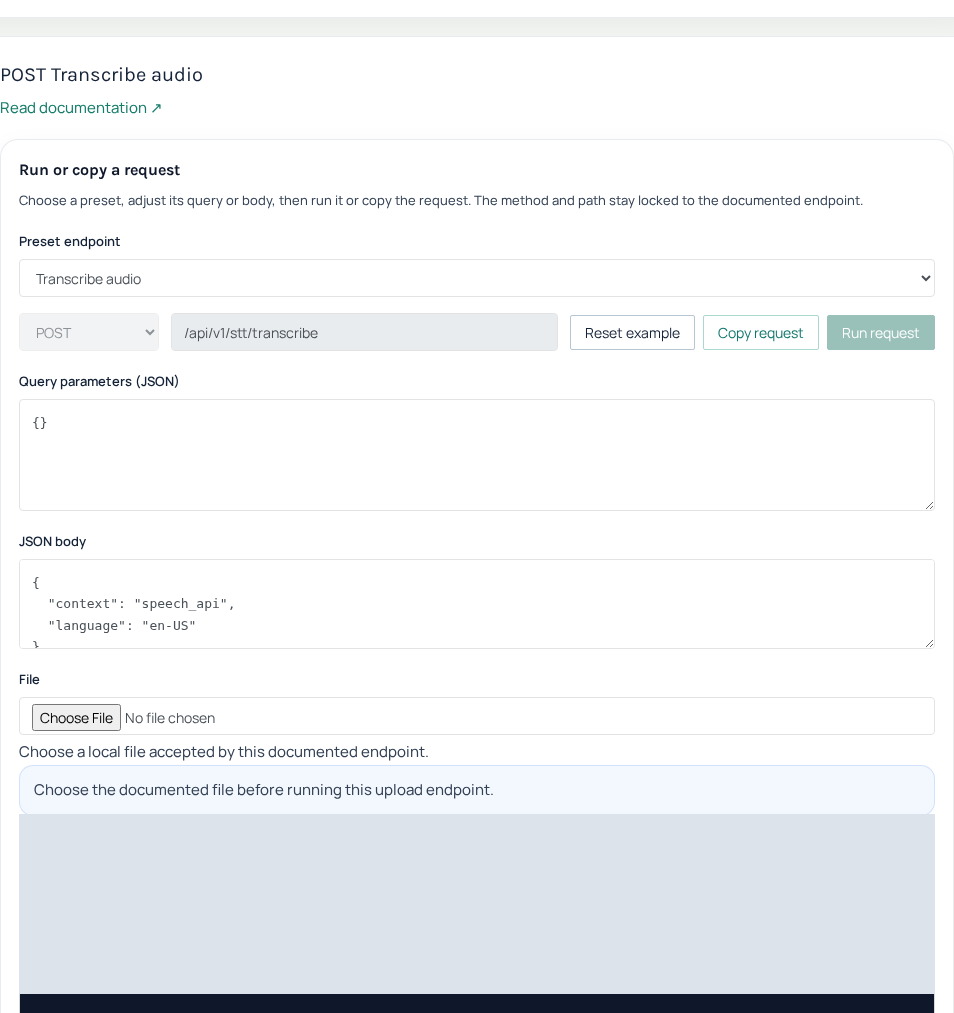
- Select Transcribe audio. Confirm the POST method and the documented STT transcription path. Selecting a preset alone does not run it.
- In the file-upload control, choose one MP3 or WAV file that you are authorized to process. Check the current endpoint reference for upload limits.
- Review the request fields. For standalone transcription use the intended
speech_apicontext and, when required, a language value from the current STT language catalogue. - Confirm that you intend to incur any Production transcription charge, then choose Run request once. Inspect the HTTP status and response body.
- Save the returned result in your application as appropriate. If the request is uncertain, follow the endpoint’s duplicate-operation guidance before submitting again.
Understand the multipart request
The preset sends the selected file in the documented file multipart field. It does not expect you to paste the audio bytes or a local filesystem path into the JSON editor. When reproducing the request in your application, let the HTTP library construct the multipart boundary; do not hard-code a bare multipart Content-Type header.
A filename selected in your browser is not an upload result. If no file is selected, choose it before execution. If validation rejects the file, compare its actual format and size with the endpoint’s accepted types; renaming an unsupported file to .wav does not convert it.
If a request cannot run
A key verification prompt needs the account owner’s current verification. A file control missing after selecting another preset may be expected: only registered upload presets expose it. A permission error, unsupported format and paid-service refusal require different fixes. Keep the exact sanitized response, and do not repeatedly regenerate credentials or resubmit a paid request to clear the screen.
Related guides
Reviewed 12 October 2026 against the current IllyVoIP controls, implementation and applicable references. Available options depend on account permissions and service state.