
In Angular, keep the phone connection in an application service and let the calling component display its state. Creating the SDK independently in every routed component can leave competing registrations or disconnect a call when a view disappears.
This guide uses standalone Angular components, signals and a root-provided service. Use a supported Angular release with those APIs, HTTPS and the reviewed IllyVoIP browser SDK bundle. It covers voice calling through an eligible IllyVoIP SIP identity, not peer-to-peer video or a separate Angular SDK.
1. Prepare assets and a protected token endpoint
Obtain the current Webphone SDK bundle from the IllyVoIP reference and host it with its required companion assets. Load the documented browser entry before enabling Connect. Do not import a browser-global bundle into code that executes during server rendering.
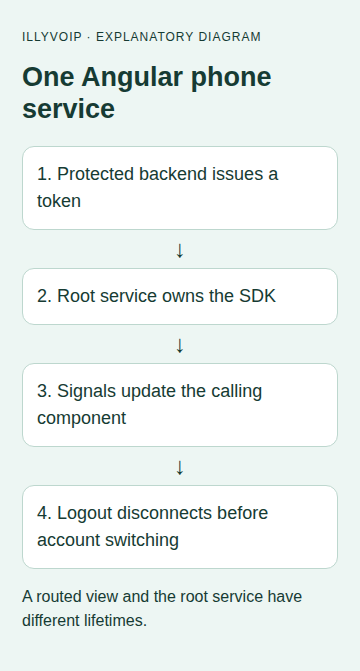
Your backend must implement POST /api/voice-token. It authenticates the current application user, validates CSRF and request limits, selects an authorized SIP identity, and calls POST /api/v1/sip/browser-token with the server-held API key. It returns the documented short-lived token payload with a no-store policy. The requested identity must permit browser_token.
The client may request an allowed region; it may not select an arbitrary account identity. Keep permanent keys and SIP passwords out of Angular environment files that become part of the browser bundle.
2. Add the shared phone owner
Save this JavaScript module as phone-owner.mjs. The service below constructs it once. It serializes operations and uses SDK events as the source of call state, rather than assuming a successful button click means the call connected.
// Construct this once per signed-in application, not once per route.
export function createPhoneOwner(makePhone, tokenProvider) {
  let phone = null, queue = Promise.resolve(), failedCleanup = false, generation = 0;
  let state = { ready: false, busy: false, call: null, status: 'Offline' };
  const listeners = new Set(), off = [];
  const publish = patch => { state = { ...state, ...patch }; listeners.forEach(f => f(state)); };
  const serial = job => {
    const result = queue.then(job);
    queue = result.catch(() => {});
    return result;
  };
  async function dispose() {
    publish({ ready: false, status: 'Disconnecting' });
    off.splice(0).forEach(unsubscribe => unsubscribe());
    try { if (phone) await phone.destroy(); }
    catch (e) { failedCleanup = true; throw e; }
    finally { phone = null; publish({ call: null, status: failedCleanup ? 'Reload required' : 'Offline' }); }
  }
  function action(job) {
    if (state.busy) return Promise.reject(new Error('Another action is pending'));
    publish({ busy: true });
    return serial(job).catch(e => {
      publish({ status: 'Action failed; check the call state' }); throw e;
    }).finally(() => publish({ busy: false }));
  }
  return {
    subscribe(listener) { listeners.add(listener); listener(state); return () => listeners.delete(listener); },
    connect() { const ticket = generation; return action(async () => {
      if (ticket !== generation) return;
      if (phone) return;
      if (failedCleanup) throw new Error('Reload after cleanup failure');
      phone = makePhone({ autoConnect: false, autoRegister: false, region: 'de',
        tokenBootstrapUrl: 'https://api.illyvoip.com/api/v1/sip/browser-bootstrap', tokenProvider });
      off.push(phone.on('registration:registered', () => publish({ ready: true, status: 'Registered' })));
      off.push(phone.on('registration:unregistered', () => publish({ ready: false, status: 'Unregistered' })));
      off.push(phone.on('connection:disconnected', () => publish({ ready: false, status: 'Disconnected' })));
      for (const event of ['call:created', 'call:incoming', 'call:answered']) {
        off.push(phone.on(event, ({ call }) => publish({ call, status: event === 'call:incoming' ? 'Incoming call' : call.state })));
      }
      off.push(phone.on('call:state', ({ call, state: next }) => {
        if (state.call?.id === call.id) publish({ call, status: next });
      }));
      off.push(phone.on('call:ended', ({ call }) => {
        if (state.call?.id === call.id) publish({ call: null, status: 'Call ended' });
      }));
      off.push(phone.on('error', () => publish({ status: 'Phone error; inspect securely' })));
      try { await phone.initialize(); if (ticket !== generation) return;
        await phone.connect(); if (ticket !== generation) return; await phone.register(); }
      catch (e) { await dispose(); throw e; }
    }); },
    dial(target) { return action(async () => {
      if (!phone || !state.ready || state.call || !String(target).trim()) throw new Error('Not ready to dial');
      await phone.call(String(target).trim());
    }); },
    answer() { return action(async () => {
      if (!phone || !state.call) throw new Error('No incoming call');
      await phone.answer(state.call.id);
    }); },
    hangup() { return action(async () => {
      if (!phone || !state.call) throw new Error('No active call');
      await phone.hangup(state.call.id);
    }); },
    disconnect() { const ticket = generation; return action(async () => {
      if (ticket !== generation) return;
      if (state.call) throw new Error('End the call and wait for its ended event first');
      await dispose();
    }); },
    // Application teardown only. Prevent this during calls in your navigation policy.
    teardown() { generation++; return serial(dispose); }
  };
}

export async function getBrowserToken({ region }) {
  const controller = new AbortController();
  const timer = setTimeout(() => controller.abort(), 10000);
  try {
    const response = await fetch('/api/voice-token', {
      method: 'POST', credentials: 'same-origin', cache: 'no-store', signal: controller.signal,
      headers: { 'Content-Type': 'application/json',
        'X-CSRF-Token': document.querySelector('meta[name="csrf-token"]')?.content || '' },
      body: JSON.stringify({ region })
    });
    if (!response.ok) throw new Error('Browser authorization failed');
    const body = await response.json();
    if (body.status !== 'success' || typeof body.token !== 'string') throw new Error('Invalid token response');
    return body;
  } finally { clearTimeout(timer); }
}
Include JavaScript modules in your application's TypeScript configuration, or add a project-appropriate declaration for this module. The sample keeps SDK call objects opaque; if you add your own types, derive them from the current SDK interface rather than inventing states or methods. Keep the chosen region consistent with backend authorization.
3. Create the root service
Save the following as phone.service.ts. It creates the SDK only after a browser action, so constructing the Angular service during SSR does not read browser globals.
import { Injectable, OnDestroy, signal } from '@angular/core';
import { createPhoneOwner, getBrowserToken } from './phone-owner.mjs';

@Injectable({ providedIn: 'root' })
export class PhoneService implements OnDestroy {
  readonly state = signal<any>({ ready: false, busy: false, call: null, status: 'Offline' });
  private owner: ReturnType<typeof createPhoneOwner> | null = null;
  private unsubscribe: (() => void) | null = null;
  private getOwner() {
    if (typeof window === 'undefined') throw new Error('Calling requires a browser');
    if (!this.owner) {
      const Constructor = (window as any).IllyVoipWebRtcPhone;
      if (typeof Constructor !== 'function') throw new Error('Load the reviewed SDK bundle first');
      this.owner = createPhoneOwner((options: any) => new Constructor(options), getBrowserToken);
      this.unsubscribe = this.owner.subscribe((value: any) => this.state.set(value));
    }
    return this.owner;
  }
  async connect() { try { await this.getOwner().connect(); }
    catch { this.state.update((s: any) => ({ ...s, status: 'Connection failed; check setup' })); } }
  async dial(target: string) { try { await this.getOwner().dial(target); } catch {} }
  async answer() { try { await this.getOwner().answer(); } catch {} }
  async hangup() { try { await this.getOwner().hangup(); } catch {} }
  async disconnect() { try { await this.getOwner().disconnect(); } catch {} }
  ngOnDestroy() {
    this.unsubscribe?.();
    void this.owner?.teardown().catch(() => {});
  }
}
Keep providedIn: 'root' as the single authority. Do not also add this service to the providers array of each calling component or lazy route, because doing so can create another instance. Signal updates let the view reflect SDK events without polling.
4. Add the calling component
The standalone component consumes the service; destroying this view does not itself destroy the root service:
import { Component, inject } from '@angular/core';
import { PhoneService } from './phone.service';
@Component({
  selector: 'app-phone', standalone: true,
  template: `
    <section aria-label="IllyVoIP phone">
      <p role="status">{{ phone.state().status }}</p>
      <button [disabled]="phone.state().busy || phone.state().ready" (click)="phone.connect()">Connect</button>
      <label>Destination <input #destination></label>
      <button [disabled]="!phone.state().ready || phone.state().busy || !!phone.state().call"
        (click)="phone.dial(destination.value)">Call</button>
      <button [disabled]="!phone.state().call || phone.state().busy" (click)="phone.answer()">Answer</button>
      <button [disabled]="!phone.state().call || phone.state().busy" (click)="phone.hangup()">End call</button>
      <button [disabled]="!!phone.state().call || phone.state().busy" (click)="phone.disconnect()">Disconnect</button>
    </section>`
})
export class PhoneComponent { readonly phone = inject(PhoneService); }
Import PhoneComponent into the intended standalone layout/component and use <app-phone />. Load the reviewed SDK entry before exposing Connect. The sample uses basic controls; your full interface should use actual call states to distinguish an incoming call from a connected one and enable Answer accordingly.
5. Handle logout and navigation explicitly
A root service can outlive a routed panel. That is useful for keeping a call available across authorized views, but it means closing one view is not a logout procedure. On logout/account switching, finish an active call, wait for its ended event, await disconnect and then clear the user session. Block new calling actions during that sequence.
Revoke the old user's ability to obtain refreshed tokens on the backend. Do not rely solely on hiding the component. The service's destroy hook handles application teardown, not every authentication transition.
The helper blocks a new connection after failed cleanup. A deliberate reload is safer than silently opening another SDK instance with unknown ownership. It does not coordinate separate tabs or guarantee calls survive a full-page navigation.
6. Test the service and the real browser separately
- Use a fake SDK to confirm repeated clicks do not create duplicate local operations.
- Check that delayed initialization followed by teardown cannot register a new phone afterward.
- Render the component, update service state and verify the displayed status and disabled controls.
- Navigate away and back while preserving the intended root service; confirm there is still one owner.
- Test logout, account switching, missing SDK assets, token failures and microphone denial.
- Perform a separately authorized incoming/outgoing audio test through your IllyVoIP line. Normal charges apply.
For a browser error, retain the SDK/Angular/browser versions, sanitized error, time/timezone and call reference when available. Never include the API key or browser token in a public issue.
Related guides and references
Reviewed 9 October 2026 against current IllyVoIP source and the linked documentation. Use the settings available to your account and installed version. These instructions are not a claim of a completed physical-device or live-service test.