
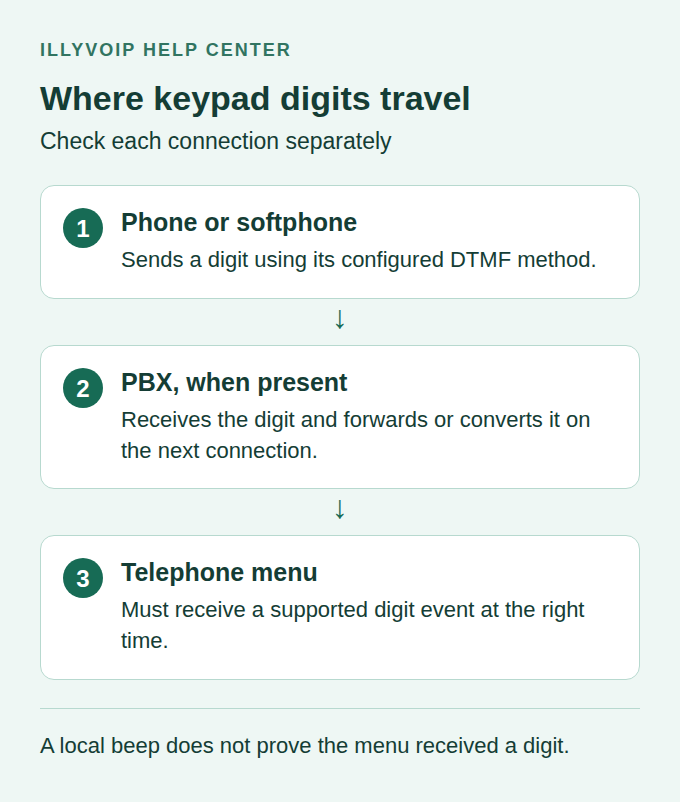
If a telephone menu ignores your keypad presses, the call may have a DTMF delivery problem even though speech works normally. DTMF is the mechanism used to send digits such as 1, 2, * and # during a call. The beep you hear locally does not prove that the remote menu received the digit.
Use this guide for SIP phones, softphones and PBXs connected to IllyVoIP. First confirm when and where the digits fail, then check the sending method on each connection. Do not change the SIP password or incoming-number route if the call already reaches the correct menu.
1. Test the in-call keypad at the right time
- Call a telephone menu you are authorized to test. Normal call charges may apply.
- Wait until the call is answered and the menu asks for input.
- Open the app's in-call keypad, or use the physical telephone keypad. Digits entered before dialing are not the same test.
- Press one requested digit once, then allow time for the menu to respond.
- If the menu requests a terminating #, include it. Do not add # to every menu automatically.
- Record whether the digit is ignored, repeated, delayed or interpreted incorrectly.
Start with a harmless menu option. Do not use a banking PIN, payment-card details, a verification code or a sensitive voicemail password as your diagnostic example. A simple test sequence makes logs easier to interpret and avoids collecting private data.
If the call has not answered or the menu is still playing an announcement that does not accept input, a missed digit may be a timing issue. Repeat after the prompt before editing the DTMF configuration.
2. Determine how widely the problem occurs
Compare the failing menu with another menu you control or are permitted to test. Try a second authorized endpoint using its normal account if available. Keep a record of the following distinctions:
| Result | What it suggests checking |
|---|---|
| Only one external menu fails | That destination's input timing, supported method and a call-specific interconnection issue. |
| Every external menu fails from one phone | The phone's in-call keypad behavior and account DTMF configuration. |
| Local PBX menu works; external menus fail | The PBX-to-provider connection and how the PBX forwards or converts digits. |
| One press is detected twice | Duplicate delivery, multiple sending methods or event handling on the path. |
| Failure begins only after transfer | The new media/signaling connection established by the transfer. |
These results narrow the investigation; they do not prove a particular system is at fault. For example, a working internal IVR shows that the phone can reach that IVR, but it does not test the provider trunk's DTMF handling.
3. Identify the DTMF sending method
Check the DTMF setting for the exact account or extension used by the test call. Manufacturers use different labels, and older interfaces often say RFC 2833 for the telephone-event method standardized in RFC 4733.
| Method | How digits are carried |
|---|---|
| RFC 4733 / telephone-event | Digit events carried in RTP separately from the encoded speech payload. Often labeled RFC 2833 in device menus. |
| In-band | Audible tones carried within the speech audio. Codec processing can affect their detection. |
| SIP INFO | Digits carried in SIP signaling messages rather than telephone-event RTP. |
| Auto | A product-specific selection or fallback policy. Check what the current product actually chooses. |
Use the method supported by both ends of each connection. RFC 4733 is a useful first method to verify for a SIP deployment, but do not assume every legacy gateway or PBX uses it. The RFC 4733 specification describes the telephone-event format; it is not a provider-specific configuration profile.
Do not switch on several sending methods indiscriminately. Some arrangements can turn one physical press into more than one detected digit. Make a single change on the affected connection, save it and start a new call for the comparison.
4. Check the phone or softphone account
Open the selected account's audio, codec or DTMF settings according to the manufacturer's guide. Verify that you are editing the account actually used for the call, not another account with a similar name.
- Record the original DTMF mode.
- Compare it with the PBX extension requirements or, for a direct connection, the agreed provider method.
- Apply the compatible mode and save through the device's normal configuration workflow.
- Repeat the same menu test on a new call.
- Restore the original setting if the change has no benefit or creates another failure.
On a managed phone, make the change in its provisioning source if required; otherwise it may disappear after a reboot. In a softphone, a local keypad-sound preference may only control the sound played to you. It is not necessarily the DTMF transport setting.
5. Check both connections when a PBX is involved
A PBX call has at least two relevant connections: phone to PBX, and PBX to the next system. The PBX may receive one DTMF method and transmit another. The methods do not always have to be identical, but the PBX must support the intended conversion and each peer must accept what it receives.
For Asterisk PJSIP, the endpoint option is dtmf_mode. The official PJSIP configuration reference documents rfc4733, inband, info, none and automatic modes. In that implementation, auto and auto_info have different fallback behavior. Do not assume that another vendor's Auto setting means the same thing.
In FreePBX, inspect the relevant PJSIP extension and trunk's DTMF mode through the administration interface. Save and apply the change using its normal workflow. Do not edit generated Asterisk configuration files, change an unrelated trunk or copy a chan_sip option into a PJSIP endpoint.
If the phone reaches a PBX IVR correctly but an external menu fails, have the administrator compare received digits with the events sent on the provider connection. This is more useful than changing every phone simultaneously.
6. Inspect negotiation, media and duplicate events
For RFC 4733, an administrator can examine the call's SDP for the negotiated telephone-event payload and supported event range, then confirm whether events arrive during the test. Do not hardcode payload number 101 merely because it appears in an example; dynamic payload values are negotiated for the connection.
For SIP INFO, check that the receiving system accepts the relevant INFO messages. For in-band tones, investigate the codec and any media conversion that could distort the tones. Changing to a less compressed codec may be a controlled diagnostic for an in-band path, but it is not a universal fix for missing telephone-event packets.
Repeated RTP packets for the same telephone event can be normal reliability behavior. An administrator should distinguish repeated packets belonging to one event from two separate detected digits. Do not conclude that the sender pressed twice from packet count alone.
If speech also has one-way or missing audio, resolve that media-path problem alongside DTMF. SIP registration does not prove RTP reaches both sides. If only keypad input is affected, preserve that distinction in the report.
7. Check timing only after confirming delivery
Some systems are sensitive to how quickly a sequence arrives or how long a tone lasts. First determine whether the receiving system sees any digit at all. Extending every tone will not fix a method mismatch or a blocked media path.
For a confirmed timing problem, follow the endpoint and receiving system's documentation. Change one duration or inter-digit setting on a bounded test, record the original value and repeat the same sequence. Avoid inventing a single timing value for all menus.
If a menu reads back an entry, compare what it received with what you pressed. Stop a test before submitting an unwanted transaction or changing an account setting.
8. Verify the result and contact Support if needed
Repeat the original menu, a second comparison menu and any transfer condition that triggered the failure. Check that single digits and an allowed multi-digit sequence are detected correctly without duplication. Retest a normal voice call to ensure the change did not introduce another problem.
Send Support the device/PBX version, selected account, timestamp/timezone, call reference, destination through the secure channel, DTMF modes on the relevant connections and the non-sensitive test sequence. State whether digits were missing, duplicated or delayed and whether speech remained normal.
Include a matching call-report reference when available. A successful call record alone does not prove that keypad events reached the menu. Share traces only when requested and remove sensitive digit sequences and unrelated calls.
Frequently asked questions
I hear a beep. Why does the menu ignore it?
The app may generate that beep locally. The remote system still needs to receive and understand the corresponding DTMF event or tone.
Are RFC 2833 and RFC 4733 completely different device settings?
Many interfaces retain the older RFC 2833 label for RTP telephone-event signaling. Check the device documentation and actual negotiated method rather than relying on the label alone.
Should I force SIP INFO on every device?
No. The receiving peer must support it. Match each connection's requirements and verify the result with a controlled call.