
Connect Grafana Alerting to a small authenticated receiver that turns approved alerts into IllyVoIP SMS requests. The receiver handles event identity, permitted recipients and uncertain send results so repeated alert-group notifications do not accidentally create repeated paid messages.
This walkthrough is for an administrator who can configure Grafana contact points and deploy a backend receiver with durable storage. It uses the documented webhook integration. It does not claim a native IllyVoIP contact point or an already deployed adapter.
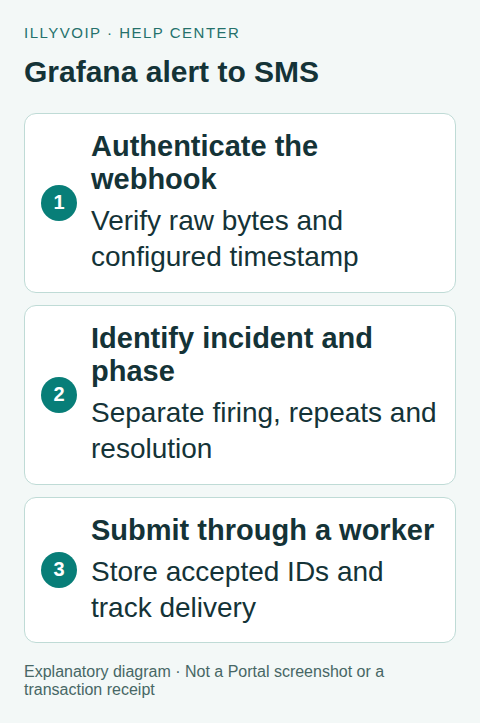
1. Define what deserves a text
Choose a narrow alert rule, authorized recipients and a policy for firing, repeat and resolved messages. Review grouping and repeat intervals. A new webhook can describe the same incident, several incidents in one group, or a resolved state; receiving it is not automatically permission to send another SMS.
Use an incident identity that distinguishes separate occurrences. A fingerprint identifies an alert’s label set, but needs an occurrence reference such as its start time to distinguish later incidents with the same labels. Keep organization/source, incident, phase, recipient and deliberate escalation step in your durable business key.
2. Prepare a secured receiver
Deploy an HTTPS endpoint reachable from the Grafana deployment. Restrict request size and rate, validate the source authentication and allow only configured recipients/senders. Keep the IllyVoIP key in the backend secret store.
Use Grafana’s documented HMAC signing where available in your installed release. Set a dedicated shared secret and a timestamp header. This secret authenticates Grafana requests; it is separate from both the IllyVoIP API key and IllyVoIP’s webhook signing secret.
Verify the raw request bytes before parsing JSON, check timestamp freshness under a stated receiver policy and compare the expected signature in constant time. Grafana’s timestamp form uses a colon between timestamp and body. Do not reuse IllyVoIP’s timestamp-dot-body verifier unchanged.
This Node.js helper verifies the timestamp-enabled Grafana format. Pass the raw body buffer, the exact configured timestamp/signature header values and your backend secret. The five-minute tolerance is an example receiver policy, not a Grafana delivery deadline:
import { createHmac, timingSafeEqual } from 'node:crypto';

export function verifyGrafana(rawBody, timestamp, signature, secret,
                              nowSeconds, toleranceSeconds = 300) {
  if (!Buffer.isBuffer(rawBody) || typeof timestamp !== 'string' ||
      !/^[0-9]+$/.test(timestamp) || typeof signature !== 'string' ||
      !/^[0-9a-fA-F]{64}$/.test(signature) ||
      typeof secret !== 'string' || secret.length === 0 ||
      !Number.isSafeInteger(nowSeconds) ||
      !Number.isSafeInteger(toleranceSeconds) || toleranceSeconds < 0) return false;
  const stamp = Number(timestamp);
  if (!Number.isSafeInteger(stamp) ||
      Math.abs(nowSeconds - stamp) > toleranceSeconds) return false;
  const expected = createHmac('sha256', secret)
    .update(timestamp + ':', 'utf8').update(rawBody).digest();
  return timingSafeEqual(expected, Buffer.from(signature, 'hex'));
}
Reject duplicate or ambiguous authentication headers at your HTTP boundary. Run raw-body middleware before JSON parsing. Synchronize the receiver clock. This helper authenticates bytes; durable incident deduplication and recipient validation still belong to the receiver described below.
3. Configure the webhook contact point
- Open Alerting → Contact points in the intended Grafana organization.
- Create a contact point using the Webhook integration and your receiver’s HTTPS URL.
- Configure the authentication/signature fields supported by that deployment.
- Keep resolved notifications enabled if your SMS policy includes recovery.
- Test the contact point with synthetic alert data before attaching the intended rule or notification policy.
Inspect the resolved payload at the receiver using sanitized diagnostics. The default body contains an alerts array and group information. Do not map the whole body directly into the IllyVoIP send endpoint.
Some Grafana deployments support a custom payload; current documentation says it is not generally available in Grafana Cloud. This guide uses a receiver so the payload conversion and durable processing remain explicit. Check your actual interface rather than assuming every deployment has the same template controls.
4. Authenticate and store each intended notification
For each accepted webhook, validate the expected source and payload shape. Inspect each alert’s state rather than relying only on a group-level label. Decide how to handle truncatedAlerts; a truncated group is not evidence that missing alerts resolved.
Atomically insert or find the notification record using the business identity from step 1. Freeze the sender, recipient, final text and IllyVoIP request key. Store a durable queue/outbox item before acknowledging receipt to Grafana. A webhook acknowledgement means your receiver retained the event, not that an SMS was delivered.
The following JSON is the SMS body produced by your worker, not Grafana’s original webhook:
{
  "from": "YOUR_APPROVED_SENDER",
  "to": ["YOUR_AUTHORIZED_RECIPIENT"],
  "message": "Service alert: the approved application needs attention."
}
5. Submit and track the SMS
POST the serialized body to https://api.illyvoip.com/api/v1/sms/messages with Content-Type: application/json, X-Api-Key and the saved Idempotency-Key. Use an unchanged key/body for a permitted retry of the same submission.
Require the actual success and accepted queued_message_ids before marking the record submitted. Check delivery separately. If the response is lost, retain an uncertain state and reconcile the existing notification. Do not allow Grafana retry, worker retry and manual resend to each generate a fresh key.
A resolved notification should have its own phase identity. If the same incident deliberately needs later reminders, model each reminder step explicitly and cap volume. Keep sensitive labels and internal diagnostic URLs out of the recipient’s message unless they are appropriate for that recipient.
6. Test the full workflow
Use local fixtures for valid/invalid signatures, stale timestamps, duplicate webhooks, multiple alerts, a second occurrence of the same fingerprint, resolved events, truncated groups and an SMS timeout. Restart the receiver and verify its stored identities survive.
Only after those tests, send one authorized live notification if you choose to incur the charge. Verify the SMS record and actual delivery outcome, then enable the narrow alert policy. Review group/repeat behavior before adding more rules.
Frequently asked questions
Does a successful contact-point test prove SMS delivery? No. It proves only the reported test result; trace the receiver’s accepted SMS ID and delivery state.
Can I paste the IllyVoIP URL into an unmodified webhook? The default Grafana payload is not the SMS request contract. Use the validated mapping described here.
Related guides and references
- Send an SMS with the IllyVoIP API and track delivery
- Official reference: grafana.com
- Official reference: api.illyvoip.com
Reviewed 9 October 2026 using current IllyVoIP implementation and official references. Check your installed version and account options before applying settings. Examples do not certify a physical device or completed live integration.