
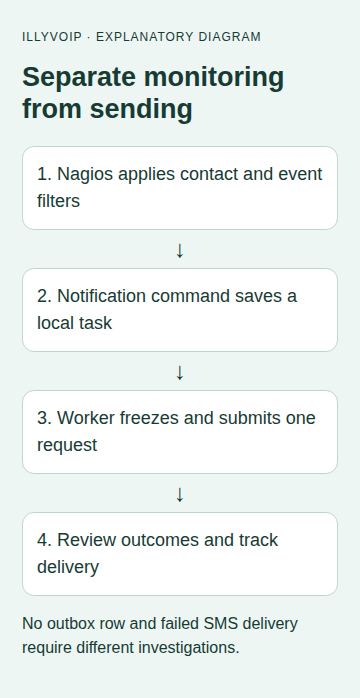
Nagios Core can call an external notification command when its alert rules permit a host or service notification. Use that command to store an SMS task locally, then let a separate worker make one IllyVoIP API attempt. This keeps the monitoring process away from a slow network request and preserves a record when an outcome is uncertain.
This guide is for a Nagios Core 4 administrator with Python3, SQLite and IllyVoIP SMS/API access. It is a custom notification integration, not a built-in IllyVoIP connector. The examples separate queue admission from sending; enabling the worker against Production can incur charges.
1. Confirm that Nagios intends to notify the contact
Check the affected host/service, its contact group, notification options and time period. Nagios filters notifications before executing the command. Scheduled downtime, flapping, disabled notifications or contact settings can suppress an alert before IllyVoIP is involved.
Decide whether the contact should receive PROBLEM and RECOVERY messages. Nagios's recovery rules depend on the corresponding problem notification. Do not test only a recovery event and assume a missing SMS means the API failed.
2. Prepare the service user's private files
Create a private directory such as /var/lib/illyvoip-alerts for the Nagios service user. Give only the intended worker/service account access. Store the Python scripts in an administrator-controlled location such as /usr/local/libexec/illyvoip-alerts; the service user should not be able to replace their code.
Create /etc/illyvoip-alerts/config.json using your secure configuration process. It contains the permitted sender and server-side api_key, with restrictive file permissions. Do not place the key in Nagios command arguments or exported macro values.
3. Add the local outbox command
The following notify.py reads Nagios environment macros. Enable the documented enable_environment_macros setting only after reviewing its effect on your installation. The example expects the host/service notification ID and contact macros to be available; missing values fail rather than invent an identity.
#!/usr/bin/env python3
"""Local Nagios notification outbox. This program does not call the SMS API."""
import hashlib, json, os, sqlite3, uuid, re
from pathlib import Path

def enqueue(env, database):
    kind = env.get('NAGIOS_NOTIFICATIONTYPE', '')
    if kind not in {'PROBLEM', 'RECOVERY'}:
        return 'ignored'
    host = env.get('NAGIOS_HOSTNAME', '')
    service = env.get('NAGIOS_SERVICEDESC', '')
    contact = env.get('NAGIOS_CONTACTNAME', '')
    recipient = env.get('NAGIOS_CONTACTPAGER', '')
    notification = env.get('NAGIOS_SERVICENOTIFICATIONID' if service else 'NAGIOS_HOSTNOTIFICATIONID', '')
    if not all([host, contact, recipient, notification]):
        raise ValueError('Required Nagios notification macros are missing')
    if not re.fullmatch(r'\+[1-9][0-9]{6,14}', recipient):
        raise ValueError('Use an international contact pager number')
    identity = json.dumps([host, service, contact, notification, kind], separators=(',', ':'))
    key = 'nagios-' + hashlib.sha256(identity.encode()).hexdigest()
    label = service or 'Host'
    state = env.get('NAGIOS_SERVICESTATE' if service else 'NAGIOS_HOSTSTATE', 'UNKNOWN')
    # Deliberately omit arbitrary plugin output and URLs from the text.
    message = f'{kind}: {host[:60]} / {label[:60]} is {state[:20]}. Check Nagios.'
    with sqlite3.connect(database, timeout=5) as db:
        db.execute('''CREATE TABLE IF NOT EXISTS notifications (
          event_key TEXT PRIMARY KEY, request_key TEXT NOT NULL,
          recipient TEXT NOT NULL, message TEXT NOT NULL,
          state TEXT NOT NULL DEFAULT 'pending', payload TEXT, result TEXT, created_at TEXT NOT NULL DEFAULT CURRENT_TIMESTAMP
        )''')
        cursor = db.execute('INSERT OR IGNORE INTO notifications(event_key,request_key,recipient,message) VALUES(?,?,?,?)',
                            (key, 'nagios-' + uuid.uuid4().hex, recipient, message))
        return 'queued' if cursor.rowcount else 'duplicate'

if __name__ == '__main__':
    # Provision this private directory for the Nagios service user in advance.
    os.umask(0o077)
    enqueue(os.environ, '/var/lib/illyvoip-alerts/notifications.sqlite3')
Keep Nagios state retention enabled so notification IDs remain unique across process restarts. If rebuilding the monitoring installation without its retained state, separate the new outbox namespace from old IDs rather than letting unrelated notifications collide. Configure each intended contact's pager as its confirmed international SMS destination. Keep that administrator-controlled; it is not arbitrary input from a monitored service. The event identity includes the notification ID, contact and type. Repeated intentional Nagios notifications may have new IDs and therefore create new alerts. Tune Nagios's notification interval and escalation policy accordingly.
The text deliberately excludes raw plugin output. That output can contain shell characters, sensitive values or very long text. Passing it into a shell command is unnecessary for this workflow.
4. Register the command with Nagios
Add a command definition with a fixed executable path:
define command {
    command_name notify-by-illyvoip-sms
    command_line /usr/bin/python3 /usr/local/libexec/illyvoip-alerts/notify.py
}
Add notify-by-illyvoip-sms to the intended contact's host_notification_commands and/or service_notification_commands. Preserve existing email commands rather than replacing them accidentally. Check the contact's pager, enabled flags, periods and host/service notification options.
Validate the Nagios configuration using your installation's normal verification command before a controlled reload. Do not copy a path to nagios.cfg from another system without checking where your installation keeps it.
5. Process one pending record
Save the following as worker.py. Run it under the permitted service account only after reviewing its Production endpoint and private configuration. It claims one pending row, freezes the complete body before sending and never automatically retries an uncertain operation.
#!/usr/bin/env python3
"""One pending outbox entry, one HTTP attempt. Run only after deliberate setup."""
import json, os, sqlite3, urllib.request, urllib.error

class NoRedirect(urllib.request.HTTPRedirectHandler):
    def redirect_request(self, req, fp, code, msg, headers, newurl):
        return None

def run(database, config_path):
    with open(config_path, encoding='utf-8') as f:
        config = json.load(f)
    if not config.get('api_key') or not config.get('sender'):
        raise ValueError('Configure the API key and permitted sender')
    with sqlite3.connect(database, timeout=5) as db:
        db.row_factory = sqlite3.Row
        db.execute('BEGIN IMMEDIATE')
        row = db.execute("SELECT * FROM notifications WHERE state='pending' ORDER BY created_at,event_key LIMIT 1").fetchone()
        if row is None:
            return 'idle'
        payload = json.dumps({'from': config['sender'], 'to': [row['recipient']], 'message': row['message']}, ensure_ascii=False)
        db.execute("UPDATE notifications SET state='attempting',payload=? WHERE event_key=?", (payload, row['event_key']))
    request = urllib.request.Request('https://api.illyvoip.com/api/v1/sms/messages',
        data=payload.encode('utf-8'), method='POST', headers={
            'Content-Type': 'application/json', 'Accept': 'application/json',
            'X-Api-Key': config['api_key'], 'Idempotency-Key': row['request_key']})
    result = {}; state = 'uncertain'
    try:
        opener = urllib.request.build_opener(NoRedirect())
        try:
            response = opener.open(request, timeout=20)
        except urllib.error.HTTPError as error:
            response = error
        with response:
            raw = response.read(65537)
            result = {'http': response.code, 'retry_after': response.headers.get('Retry-After')}
            if len(raw) > 65536: raise ValueError('Oversized response')
            body = json.loads(raw)
            state = 'review'
            if (200 <= response.code < 300 and isinstance(body, dict)
                and body.get('status') == 'success'
                and isinstance(body.get('queued_message_ids'), list)
                and len(body['queued_message_ids']) == 1):
                state = 'submitted'; result['message_ids'] = body['queued_message_ids']
    except (OSError, ValueError):
        state = 'uncertain'
    with sqlite3.connect(database, timeout=5) as db:
        db.execute('UPDATE notifications SET state=?,result=? WHERE event_key=?',
                   (state, json.dumps(result), row['event_key']))
    return state

if __name__ == '__main__':
    os.umask(0o077)
    run('/var/lib/illyvoip-alerts/notifications.sqlite3', '/etc/illyvoip-alerts/config.json')
Run synthetic admission tests only against a separate temporary database. Let the first reviewed, authorized Nagios notification initialize the production outbox, then inspect its pending row and recipient before enabling the worker schedule. Do not leave synthetic test rows in the production queue. A periodic service/timer can call the worker at a bounded rate appropriate to your alert volume. Monitor queue age so a one-record-per-run policy does not silently leave urgent work waiting.
Multiple worker invocations serialize the claim through SQLite. A process interruption can leave an attempting row; a lost response becomes uncertain. Those states require reconciliation, not an automatic reset to pending. The saved payload/key are the starting point for an explicitly eligible identical retry.
6. Test the complete path in stages
- Run the enqueue function with a temporary SQLite database and synthetic Nagios macros; no network request occurs.
- Repeat the same notification and confirm one row. Change the notification ID/type deliberately and check the new event rule.
- Mock the worker's HTTP transport. Test acceptance,429, validation errors, a lost response and malformed bodies.
- Verify that the API key stays in private configuration and plugin output is not passed to a shell.
- Use one authorized Nagios test event with one controlled recipient for the real service check. Review cost first.
- Follow the accepted message ID through SMS status or delivery webhooks; submitted is not delivered.
Find the failed stage
No outbox row: inspect Nagios filters, contact mapping, environment macros, file permissions and command errors. Rows remain pending: inspect the worker schedule and queue age. Review/uncertain rows: inspect the saved HTTP information and reconcile the operation. Submitted but no handset receipt: use the accepted message ID and SMS delivery guide.
For escalation, keep the host/service reference, notification type/ID, timestamp/timezone and message ID where available. Share monitoring and recipient details privately. Maintain another appropriate alert channel while validating the integration rather than relying on an untested SMS path.
Related guides and references
- assets.nagios.com — official reference
- assets.nagios.com — official reference
- assets.nagios.com — official reference
Reviewed 9 October 2026 against current IllyVoIP source and the linked documentation. Use the settings available to your account and installed version. These instructions are not a claim of a completed physical-device or live-service test.