
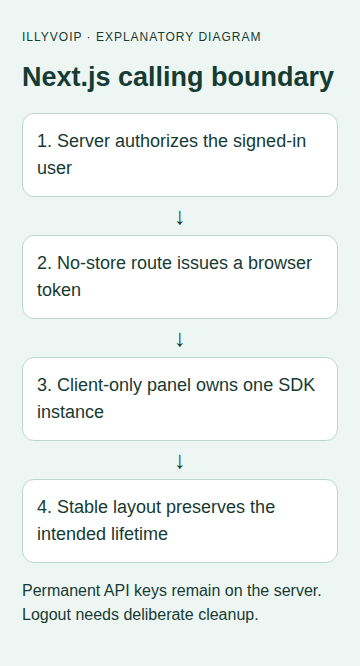
A Next.js phone panel needs a clear boundary between the server that holds your IllyVoIP API key and the browser that uses a short-lived calling token. It also needs a stable lifetime: changing application routes should not accidentally create a second phone or destroy an active one.
This guide targets the Next.js App Router and the current IllyVoIP WebRTC Phone SDK interface. Use a supported Next.js/Node.js release, HTTPS, an authenticated application and an eligible SIP identity whose available actions include browser_token. This is a custom integration, not a native Next.js SDK or a video-chat tutorial.
1. Prepare the official browser assets
Download the current Webphone SDK bundle from IllyVoIP's developer reference. Preserve its documented companion assets and relative layout under an application-owned public directory. The example uses /vendor/illyvoip/illyvoip-webrtc-phone-sdk.js; place the reviewed bundle there or adjust the path consistently.
The permanent account API key belongs in server-only configuration. Never prefix it with NEXT_PUBLIC_ or return it in a page's props. The authenticated Portal SDK playground is separate from your application and can place real calls.
2. Implement the application's authorization adapter
Your existing authentication layer must validate the session and CSRF policy, check the user's permission to call, and select that user's allowed SIP identity on the server. Do not trust a browser-supplied SIP username. Recheck eligibility when issuing refreshed tokens, not only at login.
The following factory leaves that application-specific decision in an explicit authorize(request) adapter. It must reject invalid requests or return { sipUserId: 'the-authorized-identity' }. Add your normal request-size and rate controls around the route. The example allows three documented regions; restrict them further if your application requires it.
// authorize(request) is YOUR existing authentication/CSRF/authorization adapter.
// It must reject invalid sessions and return only a server-authorized SIP identity.
export function createTokenHandler(authorize, apiKey, upstream = fetch) {
  return async function POST(request) {
    const reply = (body, status) => Response.json(body, { status,
      headers: { 'Cache-Control': 'no-store, private' } });
    let identity;
    try { identity = await authorize(request); }
    catch { return reply({ error: 'Not authorized' }, 403); }
    if (!identity || typeof identity.sipUserId !== 'string' || !identity.sipUserId) {
      return reply({ error: 'Not authorized' }, 403);
    }
    let input;
    try { input = await request.json(); }
    catch { return reply({ error: 'Invalid JSON' }, 400); }
    if (!input || !['de', 'us', 'sg'].includes(input.region)) return reply({ error: 'Invalid region' }, 400);
    if (!apiKey) return reply({ error: 'Server configuration unavailable' }, 503);
    try {
      const result = await upstream('https://api.illyvoip.com/api/v1/sip/browser-token', {
        method: 'POST', cache: 'no-store', redirect: 'error', signal: AbortSignal.timeout(10000),
        headers: { 'Content-Type': 'application/json', 'X-Api-Key': apiKey },
        body: JSON.stringify({ sip_user_id: identity.sipUserId, region: input.region })
      });
      if (!result.ok) return reply({ error: 'Voice authorization unavailable' }, 502);
      const value = await result.json();
      if (value.status !== 'success' || typeof value.token !== 'string') {
        return reply({ error: 'Invalid voice authorization response' }, 502);
      }
      return reply({ status: value.status, token: value.token, expires_at: value.expires_at,
        expires_in: value.expires_in, refresh_before_seconds: value.refresh_before_seconds,
        header_name: value.header_name }, 200);
    } catch { return reply({ error: 'Voice authorization unavailable' }, 502); }
  };
}
Put the factory in a server-only module. In app/api/voice-token/route.js, import it and your real authorization adapter, then export the handler below. The adapter name is an integration point in your application, not a supplied IllyVoIP function. Until it exists and has tests, do not expose the route.
export const POST = createTokenHandler(
  authorizeVoiceRequest,
  process.env.ILLYVOIP_API_KEY
);
Return only the documented browser-token fields. Do not cache the response at the application, CDN or service-worker layer. A temporary upstream error should remain a visible authorization failure, not a reason to return an old user's token.
3. Give one browser owner control of the SDK
Save the following as phone-owner.mjs beside the calling components. It serializes local operations, retains one call reference and removes event listeners during teardown. The token helper calls your protected route. Supply the CSRF token through your existing application mechanism.
// Construct this once per signed-in application, not once per route.
export function createPhoneOwner(makePhone, tokenProvider) {
  let phone = null, queue = Promise.resolve(), failedCleanup = false, generation = 0;
  let state = { ready: false, busy: false, call: null, status: 'Offline' };
  const listeners = new Set(), off = [];
  const publish = patch => { state = { ...state, ...patch }; listeners.forEach(f => f(state)); };
  const serial = job => {
    const result = queue.then(job);
    queue = result.catch(() => {});
    return result;
  };
  async function dispose() {
    publish({ ready: false, status: 'Disconnecting' });
    off.splice(0).forEach(unsubscribe => unsubscribe());
    try { if (phone) await phone.destroy(); }
    catch (e) { failedCleanup = true; throw e; }
    finally { phone = null; publish({ call: null, status: failedCleanup ? 'Reload required' : 'Offline' }); }
  }
  function action(job) {
    if (state.busy) return Promise.reject(new Error('Another action is pending'));
    publish({ busy: true });
    return serial(job).catch(e => {
      publish({ status: 'Action failed; check the call state' }); throw e;
    }).finally(() => publish({ busy: false }));
  }
  return {
    subscribe(listener) { listeners.add(listener); listener(state); return () => listeners.delete(listener); },
    connect() { const ticket = generation; return action(async () => {
      if (ticket !== generation) return;
      if (phone) return;
      if (failedCleanup) throw new Error('Reload after cleanup failure');
      phone = makePhone({ autoConnect: false, autoRegister: false, region: 'de',
        tokenBootstrapUrl: 'https://api.illyvoip.com/api/v1/sip/browser-bootstrap', tokenProvider });
      off.push(phone.on('registration:registered', () => publish({ ready: true, status: 'Registered' })));
      off.push(phone.on('registration:unregistered', () => publish({ ready: false, status: 'Unregistered' })));
      off.push(phone.on('connection:disconnected', () => publish({ ready: false, status: 'Disconnected' })));
      for (const event of ['call:created', 'call:incoming', 'call:answered']) {
        off.push(phone.on(event, ({ call }) => publish({ call, status: event === 'call:incoming' ? 'Incoming call' : call.state })));
      }
      off.push(phone.on('call:state', ({ call, state: next }) => {
        if (state.call?.id === call.id) publish({ call, status: next });
      }));
      off.push(phone.on('call:ended', ({ call }) => {
        if (state.call?.id === call.id) publish({ call: null, status: 'Call ended' });
      }));
      off.push(phone.on('error', () => publish({ status: 'Phone error; inspect securely' })));
      try { await phone.initialize(); if (ticket !== generation) return;
        await phone.connect(); if (ticket !== generation) return; await phone.register(); }
      catch (e) { await dispose(); throw e; }
    }); },
    dial(target) { return action(async () => {
      if (!phone || !state.ready || state.call || !String(target).trim()) throw new Error('Not ready to dial');
      await phone.call(String(target).trim());
    }); },
    answer() { return action(async () => {
      if (!phone || !state.call) throw new Error('No incoming call');
      await phone.answer(state.call.id);
    }); },
    hangup() { return action(async () => {
      if (!phone || !state.call) throw new Error('No active call');
      await phone.hangup(state.call.id);
    }); },
    disconnect() { const ticket = generation; return action(async () => {
      if (ticket !== generation) return;
      if (state.call) throw new Error('End the call and wait for its ended event first');
      await dispose();
    }); },
    // Application teardown only. Prevent this during calls in your navigation policy.
    teardown() { generation++; return serial(dispose); }
  };
}

export async function getBrowserToken({ region }) {
  const controller = new AbortController();
  const timer = setTimeout(() => controller.abort(), 10000);
  try {
    const response = await fetch('/api/voice-token', {
      method: 'POST', credentials: 'same-origin', cache: 'no-store', signal: controller.signal,
      headers: { 'Content-Type': 'application/json',
        'X-CSRF-Token': document.querySelector('meta[name="csrf-token"]')?.content || '' },
      body: JSON.stringify({ region })
    });
    if (!response.ok) throw new Error('Browser authorization failed');
    const body = await response.json();
    if (body.status !== 'success' || typeof body.token !== 'string') throw new Error('Invalid token response');
    return body;
  } finally { clearTimeout(timer); }
}
This helper does not arbitrate across browser tabs. Respect the SDK's session-conflict behavior and your application's ownership policy. Its sample region is de; change the initial selection deliberately if your application uses another permitted region.
4. Mount a client-only panel
Create PhonePanel.jsx:
'use client';
import { useEffect, useState } from 'react';
import { createPhoneOwner, getBrowserToken } from './phone-owner.mjs';

// The authenticated layout must mount exactly one panel.
let owner;
function getOwner() {
  if (!owner) owner = createPhoneOwner(
    options => new window.IllyVoipWebRtcPhone(options), getBrowserToken);
  return owner;
}
export default function PhonePanel() {
  const [state, setState] = useState({ ready: false, busy: false, call: null, status: 'Offline' });
  const [target, setTarget] = useState('');
  useEffect(() => {
    const phone = getOwner();
    const unsubscribe = phone.subscribe(setState);
    return () => { unsubscribe(); void phone.teardown().catch(() => {}); };
  }, []);
  const run = job => { void job(getOwner()).catch(() => {}); };
  return <section aria-label="IllyVoIP phone">
    <p role="status">{state.status}</p>
    <button disabled={state.busy || state.ready} onClick={() => run(p => p.connect())}>Connect</button>
    <label>Destination <input value={target} onChange={e => setTarget(e.target.value)} /></label>
    <button disabled={!state.ready || state.busy || !!state.call} onClick={() => run(p => p.dial(target))}>Call</button>
    <button disabled={!state.call || state.busy} onClick={() => run(p => p.answer())}>Answer</button>
    <button disabled={!state.call || state.busy} onClick={() => run(p => p.hangup())}>End call</button>
    <button disabled={!!state.call || state.busy} onClick={() => run(p => p.disconnect())}>Disconnect</button>
  </section>;
}
Then create PhoneBoundary.jsx. The dynamic import is inside a Client Component, and the SDK loads before the panel can construct a phone:
'use client';
import dynamic from 'next/dynamic';
import Script from 'next/script';
import { useState } from 'react';
const PhonePanel = dynamic(() => import('./PhonePanel'), { ssr: false });
export default function PhoneBoundary() {
  const [ready, setReady] = useState(false);
  const [failed, setFailed] = useState(false);
  return <>
    <Script src="/vendor/illyvoip/illyvoip-webrtc-phone-sdk.js"
      strategy="afterInteractive" onReady={() => setReady(true)} onError={() => setFailed(true)} />
    {failed ? <p>Phone assets could not load.</p> : ready ? <PhonePanel /> : <p>Loading phone…</p>}
  </>;
}
Mount one PhoneBoundary in the stable authenticated layout shared by your calling routes. Do not mount one in every page. A 'use client' directive alone does not mean all imported browser code is safe during pre-rendering; keep browser-only initialization behind this boundary.
5. Define navigation, logout and active-call behavior
Keep the owning layout mounted during routes that should share the call. Before logout or account switching, ask the user to finish the call, wait for its ended event and await disconnect. Clear the authenticated calling UI before another account can connect. The backend must also reject token refreshes after authorization is revoked.
Teardown disposes the SDK; it is not a promise that a call survives leaving the application. Prevent owner removal during a call where your application requires continuity, and explain full-page navigation behavior to users. Cleanup failure requires a controlled reload rather than silently starting a replacement connection.
The sample shows basic Answer and End controls. A production interface should enable actions according to the SDK's actual call state and display incoming-caller information under your privacy policy. A disabled Call button protects against local repeated clicks; it is not server-side authorization.
6. Test the boundaries before live calls
- Run your Next.js build and confirm no SDK access to window/document occurs on the server.
- Test the token route with missing sessions, failed CSRF, an unauthorized identity and an upstream failure.
- Inspect the client bundle and browser responses for permanent credentials.
- Mock the SDK to test rapid Connect clicks, teardown during startup, route remounts and listener removal.
- Test expired authorization, logout/account switching, microphone denial and a second tab.
- With approved test access, check one outgoing/incoming call and two-way audio. Normal charges apply.
A passing local build or mock does not prove registration, mobile-browser background behavior or actual audio. Keep those acceptance checks separate.
Related guides and references
Reviewed 9 October 2026 against current IllyVoIP source and the linked documentation. Use the settings available to your account and installed version. These instructions are not a claim of a completed physical-device or live-service test.