
To send Prometheus Alertmanager notifications through IllyVoIP SMS, route selected alerts to a protected webhook adapter. The adapter records new alert phases in a durable outbox, and a separate worker submits the SMS to IllyVoIP. This guide includes a small Python 3.12 adapter for one route and one authorized recipient, plus local checks before enabling paid messages.
The adapter intentionally sends once for each new alert occurrence and phase. Repeated firing notifications are suppressed; a resolution can generate a separate message. It is a starting implementation for a small integration, not a native IllyVoIP Alertmanager receiver or a guarantee of emergency delivery.
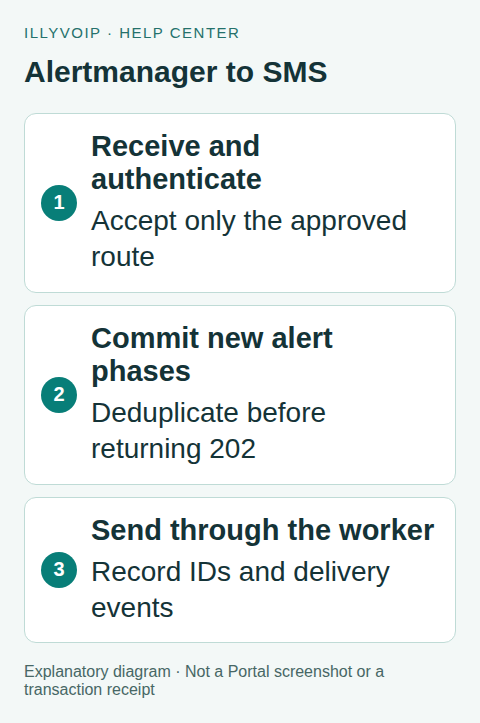
Alertmanager to SMS. Explanatory diagram showing the workflow, not an interface or completed transaction. Open the image for a larger view.
1. Choose the alerts and prepare the account
You need an IllyVoIP account with SMS API access, a permanent API key, sufficient balance, an available sender and a destination that your account can send to. Account role, verification and SMS restrictions still apply. A valid international number is not proof that a route is available or that a handset will receive the message. Use a recipient who has agreed to receive the notification.
Keep the key in your server's secret store and expose it only to the SMS worker. Do not put it in a browser, source repository, mobile app or diagnostic output. Use X-Api-Key for authentication. The separate Idempotency-Key identifies one logical send; it is not a credential.
Use this for operational notifications that can tolerate SMS delivery limits. Keep an independent monitoring channel and escalation procedure. Start with one low-volume route and one recipient. Set an operational limit for notification volume and review how rapidly alerts can flap before enabling the worker.
You also need Alertmanager with the documented generic webhook configuration, a Python 3.12 host with persistent local storage, and an HTTPS reverse proxy for the adapter. Use the amtool shipped with your Alertmanager version to check configuration. The adapter accepts webhook JSON version 4. Validate a fixture from your installed version before changing a live route.
There are two different secrets: the adapter's bearer token authenticates Alertmanager, while the IllyVoIP API key is used only by the outbound worker. Do not reuse one for the other.
2. Add a narrowly matched webhook route
The following is a merge example, not a replacement for your entire configuration. Preserve your real root receiver and existing receiver definitions. Replace the HTTPS hostname and token-file path. Mount the token file so the Alertmanager process can read it, with permissions that exclude unrelated users.
# Merge this child route into your existing route tree.
# Keep your existing root receiver and other routes.
route:
  receiver: existing-default
  routes:
    - receiver: illyvoip-sms
      matchers:
        - 'severity="critical"'
        - 'sms="true"'
      group_by: ['alertname', 'service']
      group_wait: 30s
      group_interval: 5m
      repeat_interval: 4h
receivers:
  - name: existing-default
    # Retain your existing non-SMS receiver configuration here.
  - name: illyvoip-sms
    webhook_configs:
      - url: https://alerts.example.com/alertmanager
        send_resolved: true
        max_alerts: 0
        http_config:
          authorization:
            type: Bearer
            credentials_file: /etc/alertmanager/sms-webhook-token
Review route order before deploying: a matching child can stop traversal to later sibling routes unless continuation is configured. Ensure that adding this route does not remove an existing email or incident notification. Use continue: true only where your intended routing requires it.
group_wait allows a short initial grouping period, group_interval controls updates to an existing group, and repeat_interval schedules repeated notifications. send_resolved includes recovery notifications. max_alerts: 0 avoids upstream truncation; this adapter separately caps each accepted request at 100 alerts and 64 KiB. An oversized group must be investigated, not silently treated as complete. See the official Alertmanager configuration reference.
Validate the merged file before your normal controlled reload:
amtool check-config /etc/alertmanager/alertmanager.ymlRecent Alertmanager documentation also includes a custom webhook payload option. This guide uses the normal version-4 payload and retains an adapter for authentication, durable event deduplication and response tracking. It does not depend on templating an SMS body inside Alertmanager.
3. Define identity and repeat behavior before sending
The standard webhook includes a group and an array of alerts. A group can contain both firing and resolved entries, so inspect each alert's status. A group's overall status is not a reliable replacement for those individual phases. The notification data reference describes these fields.
For this single-route example, the durable event identity is fingerprint + startsAt + phase. The start timestamp distinguishes a later occurrence of the same alert from a retry. The phase distinguishes its firing and resolved notifications. Duplicate deliveries, reordered arrays and different group boundaries do not create another job for events already stored.
New phases in one webhook become one summary SMS. The event rows and job row commit in the same SQLite transaction before the adapter returns 202. The SMS request key is a hash of the sorted new event identities; the sender, recipient and exact JSON are frozen in the job. Later changes to labels or annotations cannot rewrite an existing request.
This policy deliberately suppresses repeated firing reminders, even when Alertmanager's repeat interval elapses. It does not use a rolling time bucket, which could turn a delayed retry into a new paid send. If your team needs reminders, add an explicit durable reminder sequence and cooldown per incident, with a separate budget and acceptance test. New occurrences and resolutions can still generate messages during a storm; grouping is not an overall spending cap.
Keep the route and recipient policy stable for this adapter database. For multiple teams or recipients, design a stable policy ID into the event identity and retain its old records. Simply changing SMS_TO does not re-notify existing events. Do not delete deduplication records while old notifications could be replayed.
4. Install the durable adapter
Save the following as adapter.py in a directory owned by the service account. It uses Python's standard library and SQLite, with no extra Python package. Place the database on persistent local storage; do not put it in a disposable container layer or assume a network filesystem has suitable SQLite locking.
The HTTP listener binds only to loopback. Put it behind your maintained HTTPS reverse proxy, restricted to your Alertmanager hosts. Enforce a 64 KiB body limit, header/read timeouts and request-rate limits at that proxy too. The small built-in server is not intended to be exposed directly to the internet.
import hashlib, hmac, json, os, re, sqlite3, sys
from datetime import datetime
from http.server import BaseHTTPRequestHandler, HTTPServer
from urllib.request import Request, build_opener, HTTPRedirectHandler
from urllib.error import HTTPError

DB = os.environ.get('SMS_OUTBOX', 'sms-outbox.sqlite3')
SCHEMA = '''
CREATE TABLE IF NOT EXISTS jobs (
  key TEXT PRIMARY KEY, payload TEXT NOT NULL,
  state TEXT NOT NULL DEFAULT 'pending',
  http_status INTEGER, response TEXT,
  created_at TEXT NOT NULL DEFAULT CURRENT_TIMESTAMP);
CREATE TABLE IF NOT EXISTS events (
  identity TEXT PRIMARY KEY, job_key TEXT NOT NULL);
'''

def connect():
    db = sqlite3.connect(DB, timeout=10)
    db.execute('PRAGMA synchronous=FULL')
    return db

def initialize():
    with connect() as db:
        db.executescript(SCHEMA)

def compact(value):
    return json.dumps(value, separators=(',', ':'), sort_keys=True)

def ingest(data, sender, recipient):
    if not isinstance(data, dict) or data.get('version') != '4':
        raise ValueError('Expected webhook version 4')
    if data.get('receiver') != 'illyvoip-sms':
        raise ValueError('Unexpected receiver')
    if data.get('truncatedAlerts', 0) != 0:
        raise ValueError('Truncated alert group; investigate routing')
    alerts = data.get('alerts')
    if not isinstance(alerts, list) or not 1 <= len(alerts) <= 100:
        raise ValueError('Expected 1 to 100 alerts')
    candidates = {}
    for alert in alerts:
        phase = alert['status']
        fingerprint = alert['fingerprint']
        started = alert['startsAt']
        if phase not in ('firing', 'resolved'):
            raise ValueError('Invalid alert phase')
        if not isinstance(fingerprint, str) or not fingerprint:
            raise ValueError('Missing fingerprint')
        if not isinstance(started, str) or started.startswith('0001-'):
            raise ValueError('Missing occurrence start')
        stamp = datetime.fromisoformat(started.replace('Z', '+00:00'))
        if stamp.tzinfo is None:
            raise ValueError('Start requires timezone')
        # One route, one configured recipient. Keep this policy stable.
        identity = compact([fingerprint, started, phase])
        name = alert.get('labels', {}).get('alertname', 'Alert')
        name = re.sub(r'[^A-Za-z0-9 _.-]', '?', str(name))[:32]
        candidates[identity] = (phase, name)
    with connect() as db:
        db.execute('BEGIN IMMEDIATE')
        fresh = {k: v for k, v in candidates.items() if not db.execute(
            'SELECT 1 FROM events WHERE identity=?', (k,)).fetchone()}
        if not fresh:
            return {'new_job': False}
        identities = sorted(fresh)
        key = 'am:' + hashlib.sha256(compact(identities).encode()).hexdigest()
        firing = sum(fresh[k][0] == 'firing' for k in identities)
        resolved = len(fresh) - firing
        names = ', '.join(sorted({v[1] for v in fresh.values()})[:3])
        message = (f'Alerts: {firing} new firing, {resolved} new resolved. '
                   f'{names}. Check monitoring.')[:150]
        payload = compact({'from': sender, 'to': [recipient],
                           'message': message})
        db.execute('INSERT INTO jobs(key,payload) VALUES (?,?)', (key, payload))
        db.executemany('INSERT INTO events VALUES (?,?)',
                       [(identity, key) for identity in identities])
    return {'new_job': True, 'key': key}

class NoRedirect(HTTPRedirectHandler):
    def redirect_request(self, req, fp, code, msg, headers, newurl):
        return None

def post_sms(key, payload):
    request = Request('https://api.illyvoip.com/api/v1/sms/messages',
        data=payload.encode(), method='POST', headers={
            'X-Api-Key': os.environ['ILLYVOIP_API_KEY'],
            'Idempotency-Key': key, 'Content-Type': 'application/json'})
    try:
        with build_opener(NoRedirect()).open(request, timeout=30) as r:
            return r.status, r.read(1_000_000).decode('utf-8')
    except HTTPError as error:
        return error.code, error.read(1_000_000).decode('utf-8')

def work_once(send=post_sms):
    with connect() as db:
        db.execute('BEGIN IMMEDIATE')
        row = db.execute("SELECT key,payload FROM jobs WHERE state='pending' "
                         'ORDER BY rowid LIMIT 1').fetchone()
        if row is None:
            return False
        key, payload = row
        db.execute("UPDATE jobs SET state='sending' WHERE key=?", (key,))
    # A crash after this commit leaves 'sending': review, never auto-requeue.
    try:
        status, body = send(key, payload)
    except Exception as error:
        status, body = None, type(error).__name__
        state = 'uncertain'
    else:
        state = 'review'
        try:
            reply = json.loads(body)
            ids = reply.get('queued_message_ids')
            if 200 <= status < 300 and reply.get('status') == 'success' and \
               isinstance(ids, list) and ids and all(
                   isinstance(i, str) and i.strip() for i in ids):
                state = 'accepted'
        except (ValueError, AttributeError, TypeError):
            pass
    with connect() as db:
        db.execute('UPDATE jobs SET state=?,http_status=?,response=? WHERE key=?',
                   (state, status, body, key))
    return True

class Webhook(BaseHTTPRequestHandler):
    def log_message(self, *args):
        pass  # Use redacted metrics at the reverse proxy.
    def reply(self, status):
        self.send_response(status)
        self.end_headers()
    def do_POST(self):
        if self.path != '/alertmanager':
            return self.reply(404)
        expected = 'Bearer ' + os.environ['ALERT_WEBHOOK_TOKEN']
        if not hmac.compare_digest(
            self.headers.get('Authorization', '').encode(), expected.encode()):
            return self.reply(401)
        try:
            if self.headers.get('Transfer-Encoding'):
                return self.reply(400)
            length = int(self.headers.get('Content-Length', '0'))
            if not 0 < length <= 65536:
                return self.reply(413)
            if self.headers.get_content_type() != 'application/json':
                return self.reply(415)
            self.connection.settimeout(10)
            data = json.loads(self.rfile.read(length))
            ingest(data, os.environ['SMS_FROM'], os.environ['SMS_TO'])
        except (ValueError, KeyError, TypeError, AttributeError):
            return self.reply(400)
        except (sqlite3.Error, OSError):
            return self.reply(503)
        self.reply(202)  # Durable receipt, not SMS delivery.

if __name__ == '__main__':
    os.umask(0o077)
    initialize()
    mode = sys.argv[1] if len(sys.argv) > 1 else ''
    if mode == 'serve':
        for name in ('ALERT_WEBHOOK_TOKEN', 'SMS_FROM', 'SMS_TO'):
            if not os.environ.get(name):
                raise SystemExit('Missing ' + name)
        HTTPServer(('127.0.0.1', 8765), Webhook).serve_forever()
    elif mode == 'work' and '--send' in sys.argv:
        if not os.environ.get('ILLYVOIP_API_KEY'):
            raise SystemExit('Missing ILLYVOIP_API_KEY')
        work_once()
    else:
        print('Use serve, or work --send for one paid-capable attempt.')
The summary uses only a bounded alert name and counts of newly observed phases. It does not forward arbitrary annotations, internal URLs or stack traces to a phone. These counts describe new events in that notification, not the total number of incidents currently open. Its restricted character set and 150-character cap keep this example within a basic GSM-7 single-message budget, subject to destination support and sender rules.
A group containing more than 100 alerts, an oversized request or a nonzero truncatedAlerts value is rejected for investigation. Keep another receiver active and monitor adapter errors. Do not assume an HTTP 400 or 413 will be retried until it succeeds.
5. Configure the service and keep the worker disabled initially
Inject these settings through the service manager or your secret store. Values below are placeholders, not working credentials or a real destination:
SMS_OUTBOX=/var/lib/illyvoip-alert-sms/outbox.sqlite3
SMS_FROM=IllyVoIP
SMS_TO=YOUR_AUTHORIZED_DESTINATION
ALERT_WEBHOOK_TOKEN=YOUR_PRIVATE_ADAPTER_TOKEN
ILLYVOIP_API_KEY=YOUR_PRIVATE_ILLYVOIP_KEY
The receiver needs the first four settings. Give the API key only to the worker process. The token in the Alertmanager credentials file must match ALERT_WEBHOOK_TOKEN. Create the database directory with private service-account permissions and retain those permissions on backups and SQLite sidecar files.
python3 adapter.py serveRun the receiver under your normal process supervisor. Do not start the sending command yet. Incoming authenticated fixtures should produce durable pending jobs and HTTP 202 responses. That status means “recorded by the adapter,” not “sent by IllyVoIP.” If the database cannot commit, the receiver returns 503.
The example's worker makes one attempt per invocation, claims only pending rows, and never automatically retries a review or uncertain row. Once all local checks pass and you deliberately enable paid sends, the command is:
python3 adapter.py work --sendSchedule that command under a supervised worker or timer at an appropriate rate. One invocation processes at most one pending job. Monitor queue age, not just whether the process exited successfully. Set conservative operational rate and volume limits around the scheduler before turning it on. Stop claiming work if the queue grows unexpectedly or the SMS budget is exceeded.
6. Test duplicate, resolved and failure paths locally
Save this as fixture.json. Keep the sender worker disabled while posting it to the loopback receiver with the private adapter token:
{
  "version": "4",
  "receiver": "illyvoip-sms",
  "status": "firing",
  "groupKey": "fixture-service",
  "truncatedAlerts": 0,
  "alerts": [
    {
      "status": "firing",
      "fingerprint": "fixture-a",
      "startsAt": "2026-10-09T10:00:00Z",
      "labels": {
        "alertname": "ServiceUnavailable",
        "service": "example"
      }
    }
  ]
}
curl --fail-with-body http://127.0.0.1:8765/alertmanager -H "Authorization: Bearer ${ALERT_WEBHOOK_TOKEN}" -H "Content-Type: application/json" --data-binary @fixture.json- Post the firing fixture twice. Both requests should be acknowledged, but the database should contain one event and one pending job.
- Restart the receiver and post it again. The persisted identity must still suppress a second job.
- Change only the alert's status to
resolved. Expect one new event and job; repeating it adds neither. - Use the same fingerprint with a genuinely new
startsAt. Expect a new occurrence. Reverse alert order in a multi-alert fixture and verify no duplicate job. - Send a wrong bearer token, an unsupported phase and a truncated or oversized group. Confirm rejection without new rows.
- Replace the worker's
sendfunction with a local mock. Return queued IDs, a 400 rejection and a 503 response, then raise a simulated lost-response timeout. Verify accepted, review and uncertain states respectively. - Simulate a crash after the sending claim. Restarting the worker must leave that row for review rather than automatically submitting it again.
These adapter paths were checked locally with fixture data and fake API responses. No paid SMS or live Alertmanager route was changed for this guide. Before production use, test your own reverse proxy, installed Alertmanager version, persistence backups and worker supervision.
7. Inspect the queue and reconcile uncertainty
Inspect the private database with your administration tool. A useful status-only query avoids exposing recipients or message text:
SELECT state, COUNT(*) FROM jobs GROUP BY state;pending waits for the worker. sending means the claim was committed but the outcome has not been saved. accepted means the response included queued IDs. review retains an HTTP response requiring inspection, including an error or malformed success. uncertain means no usable HTTP outcome was obtained.
A crash can leave a sending row even when the remote SMS was accepted. Do not reset all such rows to pending on startup. Review the saved operation and available IllyVoIP evidence first. If a controlled retry is justified, preserve the job's exact payload and request key and record the operator decision; do not delete its event records or generate a new key. Long-delayed uncertainty needs explicit review rather than an assumed infinite deduplication window.
- 400: inspect the error code and recipient details. Invalid destinations, unsupported encoding and content-review responses require correction or review, not a timed retry loop. For
sms_use_case_information_required, give supportfields.review_reference. Screening approval does not automatically send the old request. - 401 or 403: check the API key and account permissions, verification and SMS access. Do not switch credentials or weaken restrictions automatically.
- 413: reduce an oversized request after confirming its rejection. Split work into deliberate new operations rather than silently changing a saved payload.
- 429: pause according to the rate-limit response. Retain the same request identity for an eligible retry and control concurrency.
- 5xx, timeout or connection loss: retain uncertainty. Inspect the saved response and any queued IDs, and reconcile before a controlled identical retry. Never generate a replacement key just because a response was lost.
- 2xx without a valid success body and message IDs: keep the raw response for review. Do not label it delivered or silently mark it as a completed send.
Restrict access to response bodies because they may contain destinations or message details. Ordinary logs should contain the internal operation ID, HTTP status and a safe error code, not the API key or full SMS text.
8. Connect accepted messages to delivery evidence
Treat the response as a submission result. A successful response containing queued_message_ids means those messages entered the sending process. Persist the IDs before acknowledging the job as accepted. Keep invalid_numbers, duplicates_removed, total_cost and any encoding or conversion information from the full response.
A request can accept some recipients and reject others. Message IDs follow accepted recipients in request order after normalization and deduplication; the rejected-number list is separate and must not be zipped with those IDs. Never resend the entire batch to correct one rejected destination. Review that recipient and create a new operation only for the intended correction.
For delivery updates, open Account Settings → Integrations / CRM & webhooks and configure the webhook endpoint and relevant sms_sent, sms_delivered and sms_failed events. Preserve any existing subscriptions when configuring the account's endpoint. Authenticate webhook requests using the documented webhook mechanism, then correlate data.message.message_id with the stored queued ID. The SMS request key is not included in delivery events and does not authenticate them.
Keep submission and delivery states separate. Handle repeated or out-of-order callbacks idempotently, retain their timestamps, and do not replace a recorded delivery result with an older submission event. A missing delivery callback means unknown delivery until investigated; it does not justify sending another SMS.
The example stores the complete API response in jobs.response. Extract and persist the queued IDs in your delivery-tracking integration, and give the webhook consumer its own authenticated endpoint. Delivery callbacks are not Alertmanager notifications and should not be posted to /alertmanager. A delivery failure should enter your escalation procedure; it should not recreate the alert event and start an uncontrolled SMS loop.
After local validation, deliberately test one authorized destination. Check the adapter's event/job count, the API acceptance, and the later handset or delivery evidence separately. A chargeable request or a 202 from the adapter alone is not end-to-end proof.
Frequently asked questions
Why did repeat_interval not send another SMS?
The example deduplicates each occurrence and phase permanently while its records are retained. Alertmanager can repeat the webhook, but repeated firing events do not create new SMS jobs. Add a separately designed reminder policy if repeated SMS is required.
Why can a resolved alert arrive without a firing SMS?
Routing, silences, receiver downtime or a failed firing send can produce that situation. The adapter records each observed phase independently and labels the message accordingly; it does not invent an earlier successful notification.
Can I place the IllyVoIP key in Alertmanager's webhook token?
No. Alertmanager authenticates to your adapter with its own bearer token. The worker uses X-Api-Key only when calling IllyVoIP.
Is this a complete high-availability paging system?
No. The example is a small single-host receiver and durable worker pattern. Production redundancy, budget enforcement, reminder policies and escalation must be designed for your environment. Keep another monitoring channel available.
References and verification
For the account workflow, read Send SMS through the API and track delivery. Use the IllyVoIP OpenAPI specification for the current contract and the Developers & Integrations Help Center for related API and webhook guidance.
Reviewed October 9, 2026 against current IllyVoIP API behavior and the official Prometheus references linked above. The illustration shows the intended flow; it is not a screenshot or evidence of an actual notification.