
A React component can disappear while an asynchronous phone connection is still starting. Build the IllyVoIP SDK integration around ownership and cleanup so a remount, logout or development Strict Mode check cannot casually leave a second registration running.
This guide shows a registration component, not a complete dialer. It assumes a React application served over HTTPS, the current official SDK and a backend that authenticates your application’s users. Keep the SDK version you tested with your application; review the current IllyVoIP SDK guide when upgrading.
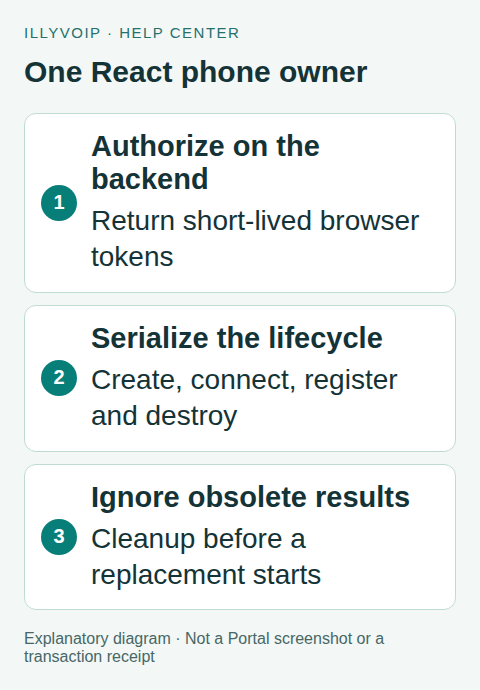
1. Keep permanent credentials on the backend
The browser must not receive the account’s permanent API key. Create an authenticated application endpoint that calls POST /api/v1/sip/browser-token with the server-held key. The backend chooses a SIP identity that the signed-in user is authorized to use and returns the documented short-lived token response.
Do not accept an arbitrary SIP user ID from browser input and forward it unchanged. Apply your normal authorization, CSRF protection, origin policy and rate controls. The example endpoint below is an application route you must implement; it is not a Portal route that already exists for your website. Its response must follow the SDK token-provider contract.
2. Load the official SDK once
Use the current official distribution from the WebRTC Phone SDK documentation. The browser script exposes window.IllyVoipWebRtcPhone; the downloadable package also provides its documented module entry point. Do not paste a permanent SIP password into your React source or environment variables bundled into the browser.
Keep one phone owner above routes that should share a call. A route transition should not accidentally destroy a call unless ending that ownership is intended. Decide explicitly what logout and account switching do to an active call, and explain that behavior to the user.
3. Serialize startup and destruction
This component uses an application-wide queue for the phone lifecycle. It creates the SDK with automatic connection disabled, subscribes to registration events, then connects and registers. Cleanup marks the instance obsolete immediately and destroys it after any in-progress lifecycle operation completes.
import { useEffect, useState } from 'react';
// Load the official SDK before mounting this component.
// All phone owners in this application must use this same queue.
let phoneQueue = Promise.resolve();
let cleanupFailed = false;
const schedule = job => {
  const result = phoneQueue.then(job);
  phoneQueue = result.catch(() => {});
  return result;
};

export default function PhoneRegistration({ sessionVersion }) {
  const [status, setStatus] = useState('Starting');
  useEffect(() => {
    let stopped = false;
    let phone;
    const off = [];
    const report = text => { if (!stopped) setStatus(text); };
    schedule(async () => {
      if (stopped) return;
      if (cleanupFailed) { report('Reload required after cleanup failure'); return; }
      try {
        phone = await window.IllyVoipWebRtcPhone.create({
          autoConnect: false,
          autoRegister: false,
          region: 'de',
          tokenBootstrapUrl:
            'https://api.illyvoip.com/api/v1/sip/browser-bootstrap',
          tokenProvider: async ({ region }) => {
            const response = await fetch('/my-backend/illyvoip/browser-token', {
              method: 'POST', credentials: 'same-origin',
              headers: {
                'Content-Type': 'application/json',
                'X-CSRF-Token': document.querySelector(
                  'meta[name="csrf-token"]')?.content ?? ''
              },
              body: JSON.stringify({ region })
            });
            if (!response.ok) throw new Error('Token request failed');
            return response.json();
          }
        });
        if (stopped) return;
        off.push(phone.on('registration:registered', () => report('Registered')));
        off.push(phone.on('registration:unregistered', () => report('Unregistered')));
        await phone.connect();
        if (stopped) return;
        await phone.register();
      } catch {
        report('Registration unavailable. Check the authorized setup.');
        if (phone) {
          try { await phone.destroy(); }
          catch (error) { cleanupFailed = true; throw error; }
          phone = undefined;
        }
      }
    }).catch(() => report('Phone cleanup failed; reload before retrying.'));
    return () => {
      stopped = true;
      schedule(async () => {
        off.forEach(unsubscribe => unsubscribe());
        if (phone) {
          try { await phone.destroy(); }
          catch (error) { cleanupFailed = true; throw error; }
        }
      }).catch(() => { /* report through your sanitized application monitoring */ });
    };
  }, [sessionVersion]);
  return <p role="status">{status}</p>;
}
Provide a real CSRF token according to your backend framework; the meta tag is an example convention. Change sessionVersion whenever the authorized session/identity changes. Do not put a token in that prop. The chosen region must be one currently supported for your SIP identity.
The queue prevents a new setup from overtaking the previous cleanup. The stopped checks prevent late results from updating an unmounted component. Keep SDK operations bounded by your application’s timeout and recovery policy; a hung network operation can otherwise delay queued cleanup. A cleanup error blocks new phone creation in this module until reload; investigate it before retrying. In a larger application, put this ownership service in one shared module rather than copying the queue into several components.
4. Treat registration and calling as separate states
“Registered” means a registration event occurred; it does not prove microphone permission, audio playback, incoming routing or a completed call. Add calling controls only after the registration lifecycle is stable. Follow the SDK’s documented call methods and events, and represent ringing, active, failed and ended calls separately.
Request microphone access through a clear user action and handle denial. Browsers can restrict autoplay and background execution. Show actionable status instead of an endless spinner, and provide a way to retry after the underlying problem is corrected without spawning another instance.
5. Test the difficult lifecycle cases
- Mount once and confirm one token flow and one registration.
- Enable React Strict Mode in development and verify that the extra setup/cleanup cycle leaves one live owner.
- Unmount before token creation finishes, then during connect and register. Confirm destruction and no obsolete state updates.
- Switch the authenticated identity and check that the old instance is destroyed before the replacement registers.
- Test a denied token request, expired authorization, lost connection and a cleanup failure.
- Finally test authorized incoming/outgoing calls, microphone permission and audible media on the browsers you support.
Local mocked SDK tests verify sequencing only. A registered browser still depends on the live SIP line, routing and browser media environment. Do not claim Safari, mobile-background or headset support solely because a React test passed.
Frequently asked questions
Should I remove Strict Mode to fix duplicate registration?
Fix ownership and cleanup. Strict Mode makes incomplete effects easier to discover; production navigation can create similar lifecycle races.
Can the token endpoint be public?
No. It grants access to a calling identity and must enforce your application’s current authentication and authorization.
Related guides and references
- Integrate webphone sdk
- Official reference: react.dev
- Official reference: illyvoip.com
- Official reference: api.illyvoip.com
Reviewed 8 October 2026 against current IllyVoIP source and official documentation. Configuration examples are not evidence of a completed hardware or live integration test. Use the current options and limits available to your account.