
Send SMS from a C# backend by posting JSON to the IllyVoIP SMS API with a server-side API key. This guide builds a typed HttpClient for an ASP.NET Core application and explains how to connect it to a durable notification worker. It covers .NET 10 and uses built-in JSON serialization; this is a custom REST integration, not an IllyVoIP .NET SDK.
The example sends one saved request per method call. Your application supplies the database outbox and worker described below. Keeping those responsibilities explicit prevents a web request, queue retry or timeout from accidentally becoming a second paid message.
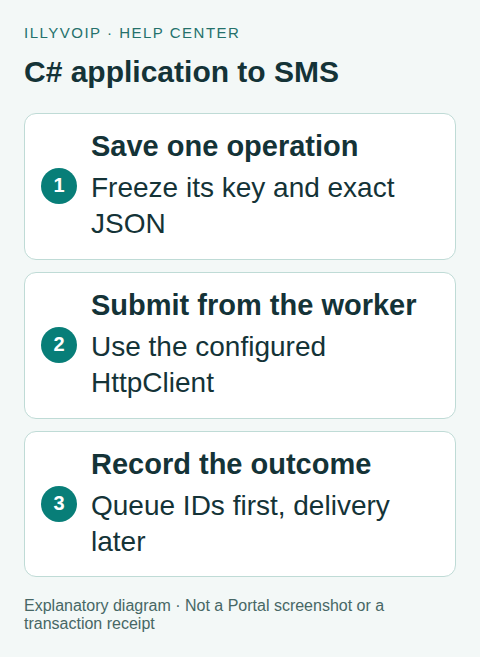
C# application to SMS. Explanatory diagram showing the workflow, not an interface or completed transaction. Open the image for a larger view.
1. Prepare the account and server configuration
You need an IllyVoIP account with SMS API access, a permanent API key, sufficient balance, an available sender and a destination that your account can send to. Account role, verification and SMS restrictions still apply. A valid international number is not proof that a route is available or that a handset will receive the message. Use a recipient who has agreed to receive the notification.
Keep the key in your server's secret store and expose it only to the SMS worker. Do not put it in a browser, source repository, mobile app or diagnostic output. Use X-Api-Key for authentication. The separate Idempotency-Key identifies one logical send; it is not a credential.
Start with an ASP.NET Core application targeting net10.0. Read ILLYVOIP_API_KEY from your deployment's secret injection. During local development use a protected development secret, and keep production keys out of shared launch profiles. Set an outbound firewall policy that permits HTTPS to the API. Keep normal TLS certificate verification enabled.
2. Register the typed HTTP client
Save the following as Registration.cs. It sets the API origin, authentication header, a connection timeout and a total client timeout. Redirects are disabled so an unexpected redirect is reviewed instead of forwarding a sensitive request to another location.
using System.Net;
using Microsoft.Extensions.DependencyInjection;
public static class SmsRegistration
{
    public static IServiceCollection AddIllySms(
        this IServiceCollection services, string apiKey)
    {
        if (string.IsNullOrWhiteSpace(apiKey))
            throw new InvalidOperationException("Missing ILLYVOIP_API_KEY");
        services.AddHttpClient<IllySms>(client => {
            client.BaseAddress = new Uri("https://api.illyvoip.com/");
            client.Timeout = TimeSpan.FromSeconds(30);
            client.DefaultRequestHeaders.Add("X-Api-Key", apiKey);
        }).ConfigurePrimaryHttpMessageHandler(() =>
            new SocketsHttpHandler {
                AllowAutoRedirect = false, UseCookies = false,
                ConnectTimeout = TimeSpan.FromSeconds(10)
            });
        return services;
    }
}
Call the registration before building the application:
builder.Services.AddIllySms(
    Environment.GetEnvironmentVariable("ILLYVOIP_API_KEY")
    ?? throw new InvalidOperationException("Missing SMS key"));
Let dependency injection create the typed client. Do not register it again as a singleton. In a long-running background service, create a dependency-injection scope for a unit of work and resolve the client there rather than capturing one typed client forever. This follows Microsoft's HTTP client factory lifetime guidance.
This registration adds no retry or hedging handler. Inspect any global HTTP-client defaults in your application too. Microsoft's standard resilience handler retries all HTTP methods by default; if it is used elsewhere, explicitly disable unsafe-method retries for this client. Hedging sends parallel attempts and is inappropriate here. See the resilience configuration reference.
3. Add the SMS client and serialize the request
Send a JSON object to POST https://api.illyvoip.com/api/v1/sms/messages. The exact fields are from, to and message. The recipient field is an array even for one number. Use an explicit international country code; do not guess or prepend one from a user's browser locale. The sender must be available to your account and destination.
{"from":"IllyVoIP","to":["YOUR_DESTINATION_NUMBER"],"message":"Your service notification"}Replace the destination placeholder before a real request. IllyVoIP is an example sender, not permission to use any sender name. The API can normalize formatting and remove duplicate recipients. Preserve your original recipient order and stored JSON when recovering a request.
Save this as IllySms.cs. BuildPayload escapes quotes, line breaks and Unicode correctly. SendOnceAsync accepts the already-saved key and JSON; it never generates a new identity or silently resends.
using System.Net.Http;
using System.Text;
using System.Text.Json;
using System.Text.RegularExpressions;

public sealed record SmsReply(int HttpStatus, string Body,
    string[] QueuedIds, bool Accepted);

public sealed class IllySms(HttpClient http)
{
    public static string BuildPayload(string sender,
        string[] recipients, string message) =>
        JsonSerializer.Serialize(new {
            from = sender, to = recipients, message
        });

    public async Task<SmsReply> SendOnceAsync(
        string savedKey, string savedJson,
        CancellationToken cancellation = default)
    {
        if (!Regex.IsMatch(savedKey,
            @"\A[A-Za-z0-9:._-]{8,128}\z"))
            throw new ArgumentException("Invalid request key");
        using var request = new HttpRequestMessage(
            HttpMethod.Post, "api/v1/sms/messages");
        request.Headers.Add("Idempotency-Key", savedKey);
        request.Content = new StringContent(
            savedJson, Encoding.UTF8, "application/json");
        using var response = await http.SendAsync(
            request, cancellation);
        var body = await response.Content.ReadAsStringAsync(
            cancellation);
        var ids = Array.Empty<string>();
        var success = false;
        try {
            using var doc = JsonDocument.Parse(body);
            var root = doc.RootElement;
            if (root.ValueKind == JsonValueKind.Object &&
                root.TryGetProperty("status", out var status) &&
                status.ValueKind == JsonValueKind.String &&
                status.GetString() == "success" &&
                root.TryGetProperty("queued_message_ids", out var list) &&
                list.ValueKind == JsonValueKind.Array) {
                ids = list.EnumerateArray()
                    .Where(x => x.ValueKind == JsonValueKind.String)
                    .Select(x => x.GetString()!)
                    .Where(x => !string.IsNullOrWhiteSpace(x)).ToArray();
                success = ids.Length > 0 &&
                    ids.Length == list.GetArrayLength();
            }
        } catch (JsonException) { /* Keep raw response for review. */ }
        return new((int)response.StatusCode, body, ids,
            response.IsSuccessStatusCode && success);
    }
}
The client returns the HTTP status and full response even for a non-success status. Accepted only indicates that a success response contains usable queued IDs. It does not mean that every requested recipient was accepted, or that any message was delivered. Transport and cancellation exceptions propagate to the worker for uncertainty handling.
4. Save the notification before calling the client
Create a durable outbox row in the same database transaction as the business event that requires the notification. Give the row a unique business identity, such as invoice:YOUR_INVOICE_ID:ready, and enforce uniqueness in the database. Generate the request key once, serialize the body once, and store both before any network attempt. A repeated form submission or queue job should load that row, not create another SMS.
- Identity: the application's unique event and notification purpose.
- Frozen request: the idempotency key and exact JSON, including sender, text and recipient order.
- Progress: pending, sending, accepted, review or uncertain; include timestamps and attempt history.
- Evidence: HTTP status, restricted response body, queued message IDs and individual recipient outcomes.
A worker must atomically claim a pending row and commit its sending state before calling the API. Only one worker may own that row. If the process dies after transmission, leave the row for reconciliation; an expired worker lease must not blindly turn it into a new send. Store the outcome with a separate database operation that is not cancelled merely because the initiating browser disconnected.
The request key must contain 8–128 letters, digits, colons, dots, underscores or hyphens. It is case-sensitive. A changed sender, message or recipient list/order requires a deliberate new operation; reusing the old key with changed content returns an error. Do not assume an unlimited deduplication retention period. Review long-delayed uncertainty with support before replaying an old operation.
When first creating the outbox row, build the values with:
var requestKey = "sms:" + Guid.NewGuid().ToString("N");
var payloadJson = IllySms.BuildPayload(
    "IllyVoIP", ["YOUR_DESTINATION_NUMBER"],
    "Your service notification");
// Insert the unique business operation, requestKey and payloadJson
// in the application's transaction. Do not send before commit.
After claiming and committing that row, call SendOnceAsync(savedKey, savedJson, workerCancellationToken). Catch HttpRequestException and OperationCanceledException, including timeout-related cancellation, and persist an uncertain outcome. Do not use the browser's RequestAborted token as the lifetime of an already-committed business notification. A cancelled local wait cannot undo a remote SMS.
The code above is the HTTP component. It does not implement your business transaction, durable storage, queue dispatch or worker claim. Complete those steps before enabling automatic production sends; an in-memory dictionary is not a durable outbox.
5. Store submission results and track delivery
Treat the response as a submission result. A successful response containing queued_message_ids means those messages entered the sending process. Persist the IDs before acknowledging the job as accepted. Keep invalid_numbers, duplicates_removed, total_cost and any encoding or conversion information from the full response.
A request can accept some recipients and reject others. Message IDs follow accepted recipients in request order after normalization and deduplication; the rejected-number list is separate and must not be zipped with those IDs. Never resend the entire batch to correct one rejected destination. Review that recipient and create a new operation only for the intended correction.
For delivery updates, open Account Settings → Integrations / CRM & webhooks and configure the webhook endpoint and relevant sms_sent, sms_delivered and sms_failed events. Preserve any existing subscriptions when configuring the account's endpoint. Authenticate webhook requests using the documented webhook mechanism, then correlate data.message.message_id with the stored queued ID. The SMS request key is not included in delivery events and does not authenticate them.
Keep submission and delivery states separate. Handle repeated or out-of-order callbacks idempotently, retain their timestamps, and do not replace a recorded delivery result with an older submission event. A missing delivery callback means unknown delivery until investigated; it does not justify sending another SMS.
6. Test locally, then make one deliberate live test
- Inject an
HttpClientbacked by a fakeHttpMessageHandler. Capture the method, URL, headers and body without opening an external connection. - Use text containing a quote, backslash, newline and Unicode. Parse the recorded JSON and compare the original values.
- Call the client twice using the same stored row. Confirm byte-identical JSON and the same request key. Separately test that the database unique constraint and claim prevent two workers from executing that row concurrently.
- Return success with queued IDs and rejected recipients. Confirm the application records both outcomes without resending accepted recipients.
- Return 400, 503, malformed JSON and an empty success response. Inject a lost-response timeout and a worker crash after claim. Confirm none creates a new key or an automatic fresh send.
- Once these pass, use one authorized destination and inspect the saved response and later delivery event. A real API submission can incur charges.
The client and registration were compiled on .NET 10, with mock-handler checks for serialization, repeated request identity, response handling and cancellation. No paid SMS was sent for this guide. Your application's transaction and worker lifecycle still require integration tests.
7. Troubleshoot the result
- 400: inspect the error code and recipient details. Invalid destinations, unsupported encoding and content-review responses require correction or review, not a timed retry loop. For
sms_use_case_information_required, give supportfields.review_reference. Screening approval does not automatically send the old request. - 401 or 403: check the API key and account permissions, verification and SMS access. Do not switch credentials or weaken restrictions automatically.
- 413: reduce an oversized request after confirming its rejection. Split work into deliberate new operations rather than silently changing a saved payload.
- 429: pause according to the rate-limit response. Retain the same request identity for an eligible retry and control concurrency.
- 5xx, timeout or connection loss: retain uncertainty. Inspect the saved response and any queued IDs, and reconcile before a controlled identical retry. Never generate a replacement key just because a response was lost.
- 2xx without a valid success body and message IDs: keep the raw response for review. Do not label it delivered or silently mark it as a completed send.
Restrict access to response bodies because they may contain destinations or message details. Ordinary logs should contain the internal operation ID, HTTP status and a safe error code, not the API key or full SMS text.
Message length is not simply the number of visible characters. GSM-7 allows 160 units in a single SMS and normally 153 per part for multipart messages; extension characters consume extra units. Unicode uses 70 UTF-16 units for a single SMS and normally 67 per part. Destination limits and Unicode support can be stricter. Emoji and punctuation can change the encoding and cost. Review the current API response and destination conditions instead of promising that a short-looking message costs one segment.
Frequently asked questions
Can I call this directly from Blazor WebAssembly?
Keep the permanent key on a trusted backend. A browser-delivered application cannot keep that credential secret. Have the browser request an authorized business operation from your backend instead.
Should I add a retry policy to every HTTP error?
No. First classify the outcome and retain the original operation. A validation rejection needs correction, while a lost response needs reconciliation. Retry scheduling belongs to the durable worker, with the same frozen request where appropriate.
Does cancellation stop the SMS?
Cancellation stops the local operation or wait; it is not an SMS recall API. If transmission might have happened, preserve uncertainty.
References and verification
For the account workflow, read Send SMS through the API and track delivery. Use the IllyVoIP OpenAPI specification for the current contract and the Developers & Integrations Help Center for related API and webhook guidance.
Reviewed October 9, 2026 against the current IllyVoIP SMS contract and the Microsoft references linked above. The workflow image is an explanatory diagram, not an application screenshot or delivery receipt.