
A Java service can send SMS through IllyVoIP using java.net.http.HttpClient and a JSON serializer. This guide targets JDK 21 and shows a reusable server-side client, durable request identity, interruption handling and delivery correlation. It uses the REST API directly; there is no assumed IllyVoIP Java SDK or Spring-specific configuration.
Build the HTTP client once for your application's service layer, and supply it with notification records already committed to your database. Java and JavaScript use the same API contract, but their HTTP, exception and lifecycle handling differ.
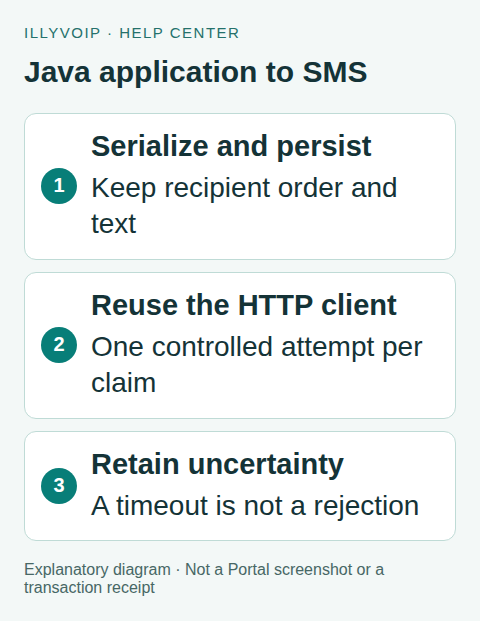
Java application to SMS. Explanatory diagram showing the workflow, not an interface or completed transaction. Open the image for a larger view.
1. Prepare Java and your IllyVoIP account
You need an IllyVoIP account with SMS API access, a permanent API key, sufficient balance, an available sender and a destination that your account can send to. Account role, verification and SMS restrictions still apply. A valid international number is not proof that a route is available or that a handset will receive the message. Use a recipient who has agreed to receive the notification.
Keep the key in your server's secret store and expose it only to the SMS worker. Do not put it in a browser, source repository, mobile app or diagnostic output. Use X-Api-Key for authentication. The separate Idempotency-Key identifies one logical send; it is not a credential.
Use a maintained JDK 21 distribution and a Maven application. The example uses Jackson 2.x databind for JSON; the tested version is 2.22.3. Keep dependencies on a reviewed patch level in your own dependency-management policy. This example deliberately uses the com.fasterxml.jackson 2.x API, not the different Jackson 3 package names.
<dependency>
  <groupId>com.fasterxml.jackson.core</groupId>
  <artifactId>jackson-databind</artifactId>
  <version>2.22.3</version>
</dependency>
Set your compiler release to 21. Maven resolves the databind dependencies. Keep the API key in server-side secret configuration as ILLYVOIP_API_KEY; do not pass it on a shared command line or print environment variables during debugging.
2. Build one reusable SMS client
Send a JSON object to POST https://api.illyvoip.com/api/v1/sms/messages. The exact fields are from, to and message. The recipient field is an array even for one number. Use an explicit international country code; do not guess or prepend one from a user's browser locale. The sender must be available to your account and destination.
{"from":"IllyVoIP","to":["YOUR_DESTINATION_NUMBER"],"message":"Your service notification"}Replace the destination placeholder before a real request. IllyVoIP is an example sender, not permission to use any sender name. The API can normalize formatting and remove duplicate recipients. Preserve your original recipient order and stored JSON when recovering a request.
Save the following as IllySms.java. It reuses an HTTP client, applies connection and per-request timeouts, and does not follow redirects. The package-private constructor only allows the local fixture to substitute a loopback endpoint; application code uses the public constructor with the fixed HTTPS API URL.
import com.fasterxml.jackson.databind.JsonNode;
import com.fasterxml.jackson.databind.ObjectMapper;
import java.io.IOException;
import java.net.URI;
import java.net.http.*;
import java.time.Duration;
import java.util.*;

public final class IllySms {
    private final HttpClient http;
    private final URI endpoint;
    private final String apiKey;
    private final ObjectMapper json = new ObjectMapper();

    public record Reply(int httpStatus, String body,
                        List<String> queuedIds, boolean accepted) {}

    public IllySms(String apiKey) {
        this(apiKey, URI.create(
            "https://api.illyvoip.com/api/v1/sms/messages"));
    }
    // Package-private endpoint injection for local tests only.
    IllySms(String apiKey, URI endpoint) {
        if (apiKey == null || apiKey.isBlank())
            throw new IllegalArgumentException("Missing API key");
        this.apiKey = apiKey;
        this.endpoint = endpoint;
        this.http = HttpClient.newBuilder()
            .connectTimeout(Duration.ofSeconds(10))
            .followRedirects(HttpClient.Redirect.NEVER).build();
    }
    public String buildPayload(String sender,
            List<String> recipients, String message) throws IOException {
        var payload = new LinkedHashMap<String, Object>();
        payload.put("from", sender);
        payload.put("to", recipients);
        payload.put("message", message);
        return json.writeValueAsString(payload);
    }
    public Reply sendOnce(String savedKey, String savedJson)
            throws IOException, InterruptedException {
        if (!savedKey.matches("[A-Za-z0-9:._-]{8,128}"))
            throw new IllegalArgumentException("Invalid request key");
        var request = HttpRequest.newBuilder(endpoint)
            .timeout(Duration.ofSeconds(30))
            .header("X-Api-Key", apiKey)
            .header("Idempotency-Key", savedKey)
            .header("Content-Type", "application/json; charset=utf-8")
            .POST(HttpRequest.BodyPublishers.ofString(savedJson))
            .build();
        var response = http.send(request,
            HttpResponse.BodyHandlers.ofString());
        var ids = new ArrayList<String>();
        boolean success = false;
        try {
            JsonNode root = json.readTree(response.body());
            if (root != null && root.isObject() &&
                "success".equals(root.path("status").asText()) &&
                root.path("queued_message_ids").isArray()) {
                for (JsonNode id : root.path("queued_message_ids"))
                    if (id.isTextual() && !id.asText().isBlank())
                        ids.add(id.asText());
                success = !ids.isEmpty() && ids.size() ==
                    root.path("queued_message_ids").size();
            }
        } catch (com.fasterxml.jackson.core.JsonProcessingException ex) {
            // Preserve HTTP status and raw body for review.
        }
        return new Reply(response.statusCode(), response.body(),
            List.copyOf(ids), response.statusCode() >= 200 &&
            response.statusCode() < 300 && success);
    }
}
The JDK HTTP client reference describes client reuse and synchronous request behavior. sendOnce blocks the calling thread, so run it in a bounded background worker, not an unbounded thread per recipient or a reactive event loop. Configure the mapper before sharing it; this example does not modify its configuration during sends.
3. Serialize and persist one business notification
Create a durable outbox row in the same database transaction as the business event that requires the notification. Give the row a unique business identity, such as invoice:YOUR_INVOICE_ID:ready, and enforce uniqueness in the database. Generate the request key once, serialize the body once, and store both before any network attempt. A repeated form submission or queue job should load that row, not create another SMS.
- Identity: the application's unique event and notification purpose.
- Frozen request: the idempotency key and exact JSON, including sender, text and recipient order.
- Progress: pending, sending, accepted, review or uncertain; include timestamps and attempt history.
- Evidence: HTTP status, restricted response body, queued message IDs and individual recipient outcomes.
A worker must atomically claim a pending row and commit its sending state before calling the API. Only one worker may own that row. If the process dies after transmission, leave the row for reconciliation; an expired worker lease must not blindly turn it into a new send. Store the outcome with a separate database operation that is not cancelled merely because the initiating browser disconnected.
The request key must contain 8–128 letters, digits, colons, dots, underscores or hyphens. It is case-sensitive. A changed sender, message or recipient list/order requires a deliberate new operation; reusing the old key with changed content returns an error. Do not assume an unlimited deduplication retention period. Review long-delayed uncertainty with support before replaying an old operation.
var sms = new IllySms(System.getenv("ILLYVOIP_API_KEY"));
var requestKey = "sms:" + UUID.randomUUID();
var payloadJson = sms.buildPayload("IllyVoIP",
    List.of("YOUR_DESTINATION_NUMBER"),
    "Your service notification");
// Commit requestKey and payloadJson with the unique business event.
// The worker loads these saved values after claiming the row.
ObjectMapper handles JSON escaping; do not build the body by concatenating recipient numbers or message text into a JSON string. Preserve the serialized body from the first attempt. Reloading a changing database template when retrying would change the request under its existing key.
The client does not implement your database outbox. Use a transaction and a uniqueness constraint in your application's persistence layer, then atomically claim one row per worker. A Java lock or static map does not protect against process restarts or multiple service instances.
4. Handle interruption and uncertain requests
Call sms.sendOnce(savedKey, savedJson) only after committing the worker claim. On an ordinary response, persist its status and body before releasing the job. accepted() means queued IDs were returned, not complete delivery or acceptance of every recipient.
On InterruptedException, preserve the operation as uncertain using an application persistence path that can finish, then restore the thread's interrupted status with Thread.currentThread().interrupt() and stop that unit of work. If persistence itself fails, the precommitted sending state remains the recovery signal. Do not catch interruption and continue a sending loop.
IOException, including a timeout or connection failure, does not by itself establish whether IllyVoIP received the request. Keep the same key and payload for reconciliation. A later controlled identical retry can reuse them; creating a new UUID in the catch block defeats that protection. Inspect job-runner retries, HTTP wrappers and resilience libraries as well as this method, because they can cause repeated execution outside the client.
Do not translate a malformed success response into “SMS failed, send another.” Keep the HTTP status and restricted raw body for investigation. If a database save fails after the API accepted a message, treat the remaining sending row as uncertain rather than pending.
5. Record recipient outcomes and delivery
Treat the response as a submission result. A successful response containing queued_message_ids means those messages entered the sending process. Persist the IDs before acknowledging the job as accepted. Keep invalid_numbers, duplicates_removed, total_cost and any encoding or conversion information from the full response.
A request can accept some recipients and reject others. Message IDs follow accepted recipients in request order after normalization and deduplication; the rejected-number list is separate and must not be zipped with those IDs. Never resend the entire batch to correct one rejected destination. Review that recipient and create a new operation only for the intended correction.
For delivery updates, open Account Settings → Integrations / CRM & webhooks and configure the webhook endpoint and relevant sms_sent, sms_delivered and sms_failed events. Preserve any existing subscriptions when configuring the account's endpoint. Authenticate webhook requests using the documented webhook mechanism, then correlate data.message.message_id with the stored queued ID. The SMS request key is not included in delivery events and does not authenticate them.
Keep submission and delivery states separate. Handle repeated or out-of-order callbacks idempotently, retain their timestamps, and do not replace a recorded delivery result with an older submission event. A missing delivery callback means unknown delivery until investigated; it does not justify sending another SMS.
6. Verify the integration without a paid send
- Start a loopback HTTP fixture and construct the package-private client with that fixture URI and a fake key. Never use your production key in the fixture.
- Capture the request and assert that it is a JSON POST with
X-Api-Key, the savedIdempotency-Keyand an array of recipients. - Round-trip quotes, line breaks, backslashes and Unicode through the serializer.
- Submit the same saved operation twice and compare the exact key and body. Test the database's unique event and worker claim separately so duplicate queue execution cannot create two operations.
- Return success with partial recipient rejection, then 400, 503, a redirect, malformed JSON and a null body. Confirm the application preserves each response and never infers delivery.
- Interrupt the worker and simulate connection loss. Confirm that interruption is propagated, the operation remains recoverable and no replacement key appears.
The client was compiled on JDK 21 and tested against a local HTTP fixture using Jackson 2.22.3. These checks establish example behavior, not a carrier delivery test. Before enabling production automation, test your database recovery and then deliberately send one message to an authorized recipient, allowing for its cost.
7. Diagnose API errors and message length
- 400: inspect the error code and recipient details. Invalid destinations, unsupported encoding and content-review responses require correction or review, not a timed retry loop. For
sms_use_case_information_required, give supportfields.review_reference. Screening approval does not automatically send the old request. - 401 or 403: check the API key and account permissions, verification and SMS access. Do not switch credentials or weaken restrictions automatically.
- 413: reduce an oversized request after confirming its rejection. Split work into deliberate new operations rather than silently changing a saved payload.
- 429: pause according to the rate-limit response. Retain the same request identity for an eligible retry and control concurrency.
- 5xx, timeout or connection loss: retain uncertainty. Inspect the saved response and any queued IDs, and reconcile before a controlled identical retry. Never generate a replacement key just because a response was lost.
- 2xx without a valid success body and message IDs: keep the raw response for review. Do not label it delivered or silently mark it as a completed send.
Restrict access to response bodies because they may contain destinations or message details. Ordinary logs should contain the internal operation ID, HTTP status and a safe error code, not the API key or full SMS text.
Message length is not simply the number of visible characters. GSM-7 allows 160 units in a single SMS and normally 153 per part for multipart messages; extension characters consume extra units. Unicode uses 70 UTF-16 units for a single SMS and normally 67 per part. Destination limits and Unicode support can be stricter. Emoji and punctuation can change the encoding and cost. Review the current API response and destination conditions instead of promising that a short-looking message costs one segment.
Frequently asked questions
Does this require Spring Boot?
No. It uses the JDK HTTP API and Jackson. In Spring, register the reusable client as a service and supply the key from protected configuration. Your transaction and queue integration still need explicit implementation.
Can I use this in an Android application?
This guide targets a trusted Java server, not Android's API availability or app lifecycle. Keep the permanent key on your backend; do not embed it in an APK.
Why not create a new HTTP client for each message?
A reusable client keeps connection management within one service component. Create a request for each attempt while preserving the saved logical operation, key and body.
References and verification
For the account workflow, read Send SMS through the API and track delivery. Use the IllyVoIP OpenAPI specification for the current contract and the Developers & Integrations Help Center for related API and webhook guidance.
See the Jackson databind project for serializer documentation and the linked JDK reference for HTTP behavior. Reviewed October 9, 2026. The image is an explanatory workflow diagram; no live Java-to-carrier delivery is claimed.