
Send an IllyVoIP SMS from a Laravel queue worker after your application has saved the event that justifies it. Keep a durable notification record so a retried job or a lost HTTP response does not become a new message by accident.
This guide uses Laravel’s HTTP client and queue concepts documented for Laravel 13. Adapt the configuration to your supported installed release. It is a custom backend integration, not a built-in IllyVoIP notification channel. You need SMS/API access, an eligible sender, a queue worker and a database you control.
1. Store configuration on the server
Add the API URL and key to the application’s server-side environment and expose them through your Laravel configuration, for example a services.illyvoip entry. Read them with config() in application code so deployment configuration caching is handled consistently.
The Production base URL is https://api.illyvoip.com. Sandbox requires its own URL and key. Do not put either secret in frontend JavaScript, a queue payload visible to untrusted users or a committed example file. Redact authorization headers in HTTP instrumentation.
2. Create a durable notification record
Store a unique business reference, sender, international recipient, final message, stable request key and state. A useful identity might combine an order ID, a particular status transition and recipient. An order ID alone is insufficient if two different transitions each require a message.
Use a database unique constraint for that business identity. Freeze the payload and key before the first attempt. Store accepted message IDs, safe error information and attempt timing separately. Do not serialize a changing model and let every retry silently generate different SMS text.
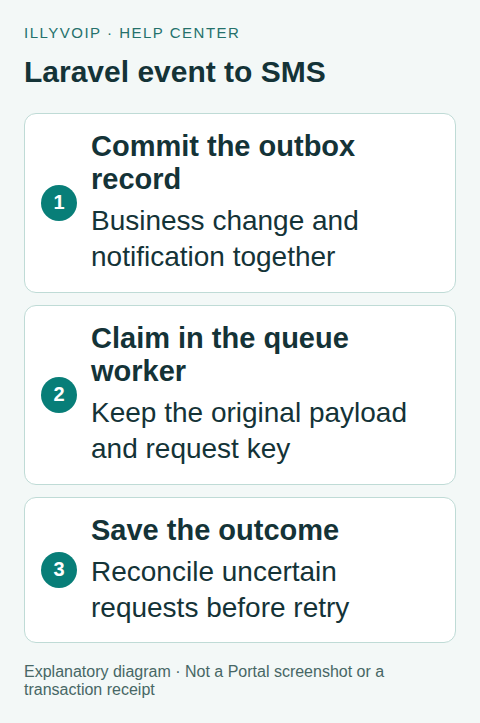
For a business change and its notification, create the outbox record in the same database transaction. Dispatch the queue job after commit. Laravel’s after-commit dispatch prevents a worker from acting on data that later rolls back, but it does not close the gap if the process dies after the commit and before dispatch. A periodic outbox sweep should recover committed pending records.
3. Claim work before sending
Have the worker atomically claim one pending record. If it is already submitted, return without calling the API. If a previous attempt is uncertain, send it to reconciliation rather than treating it as new work. Use a bounded lease or equivalent recovery policy for a worker that crashes while holding the claim.
Queue uniqueness is helpful but does not replace the database record: another worker, a manual retry or a different queue can otherwise send the same business event. Do not hold a long database transaction open during the network request.
4. Build the HTTP request
The following fragment belongs inside your claimed-record handler. It performs one request and captures the result; you must connect it to the durable states described above. $record represents your saved notification:
use Illuminate\Support\Facades\Http;

$response = Http::acceptJson()
    ->asJson()
    ->withHeaders([
        'X-Api-Key' => config('services.illyvoip.key'),
        'Idempotency-Key' => $record->request_key,
    ])
    ->connectTimeout(5)
    ->timeout(20)
    ->post(rtrim(config('services.illyvoip.url'), '/') . '/api/v1/sms/messages', [
        'from' => $record->sender,
        'to' => [$record->recipient],
        'message' => $record->message,
    ]);

$httpStatus = $response->status();
$result = $response->json();
Use a request key containing 8–128 letters, numbers, dots, colons, underscores or dashes. Reuse it only with the same frozen body. The HTTP client serializes JSON; do not hand-escape the message. The example deadlines are application choices, not service delivery promises.
5. Save the actual outcome
Laravel’s HTTP client does not automatically throw for every client/server error. Check the HTTP status and structured API result. Validate that queued_message_ids contains the expected accepted reference before recording submission. For one recipient, also inspect invalid_numbers if the result rejects it.
Catch transport/connection exceptions around the request. If the request could have reached the service but the response was lost, record an uncertain outcome. Do not let a queue exception handler generate a new notification ID and resend automatically. For an explicitly retryable submission, preserve the same body/key and follow the API’s current retry contract.
Validation and permission failures need a correction. Rate limits need the documented delay. A success means queued, not delivered: correlate the accepted message ID with status or delivery webhooks before recording delivery.
6. Test without sending real SMS
Use Http::fake() and Http::preventStrayRequests() for request tests. Assert the exact URL, headers and JSON fields. Include text with quotes, line breaks and accents. Use synthetic success and rejection bodies based on the current public contract.
Test the workflow separately: transaction rollback creates no send; a committed record survives failed queue dispatch; duplicate jobs cannot claim the same notification; a worker restart preserves uncertainty; delivery updates match an accepted ID. A successful HTTP mock alone does not prove those database and queue properties.
After review, one authorized Production test can verify the real sender and destination. Review cost and segmentation first. Do not run a test suite against the real send endpoint.
Frequently asked questions
Can I call the API directly from a model event? Avoid tying paid network activity to a transaction that may roll back. Persist the intended notification and process it afterward.
Does afterCommit guarantee exactly one SMS? No. Durable claiming, reconciliation and the endpoint’s retry rules remain necessary.
Related guides and references
- Send an SMS with the IllyVoIP API and track delivery
- Send a CSV recipient list with Python and IllyVoIP
- Official reference: laravel.com
- Official reference: laravel.com
- Official reference: api.illyvoip.com
Reviewed 9 October 2026 using current IllyVoIP implementation and official references. Check your installed version and account options before applying settings. Examples do not certify a physical device or completed live integration.