
Use the IllyVoIP SMS REST endpoint from your PHP backend when an application needs to send a deliberate notification. The useful result is not just an HTTP response: your application must retain the accepted message IDs and distinguish an uncertain submission from a rejected one.
This walkthrough uses PHP 8 with the cURL extension and JSON exception support. It is a custom REST integration, not a separate IllyVoIP PHP SDK. Laravel and WooCommerce workflows have their own guides.
1. Prepare account access and private configuration
Open Account settings → Developer tools to manage your API key through the required verification flow. Keep it in your backend's secret configuration. Use the public API reference for current endpoint details and API Playground for deliberate requests. Production sends can incur charges.
You need SMS access, sufficient balance, an allowed sender and an authorized recipient. Use https://api.illyvoip.com for Production. Sandbox has its own URL and key; never silently fall back to Production when a Sandbox request fails.
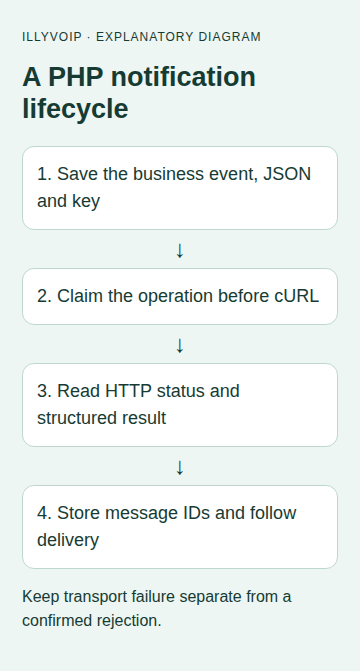
2. Save the notification before attempting delivery
Create a durable operation record containing the business event, sender, recipient, final text, idempotency key and exact JSON. A database uniqueness constraint should prevent two workers creating the same intended notification. Claim the record before performing network work.
Build JSON with the encoder rather than string concatenation:
$payload = [
    'from' => $allowedSender,
    'to' => [$confirmedInternationalRecipient],
    'message' => $notificationText,
];
$json = json_encode($payload, JSON_THROW_ON_ERROR | JSON_UNESCAPED_UNICODE);
$requestKey = bin2hex(random_bytes(16));
// Persist $json and $requestKey atomically with your operation before sending.
// A retry loads these saved values; it does not regenerate them.
The variables represent values your application has already validated. The key belongs to this submission, not permanently to the recipient. Keep it unchanged for an eligible identical retry; a genuinely new notification needs a new operation identity.
3. Make one HTTP attempt
The helper below sends the stored body without a retry loop. Its return value is an input to your durable state machine, not a claim that a message arrived.
<?php
declare(strict_types=1);

// $json and $requestKey come from an already persisted operation.
// This function makes one attempt. It does not decide whether to retry.
function submitIllySms(string $json, string $requestKey, string $apiKey): array
{
    if (!preg_match('/\A[A-Za-z0-9._:-]{8,128}\z/D', $requestKey)) {
        throw new InvalidArgumentException('Invalid saved request key');
    }
    if ($apiKey === '' || preg_match('/[\r\n]/', $apiKey)) {
        throw new InvalidArgumentException('Invalid API key configuration');
    }
    json_decode($json, true, 64, JSON_THROW_ON_ERROR);
    $ch = curl_init('https://api.illyvoip.com/api/v1/sms/messages');
    if ($ch === false) throw new RuntimeException('Unable to initialize HTTP client');
    try {
        curl_setopt_array($ch, [
            CURLOPT_POST => true,
            CURLOPT_POSTFIELDS => $json,
            CURLOPT_HTTPHEADER => [
                'Content-Type: application/json',
                'Accept: application/json',
                'X-Api-Key: ' . $apiKey,
                'Idempotency-Key: ' . $requestKey,
            ],
            CURLOPT_RETURNTRANSFER => true,
            CURLOPT_CONNECTTIMEOUT => 5,
            CURLOPT_TIMEOUT => 20,
            CURLOPT_FOLLOWLOCATION => false,
        ]);
        $raw = curl_exec($ch);
        $http = (int) curl_getinfo($ch, CURLINFO_RESPONSE_CODE);
        if ($raw === false) {
            return ['state' => 'uncertain', 'http' => $http,
                    'transport_code' => curl_errno($ch)];
        }
        try {
            $body = json_decode($raw, true, 64, JSON_THROW_ON_ERROR);
        } catch (JsonException) {
            return ['state' => 'review', 'http' => $http,
                    'reason' => 'Response is not valid JSON'];
        }
        return ['state' => 'response', 'http' => $http, 'body' => $body];
    } finally {
        curl_close($ch);
    }
}
Call submitIllySms($savedJson, $savedKey, $configuredApiKey) only after the operation has been claimed. The helper keeps TLS verification at cURL's normal enabled behavior and does not follow redirects with your credentials. Its example timeouts are local application choices.
4. Classify the response before updating your record
curl_exec returning a string does not mean HTTP success. Inspect the returned HTTP status and body together. For a successful response, require the documented success status and the expected queued_message_ids; save those IDs and any rejected-recipient details before marking the operation submitted.
| Result | Application action |
|---|---|
| Accepted message IDs | Persist them and track delivery separately. |
| Validation or permission rejection | Correct the cause; do not loop the unchanged request. |
| 429 throttling | Schedule a bounded eligible retry using the documented delay and same saved operation. |
| Timeout, connection loss or unclear body | Preserve uncertainty and reconcile; do not create a replacement key automatically. |
| Partial acceptance | Keep accepted IDs and map invalid/duplicate recipients before deciding on any new submission. |
The helper does not export the API key or raw transport exception text. Keep diagnostic logging similarly selective. A successful JSON parse can still produce the wrong structure, so validate fields before reading them.
5. Follow delivery after submission
Use the returned message ID with GET /api/v1/sms/messages/status, or process verified delivery webhooks. Store the accepted and delivered states separately. The request key is not a message ID, and a queue acceptance is not a handset receipt.
For batches, accepted IDs correspond to accepted unique recipients after normalization and deduplication. Begin with one recipient while building your integration, then add explicit per-recipient mapping before expanding it.
6. Test locally before a paid request
Put the HTTP helper behind your application's transport interface and substitute a local fake in tests. Check Unicode text, quotes, line breaks, HTTP400/403/429, non-JSON responses, partial acceptance and a lost response. Verify that a restarted worker reloads the same JSON/key and that two workers cannot claim the same operation.
Then use the separate Sandbox contract for response-shape checks. A Sandbox result does not prove real delivery. The first authorized Production check should use one recipient you control, with cost and content reviewed in advance.
Common questions
Can I call this from browser JavaScript? The permanent API key must stay on the backend. Your public form should call an authenticated, authorized application route with its own abuse controls.
Should I rerun the script after a timeout? Load and reconcile the existing operation first. Rerunning a block that generates a new key can create another paid message.
Related guides and references
Reviewed 9 October 2026 against current IllyVoIP source and the linked documentation. Use the settings available to your account and installed version. These instructions are not a claim of a completed physical-device or live-service test.