
PowerShell can send an IllyVoIP SMS as part of an administrator's approved workflow. The important distinction is between starting a new notification and retrying an existing one. Save the request before sending so a timeout does not tempt you to create a second paid message.
This guide uses PowerShell 7 and its HTTP response controls. Windows PowerShell 5.1 has different behavior and is not the target of this example. You need API/SMS access, an allowed sender, sufficient balance and an authorized recipient.
1. Prepare private configuration
Manage the API key in the Portal's Account settings → Developer tools, following its verification prompts. Supply it to the running script through your organization's secret-management process. Do not paste it into a command that will be saved in history or include it in a transcript.
The helper below pins the Production endpoint. A deliberate Sandbox adaptation must change both base URL and credential to the documented Sandbox values. Never switch environments automatically after an error.
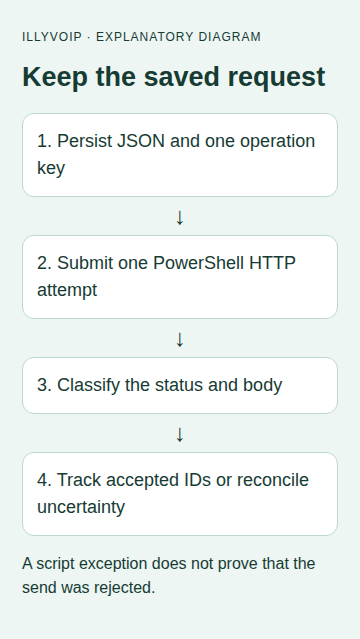
2. Build and persist one operation
Use an object and ConvertTo-Json so quotation marks, line breaks and Unicode text are encoded correctly. These variables must already contain your reviewed sender, confirmed international recipient and notification text:
$payload = [ordered]@{
    from = $allowedSender
    to = @($confirmedInternationalRecipient)
    message = $notificationText
}
$json = $payload | ConvertTo-Json -Depth 4 -Compress
$requestKey = [Guid]::NewGuid().ToString('N')
# Persist $json and $requestKey together in your private operation store.
# Do this before the attempt. Retries reload them instead of running this again.
Use an atomic operation store with a business-event uniqueness rule and a worker claim. A pair of unrelated temporary files is not sufficient if two scheduled jobs can race. Keep the recipient array even when it has only one member.
3. Submit a single attempt
Save the function in your reviewed script module. It returns the response for classification and does not enable automatic HTTP retries:
function Send-IllySmsAttempt {
    [CmdletBinding()]
    param(
        [Parameter(Mandatory)][string] $SavedJson,
        [Parameter(Mandatory)][string] $SavedRequestKey,
        [Parameter(Mandatory)][string] $ApiKey
    )
    if ($SavedRequestKey -cnotmatch '\A[A-Za-z0-9._:-]{8,128}\z') {
        throw 'Invalid saved request key'
    }
    if ([string]::IsNullOrWhiteSpace($ApiKey) -or $ApiKey -match '[\r\n]') {
        throw 'Invalid API key configuration'
    }
    $null = ConvertFrom-Json -InputObject $SavedJson -ErrorAction Stop
    $headers = @{
        'X-Api-Key' = $ApiKey
        'Idempotency-Key' = $SavedRequestKey
        'Accept' = 'application/json'
    }
    try {
        $body = Invoke-RestMethod `
            -Uri 'https://api.illyvoip.com/api/v1/sms/messages' `
            -Method Post -Headers $headers `
            -ContentType 'application/json; charset=utf-8' `
            -Body ([Text.Encoding]::UTF8.GetBytes($SavedJson)) `
            -TimeoutSec 20 -MaximumRedirection 0 `
            -SkipHttpErrorCheck -StatusCodeVariable httpStatus `
            -ResponseHeadersVariable responseHeaders -ErrorAction Stop
        [pscustomobject]@{
            State = 'Response'
            HttpStatus = $httpStatus
            RetryAfter = $responseHeaders['Retry-After']
            Body = $body
        }
    } catch {
        # A failed local wait does not prove the server rejected the send.
        [pscustomobject]@{
            State = 'Uncertain'
            ErrorType = $_.Exception.GetType().FullName
        }
    }
}
Call it with the saved JSON/key and the privately loaded credential after claiming the operation. UTF-8 bytes make the intended character encoding explicit. Redirects are not followed, TLS validation remains enabled, and the helper does not print the authorization header.
4. Read HTTP status and response fields together
-SkipHttpErrorCheck lets your code inspect a 4xx/5xx response rather than losing it in a generic exception path. It does not make that response successful. Validate State, HttpStatus and the parsed body before changing the durable operation.
- Successful acceptance: require the documented success result and save
queued_message_ids. - Rejected or duplicate recipients: inspect
invalid_numbersandduplicates_removedbefore mapping IDs to input numbers. - 429: respect the actual retry information and your bounded scheduler; retain the same saved request identity.
- Validation or permission failure: correct the cause rather than automatically repeating.
- Uncertain or malformed response: keep a review state. A local exception does not prove the message was never accepted.
Do not write the entire result object to a shared console transcript if it contains recipients or message content. Store only the diagnostic fields needed for your workflow, with appropriate access controls.
5. Track delivery separately
Use an accepted message ID with the SMS status endpoint, or process verified delivery webhooks in your application. The idempotency key identifies the submission; it is not the message ID. Marking the job “submitted” is different from recording a delivered SMS.
For a partial result, preserve accepted IDs and reconcile rejected recipients. Do not resend the original batch with a new key merely because one destination failed.
6. Test the script without sending SMS
Mock Invoke-RestMethod in your PowerShell tests and inspect the request URL, headers and UTF-8 body. Cover quotes, accented text, a successful queued response,400/403/429, unexpected JSON shape and a transport exception. Check that the wrapper itself performs only one attempt.
Test the surrounding store separately: duplicate scheduled jobs cannot claim the same operation, a restart loads the same saved key, and a cancelled notification is not sent after a delay. Local tests do not prove carrier delivery.
For a first authorized Production check, use one recipient you control, review costs and message parts, then compare the received text with the stored message ID/status. Do not point a repeatable test suite at the real send endpoint.
Common questions
Can I set MaximumRetryCount to keep trying? Not as a substitute for classifying paid-operation outcomes and preserving request identity. Keep retries in the explicit scheduler.
Why not interpolate JSON into a string? An encoder handles quotes and Unicode reliably; interpolation can produce a different or invalid payload.
Related guides and references
Reviewed 9 October 2026 against current IllyVoIP source and the linked documentation. Use the settings available to your account and installed version. These instructions are not a claim of a completed physical-device or live-service test.