
Use the IllyVoIP WebRTC Phone SDK from a client-side Vue 3 composable, with one phone owner for the application. Keep permanent credentials on your server, expose call state through Vue refs and make connection cleanup part of the component lifecycle.
This is a custom Vue integration using the existing JavaScript SDK, not a separate Vue SDK. The example supplies a small single-call panel; it does not implement a full contact-center interface. It was reviewed against the current SDK on October 9, 2026, with actual Vue lifecycle tests and a mocked phone. No live SIP registration or paid call is claimed.
1. Prepare the browser and backend
Use a Vue 3 application served over HTTPS, an authorized IllyVoIP SIP identity and a backend that authenticates your application’s users. Start with the Webphone SDK setup guide for the current distribution, supported browser setup and token contract.
Your backend must call the documented POST /api/v1/sip/browser-token endpoint using its server-held API key. It selects only a SIP identity that the signed-in user is authorized to use and returns the documented short-lived token response. Do not let a browser choose an arbitrary account identity or receive the permanent API key.
The route /my-backend/illyvoip/browser-token below is a route you implement in your application. It is not an existing IllyVoIP Portal route. Apply authentication, authorization, CSRF protection, origin checks, rate controls and private/no-store response caching appropriate to your application. Do not log tokens or send them to analytics.
2. Load the SDK once and choose its owner
Load the official SDK before mounting the calling component; the browser distribution exposes window.IllyVoipWebRtcPhone. Pin the reviewed distribution in your deployment. Never put a permanent SIP password or API key into a Vue environment variable that is bundled into browser JavaScript.
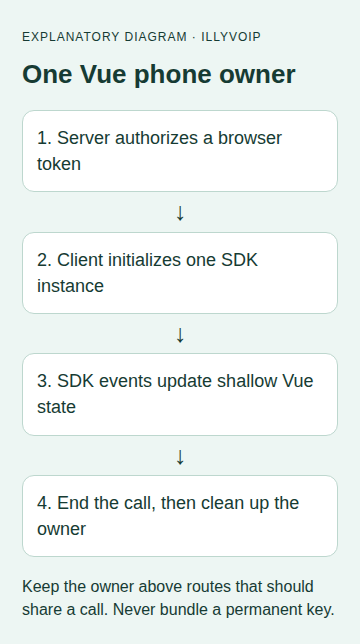
Mount the owner above route views that should share a call. Do not mount a new owner on every page or let two call panels compete for the same identity. Server-rendered applications must initialize calling on the client; this composable starts in onMounted. Vue’s lifecycle documentation explains those hooks.
3. Create the composable
Save this as useIllyPhone.js. It serializes setup, user actions and teardown, registers listeners before connecting, and exposes SDK call objects through shallowRef. The region is an example; select the documented region suitable for the identity and application.
import { ref, shallowRef, onMounted, onBeforeUnmount } from 'vue';

// One shared queue and owner for this application, above route-level views.
let queue = Promise.resolve();
let owner = null;
let cleanupFailed = false;
function serial(job) {
  const result = queue.then(job);
  queue = result.catch(() => {});
  return result;
}

export function useIllyPhone({ region = 'de' } = {}) {
  const status = ref('Not connected');
  const ready = ref(false);
  const busy = ref(false);
  const call = shallowRef(null); // SDK objects must not become deep Vue proxies.
  const lease = {};
  let phone = null;
  let stopped = false;
  const off = [];
  const report = value => { if (!stopped) status.value = value; };
  async function dispose() {
    ready.value = false;
    off.splice(0).forEach(unsubscribe => unsubscribe());
    try {
      if (phone) await phone.destroy();
    } catch {
      cleanupFailed = true; // Do not silently start a replacement connection.
    } finally {
      phone = null;
      call.value = null;
      if (owner === lease) owner = null;
    }
  }
  onMounted(() => {
    serial(async () => {
      if (stopped) return;
      if (cleanupFailed || owner) {
        report('Another owner exists or cleanup requires a reload');
        return;
      }
      owner = lease;
      try {
        // Load the official SDK before mounting this component.
        phone = new window.IllyVoipWebRtcPhone({
          autoConnect: false, autoRegister: false, region,
          tokenBootstrapUrl:
            'https://api.illyvoip.com/api/v1/sip/browser-bootstrap',
          tokenProvider: async ({ region }) => {
            const abort = new AbortController();
            const timer = setTimeout(() => abort.abort(), 10000);
            try {
              const response = await fetch('/my-backend/illyvoip/browser-token', {
                method: 'POST', credentials: 'same-origin', signal: abort.signal,
                headers: {
                  'Content-Type': 'application/json',
                  'X-CSRF-Token': document.querySelector(
                    'meta[name="csrf-token"]')?.content ?? ''
                },
                body: JSON.stringify({ region })
              });
              if (!response.ok) throw new Error('Token request failed');
              return await response.json();
            } finally { clearTimeout(timer); }
          }
        });
        off.push(phone.on('registration:registered', () => {
          if (!stopped) ready.value = true;
          report('Registered');
        }));
        off.push(phone.on('registration:unregistered', () => {
          ready.value = false; report('Unregistered');
        }));
        off.push(phone.on('connection:disconnected', () => {
          ready.value = false; report('Disconnected');
        }));
        for (const event of ['call:created', 'call:incoming', 'call:answered']) {
          off.push(phone.on(event, ({ call: current }) => {
            if (!stopped) call.value = current;
            report(event === 'call:incoming' ? 'Incoming call' : current.state);
          }));
        }
        off.push(phone.on('call:state', ({ call: current, state }) => {
          if (!stopped && call.value?.id === current.id) report(state);
        }));
        off.push(phone.on('call:ended', ({ call: current }) => {
          if (call.value?.id === current.id) call.value = null;
          report('Call ended');
        }));
        off.push(phone.on('error', () => report('Phone error; inspect securely')));
        await phone.initialize();
        if (stopped) return;
        await phone.connect();
        if (stopped) return;
        await phone.register();
      } catch {
        report('Connection failed; check authorized setup');
        await dispose();
      }
    }).catch(() => report('Phone unavailable'));
  });
  function act(job) {
    if (stopped || busy.value || !ready.value) return Promise.resolve();
    busy.value = true;
    return serial(async () => {
      if (!stopped && phone && owner === lease) await job(phone);
    }).catch(() => report('Action failed; check call state before retrying'))
      .finally(() => { busy.value = false; });
  }
  const dial = target => act(async p => {
    if (call.value || !String(target).trim()) return;
    await p.call(String(target).trim());
    // call:created/answered/state events own the UI state.
  });
  const answer = () => act(p => call.value ? p.answer(call.value.id) : undefined);
  const hangup = () => act(p => call.value ? p.hangup(call.value.id) : undefined);
  onBeforeUnmount(() => {
    stopped = true;
    ready.value = false;
    serial(dispose).catch(() => { cleanupFailed = true; });
  });
  return { status, ready, busy, call, dial, answer, hangup };
}
The shared queue belongs to this module, so all owners in the application must use the same module instance. It prevents a rapid local remount from connecting before the previous instance has been destroyed. It is not a cross-tab ownership coordinator or permission to take over a session already used elsewhere.
4. Connect a small calling panel
In a Vue single-file component, use the composable from <script setup>. This is a one-call example: use a destination you are authorized to call, and deliberately expand the state model before supporting multiple simultaneous calls.
<script setup>
import { ref } from 'vue';
import { useIllyPhone } from './useIllyPhone.js';
const destination = ref('');
const { status, ready, busy, call, dial, answer, hangup } = useIllyPhone();
</script>

<template>
  <section aria-label="Browser phone">
    <p role="status">{{ status }}</p>
    <label>Destination
      <input v-model="destination" autocomplete="off" />
    </label>
    <button :disabled="!ready || busy || !!call" @click="dial(destination)">
      Call
    </button>
    <button :disabled="!ready || busy || !call || status !== 'Incoming call'"
      @click="answer">Answer</button>
    <button :disabled="!ready || busy || !call" @click="hangup">End call</button>
  </section>
</template>
Calls must follow a user action. Request microphone access in the calling workflow and handle permission denial clearly. A successful registration does not prove microphone permission, working speaker output or an answered destination. Use the published SDK guide when adding microphone/speaker selection and the SDK’s documented remote-audio configuration.
5. Define navigation, logout and failure behavior
Before allowing an owner to unmount during a call, either keep it mounted above the router or ask the user to end the call and wait for the ended event. Destroying a connection is not a substitute for a confirmed end-call workflow. Do not claim route navigation preserves a call if the component owns and destroys that connection.
Use a new owner after an intentional account change only once the previous identity has been cleaned up. If cleanup fails, the example blocks a replacement and asks for a controlled reload; it does not silently start another registration. Do not retry a failed call button automatically: the result might be uncertain and the call state should be checked first.
The token provider supports later SDK refresh requests, not just the first mount. Keep the backend authorization valid throughout the session and handle logout there. The ten-second token-request timeout bounds the HTTP request; it is not a promise that all signaling operations finish within ten seconds.
6. Test before enabling real calls
- Mock the SDK and token endpoint. Test mount/unmount during startup, rapid remount, a second owner and initialization failure.
- Confirm that event listeners are removed and that failed cleanup blocks another instance.
- Test two rapid Call clicks, an incoming call, the ended event and a disconnected registration.
- With approved test access, verify real registration, microphone permission, incoming/outgoing audio and remote hangup separately. Normal call charges may apply.
- Test navigation, logout, expired tokens and a second tab with your intended ownership policy.
Troubleshooting
- window is undefined: calling code ran during server rendering. Keep it in the client lifecycle.
- Constructor is missing: the SDK script has not loaded or the distribution differs from the integration you reviewed.
- Token request fails: inspect backend authentication/authorization and response shape without exposing credentials.
- Duplicate registration: check component placement, multiple module copies and other tabs.
- Registered but no audio: inspect permissions, selected devices and the media path; registration alone is not an audio test.