
Add a rate preview to your custom IllyVoIP dialer by asking your backend for a destination quote before enabling the final Call action. Bind the result to the current destination and account context. A preview helps users understand the tariff; it does not reserve a price or calculate the eventual call charge.
This guide extends a custom application using IllyVoIP Webphone SDK 1.4.2. Begin with one managed SDK instance, HTTPS, an eligible SIP identity and a short-lived token issued by your authorized backend. Follow the SDK setup guide for registration and audio controls.
1. Capture the exact destination and authorized identity
- Normalize the full international destination before requesting a quote.
- Resolve the permitted SIP identity on the backend rather than trusting an arbitrary browser-supplied identity.
- Create a local generation for this combination of account, selected identity and destination.
- Clear the previous quote whenever any of those values changes.
Keep rate preview separate from SDK registration and microphone permission. A successful quote does not prove the phone is registered, the caller ID is eligible, the account has enough balance or Fraud Control permits the destination.
2. Request the account’s current quote
Use a backend with authorized account API access and keep X-Api-Key out of browser code. The API base is https://api.illyvoip.com. Check HTTP status and the JSON result. Examples below are request templates, not records of completed transactions.
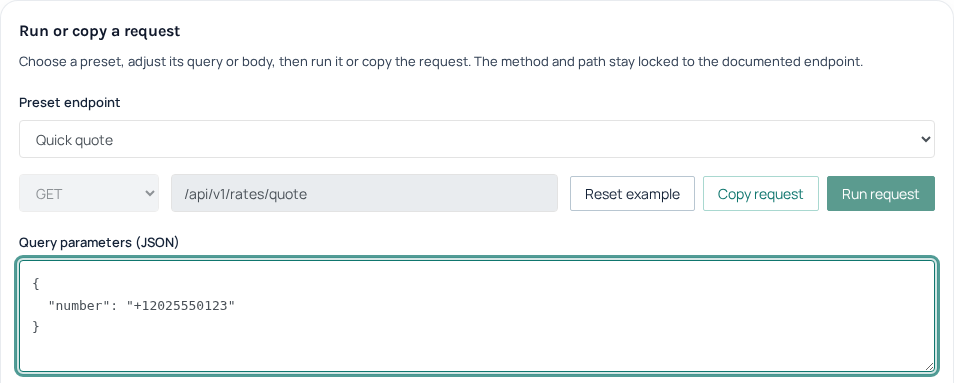
Call GET /api/v1/rates/quote with the number query parameter. Use the account owner’s authorized backend credentials. Encode the plus sign rather than letting it become a space:
GET /api/v1/rates/quote?number=%2B12025550123The number is illustrative. The service resolves the authenticated account owner’s assigned pricing package. This endpoint does not offer a SIP-line price selector or an arbitrary package selector. Do not send an invented sip_user_id parameter to obtain a different tariff. If the selected identity’s billing context cannot be established, label the preview unavailable instead of promising it represents that call.
3. Display the fields without inventing a total
- Show the returned
package_name,quote.destinationand matchedquote.prefix. - Check
quote.enabled. A disabled destination must not look ready to call merely because a rate is present. - Display
quote.rate_per_minuteusing decimal-safe formatting. Null means unavailable, not zero. - Explain
quote.billing.init_secondsandincrement_secondsas the initial interval and subsequent billing increment. - Keep the request time beside the preview. Optional
lookupinformation can be null.
The quote response does not include a currency field. Use only a separately verified account billing currency; otherwise display that currency is not established and resolve it before presenting a monetary promise. Do not insert a currency symbol based on a browser locale. Missing intervals likewise require clarification, not guessed billing.
Avoid a total-call estimate unless the user has deliberately provided a hypothetical duration and your interface clearly labels the result as an estimate. The existing Rates API guide explains interval arithmetic. Actual duration, charges and other applicable billing terms belong to the completed call record.
4. Confirm only the current preview
When a quote returns, compare its saved generation with the dialer’s current generation before displaying it. A slow quote for an earlier number must never enable the Call button for a new number. Changing account, selected identity or number invalidates the confirmation, even if an old request finishes successfully.
- Keep Call disabled while the current quote is loading, unavailable or disabled.
- Ask the user to confirm the current destination and displayed rate context.
- At the click, recheck the generation and current SDK readiness. Serialize the action to prevent double clicks.
- Dial the exact confirmed number through the existing SDK owner. Do not fetch a different number from mutable form state after confirmation.
- Follow the SDK’s actual call events and report failure without automatically dialing again.
Choose a short, explicit application expiry for quotes and refresh when needed. This local expiry is a display policy, not an IllyVoIP price guarantee. If the account package changes, discard cached results and confirmations.
5. Test stale and missing results
Use fixtures where number A’s response arrives after number B’s, where the account changes mid-request, and where the rate, billing intervals or lookup are null. Test disabled pricing and failed requests. Confirm none produces a free-call label or an unintended dial. A local test can verify these decisions without placing a call; a later authorized call is needed to check the complete dialer and actual billing outcome.
Related guides
- Check a destination’s calling rate with the IllyVoIP Rates API
- Add browser calling with the Webphone SDK
- Build incoming-call Answer and Decline controls with the Webphone SDK
Reference
Current instructions and technical reference: IllyVoIP API documentation.
Reviewed 13 October 2026 against the current IllyVoIP controls, implementation and applicable references. Available options depend on account permissions and service state.