
Use the IllyVoIP Calls API to export call history, following its returned cursor until all pages are read. Keep each public call_id unchanged. When a recording is available and your account is allowed to access it, use that same reference with the recordings endpoint.
This guide covers an API export for reporting or reconciliation. The Portal’s Call Reports screen has its own filters and exports; those UI filters are not automatically API parameters.
1. Choose the supported call-history scope
The examples use a terminal with cURL and a server-side API key supplied through the ILLYVOIP_API_KEY environment variable. Keep the key out of browser code, screenshots and source control. Follow the API quickstart to reveal your key using the Portal’s verification prompts. Examples are templates, not records of a completed transaction; replace placeholders deliberately before running them.
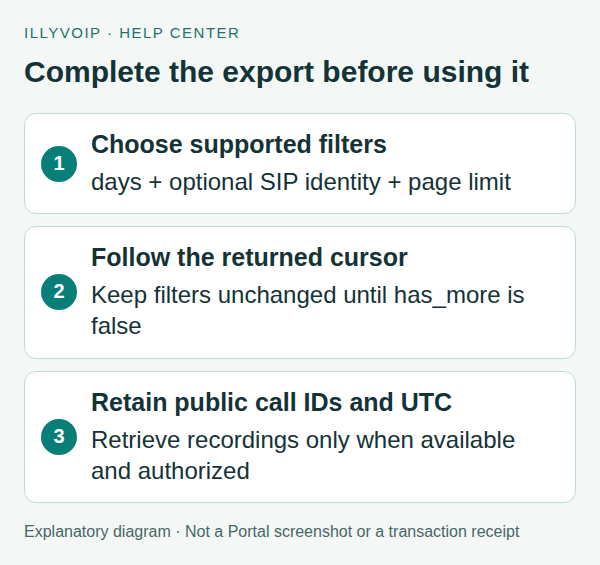
GET /api/v1/calls accepts a UTC calendar-day days window from 1 to 31, optional sip_user_id, limit and cursor. The default window is 7 days. The default page size is 100 and the maximum is 500.
There is no arbitrary start/end-date pair in this endpoint’s documented request. Do not copy Portal date-filter names into an API query and assume they apply. If you need a longer-term archive, design a regular bounded export and retain it under your own access and retention policy.
2. Fetch the first page and inspect its shape
curl --silent --show-error --fail-with-body --get \
  'https://api.illyvoip.com/api/v1/calls' \
  -H "X-Api-Key: ${ILLYVOIP_API_KEY:?Set ILLYVOIP_API_KEY}" \
  --data-urlencode 'days=7' \
  --data-urlencode 'limit=100' > calls-first-page.json
After HTTP and JSON success, inspect calls and pagination. A single successful page is not necessarily a complete export. Follow pagination.next_cursor while pagination.has_more is true.
Keep the same days, page size and SIP-identity filter during that traversal. Cursors are opaque: do not decode, modify or manufacture them. If you change the scope, start a new export without the old cursor.
3. Export all pages with Python
This Python 3 example uses only the standard library. It writes newline-delimited JSON and refuses to overwrite an existing output. Save it as export_calls.py, supply your API key securely and run it from a private working directory.
import json
import os
import urllib.error
import urllib.parse
import urllib.request
from pathlib import Path

base = "https://api.illyvoip.com/api/v1/calls"
key = os.environ["ILLYVOIP_API_KEY"]
params = {"days": 7, "limit": 100}
# Optional: params["sip_user_id"] = "YOUR_ACTUAL_SIP_IDENTITY"
partial = Path("calls-export.partial.jsonl")
final = Path("calls-export.jsonl")
if partial.exists() or final.exists():
    raise SystemExit("Move earlier output deliberately before starting.")
seen_ids = set()
seen_cursors = set()
with partial.open("x", encoding="utf-8") as output:
    while True:
        request = urllib.request.Request(
            base + "?" + urllib.parse.urlencode(params),
            headers={"X-Api-Key": key})
        try:
            with urllib.request.urlopen(request, timeout=30) as response:
                result = json.load(response)
        except urllib.error.HTTPError as error:
            raise SystemExit(f"HTTP {error.code}; export remains partial.")
        if result.get("status") != "success":
            raise SystemExit("API error; export remains partial.")
        for call in result["calls"]:
            call_id = call["call_id"]
            if call_id not in seen_ids:
                output.write(json.dumps(call, ensure_ascii=False) + "\n")
                seen_ids.add(call_id)
        page = result["pagination"]
        if not page["has_more"]:
            break
        cursor = page.get("next_cursor")
        if not cursor or cursor in seen_cursors:
            raise SystemExit("Invalid/repeated cursor; export remains partial.")
        seen_cursors.add(cursor)
        params["cursor"] = cursor
partial.rename(final)
print(f"Exported {len(seen_ids)} calls to {final.name}")
Only the completed export is renamed to calls-export.jsonl. A failed request leaves the partial file clearly marked. This sample restarts a traversal rather than implementing durable resume; production integrations should retain their scope and checkpoint deliberately. Do not treat a partial file as a complete reporting period.
4. Preserve identifiers and UTC timestamps
Public call references look like CALL-…. Treat the whole value as an opaque identifier, including its prefix. Do not substitute a numeric database ID or truncate it for recording lookups.
Prefer started_at, which is ISO-8601 UTC. The deprecated starttime alias is a naive UTC string, not local time. Convert UTC for display only when you know the intended timezone. Keep the source timestamp and identifier in your stored export so records can be reconciled unambiguously.
Use returned call status, hangup cause and failure details when available. Missing optional data is not evidence for an invented cause. For repeat exports with overlapping days, use the public call ID to avoid counting the same record twice.
5. Download a recording that is available to you
Recording access does not create a recording or enable recording retrospectively. Confirm the call was recorded and that the recording is available to your account. Set CALL_ID to the exact returned reference:
: "${CALL_ID:?Set the exact public CALL reference}"
# Stop on an HTTP error; inspect the saved response before treating it as audio.
curl --silent --show-error --fail-with-body --get \
  'https://api.illyvoip.com/api/v1/recordings/play' \
  -H "X-Api-Key: ${ILLYVOIP_API_KEY:?Set ILLYVOIP_API_KEY}" \
  --data-urlencode "call_id=$CALL_ID" \
  --data-urlencode 'method=download' \
  --dump-header recording-headers.txt \
  --output recording-response.bin
Check that the request succeeded and the content type is the documented audio/mpeg before saving the body as an MP3. Error JSON saved in the output file is not audio. Keep recordings private and apply your organization’s access and retention rules.
6. Handle unavailable records and incomplete exports
- Empty page: confirm account, UTC calendar-day window and any SIP filter.
- Unexpected time: compare UTC with the Portal display timezone.
- Recording missing: check availability and processing in Call Reports; a call-history entry does not promise a recording.
- Invalid cursor: do not change it manually. Restart with a consistent scope if necessary.
- Request failure: preserve the HTTP result and export state. Do not silently skip that page.
Frequently asked questions
Can I download every call’s recording?
Only recordings that exist, are available and are accessible to your account. A call ID alone is not an entitlement or an availability guarantee.
Does limit=500 fetch all history?
No. It controls one page. Continue following the returned cursor.
Can I request last year with start_date and end_date?
Those are not documented filters for this endpoint. Use the supported days window and plan retention/export accordingly.
Related guides and reference
For current endpoint parameters and examples, use the IllyVoIP developer resources and public API specification.
Instructions reviewed on 8 October 2026. Available controls and service options depend on your account. Use the current values shown in your Portal.
Build a repeatable daily mirror
Choose each authorized SIP identity explicitly. Omitting the SIP filter uses the account’s default SIP identity; it does not mean every line on the account. Keep separate pagination state for each identity so a cursor from one line is never applied to another.
The days parameter describes UTC calendar days, including the current day, rather than an exact multiple of the last 24 hours. A request for two days at 15:00 UTC starts at 00:00 UTC on the previous day and ends at the listing snapshot time. Convert timestamps for display only after preserving their UTC meaning.
- Begin a run with the intended SIP identity, days and limit. Save those parameters with the first response.
- Apply each page to durable storage using the public call ID as the record identity. Update an existing row when the same call appears again; do not add another charge to a running total just because you reread it.
- Commit the page’s rows and its next cursor together. If a crash occurs first, reread and upsert that page.
- Continue while
pagination.has_moreis true, usingpagination.next_cursorand unchanged filters. Do not decode or modify a cursor. - If the cursor expires or is rejected, restart the listing and reconcile by public call ID. Cursors are short-lived pagination state, not permanent daily bookmarks.
Use overlap to catch later updates
Run the next export with an overlapping day window. Calls can acquire later completion or reporting details; replace the stored representation with the newer returned row instead of assuming the first observation is final. Keep a per-run completion record and retain prior data if a run fails.
import json, sqlite3

def save_page(db, account_scope, sip_identity, rows):
    db.execute("""CREATE TABLE IF NOT EXISTS call_mirror (
      account_scope TEXT, sip_identity TEXT, call_id TEXT, body TEXT,
      PRIMARY KEY(account_scope, sip_identity, call_id))""")
    with db:
        for row in rows:
            call_id = row["call_id"]
            if not isinstance(call_id, str) or not call_id:
                raise ValueError("Missing public call reference")
            db.execute("""INSERT INTO call_mirror VALUES (?, ?, ?, ?)
              ON CONFLICT(account_scope,sip_identity,call_id)
              DO UPDATE SET body=excluded.body""",
              (account_scope, sip_identity, call_id, json.dumps(row)))
This local storage example accepts the call rows from your successful response. It does not make an API request or implement the surrounding cursor transaction. Add that transaction to your worker before using it for crash recovery. Store the database with access controls appropriate to call records.
Separate history synchronization from recording access
A call-history row is not a downloaded audio file. Fetch recordings only when the intended user needs them and the call is eligible. Recording playback or download can incur a charge, including through a GET request. Do not attach automatic recording downloads to every daily history run unless that cost and data-retention workflow is deliberately intended.
Related guides
Reviewed 12 October 2026 against the current IllyVoIP controls, implementation and applicable references. Available options depend on account permissions and service state.