
A phone number copied from a spreadsheet can look familiar and still identify the wrong destination. A national trunk prefix, a missing country code or a spreadsheet's numeric conversion can change what your application sends. Prepare the international number before building an IllyVoIP SMS request, then show it for confirmation.
This guide is for developers collecting SMS recipients in an application or import workflow. It uses a JavaScript formatting example and the current IllyVoIP SMS contract. Formatting is not permission to message someone, and a number that passes validation is not proof of delivery.
1. Decide what input your form accepts
For an international-only field, ask for a leading plus sign, country calling code and complete national number. If you accept a local number, provide an explicit country selector. Do not infer the recipient's country from your server location, the sender's account or the browser language.
Keep the input as a string. Do not store it as an integer or let a spreadsheet convert it to scientific notation. Extensions belong in a separate voice-contact field; ordinary SMS destinations should not include an extension, pause or menu sequence.
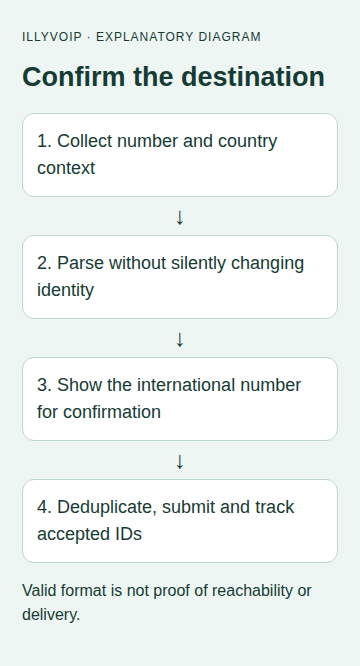
2. Parse, then show the proposed international number
The following helper uses libphonenumber-js/max. Install the maintained package in your application and pin the reviewed version in your lockfile. The function accepts an explicit two-letter country code for national input. It returns a proposed number for confirmation; it does not send anything.
import { parsePhoneNumberWithError } from 'libphonenumber-js/max';

// Application input policy; not a delivery or IllyVoIP eligibility check.
export function prepareRecipient(input, country) {
  if (typeof input !== 'string') throw new Error('Enter a phone number');
  const original = input.trim();
  if (!original || original.length > 64 || !/^[+0-9 ().-]+$/.test(original)) {
    throw new Error('Use a number without an extension or surrounding text');
  }
  let compact = original.replace(/[ ().-]/g, '');
  if (compact.startsWith('00')) compact = '+' + compact.slice(2);
  const international = compact.startsWith('+');
  if (!international && !country) throw new Error('Select the number’s country');
  if (international && !/^\+[1-9][0-9]{6,14}$/.test(compact)) {
    throw new Error('Check the international digits');
  }
  const number = parsePhoneNumberWithError(compact, {
    defaultCountry: international ? undefined : country,
    extract: false
  });
  if (number.ext || !/^\+[1-9][0-9]{6,14}$/.test(number.number)) {
    throw new Error('Use a full international SMS destination');
  }
  if (international && number.number !== compact) {
    throw new Error('Check the digits after the country code; do not silently repair them');
  }
  return {
    input: original,
    e164: number.number,
    display: number.formatInternational(),
    numberingWarning: !number.isPossible() || !number.isValid(),
    needsConfirmation: true
  };
}
The example deliberately recognizes 00 as an international prefix in its input policy. If your product uses a different convention, make that choice explicit rather than assuming every national dial-out prefix is universal. It rejects surrounding text instead of extracting a number from a sentence.
For already international input, a parser that silently removes an extra national trunk digit can turn a mistake into a different number. The equality check stops that repair for review. For national input, show the returned international number clearly and require confirmation before persisting it. Some countries retain a significant leading zero in the national number; do not remove all zeros with a generic string rule.
3. Separate formatting checks from service eligibility
The helper's numbering warning comes from library metadata. That metadata can lag real numbering changes, and it is not the IllyVoIP sending policy. The current ordinary-SMS path checks international syntax and identity without treating every strict metadata mismatch as proof that sending is forbidden. Verification-specific flows can have stricter rules.
Use a warning to request a careful check, not to claim that the person cannot receive SMS. If your application chooses to block a class of numbers, describe that as your application's policy. Never label the warning a delivery test.
Number Lookup is a separate service with its own permissions, price and returned information. Where appropriate, follow the Lookup guide and interpret the actual response; it does not replace consent or guarantee SMS reachability.
4. Deduplicate only after normalization
Once the user confirms the destination, store the canonical string and retain a suitable audit reference for the original input. Two visually different inputs can normalize to the same destination. Deduplicate by that normalized number within the intended submission, while keeping a mapping back to the original rows so errors remain understandable.
A duplicate number in a recipient list is different from a later legitimate notification to the same person. Do not deduplicate all future business events just because their recipient is the same.
5. Build the IllyVoIP request from confirmed values
Send the confirmed strings in the to array of POST /api/v1/sms/messages, alongside the permitted from and the intended message. Keep the API key on the backend. Save the exact request and its stable idempotency key before the first attempt.
On a response, inspect invalid_numbers, duplicates_removed, queued_count and queued_message_ids. Accepted IDs follow the accepted unique recipients, not every row in your original spreadsheet. Do not attach the first returned ID to the first input row without reconciling rejected and duplicate entries.
For an uncertain send, do not “fix” a number inside the saved request and reuse that operation as if nothing changed. Reconcile what was accepted first. A corrected recipient is a deliberate new business decision, with the endpoint's documented request-identity rules.
6. Test mistakes before testing delivery
- A local number with no country selected must stop for clarification.
- Spaces and ordinary punctuation should not alter the intended international identity.
- An accidental trunk prefix after the country code must not be silently discarded.
- A significant zero, an extension and a number exceeding the accepted length need separate test cases.
- Two differently formatted copies of one destination should be reported as a duplicate after confirmation.
- A metadata warning must not be displayed as “delivery failed.”
Use synthetic inputs for local tests. When you deliberately perform a live SMS test, use one authorized recipient, review cost and segment count, then correlate the accepted message ID with its delivery status. A successful parser test does not send or verify an SMS.
Related guides and references
- Send an SMS with the IllyVoIP API and track delivery
- Check phone numbers with the IllyVoIP Lookup API and optional HLR
- Send a CSV recipient list with Python and IllyVoIP
- Check a phone number with Number Lookup
Reviewed 9 October 2026 against current IllyVoIP source and the linked documentation. Use the settings available to your account and installed version. These instructions are not a claim of a completed physical-device or live-service test.