
You can notify an administrator by SMS when a Gravity Forms entry is ready for review. This example sends a short fixed message to a privately configured recipient; it does not let a visitor turn your form into an arbitrary SMS relay.
The integration uses a small custom WordPress plugin and the Gravity Forms server-side submission hook. It is not a built-in IllyVoIP add-on. You need administrator/developer access, a supported WordPress/PHP/Gravity Forms installation and IllyVoIP SMS/API access.
1. Choose the exact notification rule
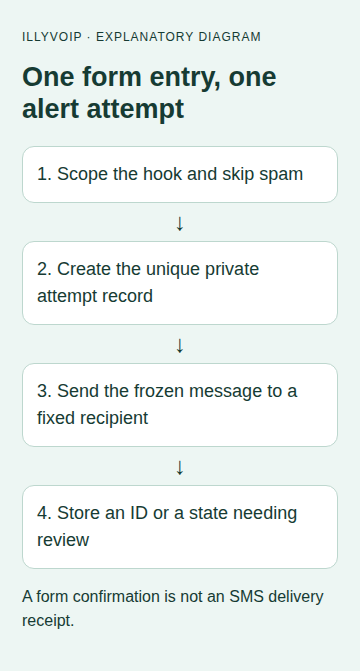
Decide which form triggers the alert, who receives it and when an alert is justified. The example uses form ID 5 and sends one administrator alert per accepted entry. Replace that form ID consistently in the hook, option key and operation prefix if your form differs.
Keep the form's normal anti-abuse controls in place. A legitimate-looking public submission can still incur notification costs. Review expected volume and the administrator's agreement to receive alerts before enabling it.
If you want to message the visitor instead, that is a different workflow: validate the recipient field, collect the appropriate request/consent, restrict content and add abuse controls. Do not simply swap a posted phone field into this example.
2. Configure the sender and credentials privately
Manage the IllyVoIP API key through Account settings → Developer tools. In WordPress's protected server configuration, supply the constants ILLYVOIP_SMS_API_KEY, ILLYVOIP_SMS_FROM and ILLYVOIP_SMS_ADMIN_TO. The sender must be permitted for the account, and the recipient must be confirmed in international form.
Use your normal secret-management mechanism to define these values. Do not put them in theme JavaScript, a public repository or a plugin settings screenshot. The sample pins the Production API; it can send a billable message once enabled on a real submission.
3. Install the narrowly scoped plugin
Create a small plugin file under your site's custom plugin directory and review it in staging before activation. The hook runs after the entry exists. Gravity Forms documents that it also runs for spam entries, so the explicit status check is necessary.
<?php
/** Plugin Name: IllyVoIP reviewed Gravity Forms example */
// Configure ILLYVOIP_SMS_API_KEY, ILLYVOIP_SMS_FROM and
// ILLYVOIP_SMS_ADMIN_TO privately before enabling this plugin.
add_action('gform_after_submission_5', 'iv_gf_notify_admin', 10, 2);
function iv_gf_notify_admin(array $entry, array $form): void
{
    if (rgar($entry, 'status') === 'spam') return;
    $entryId = (int) rgar($entry, 'id');
    if ($entryId < 1) return;
    foreach (['ILLYVOIP_SMS_API_KEY', 'ILLYVOIP_SMS_FROM', 'ILLYVOIP_SMS_ADMIN_TO'] as $name) {
        if (!defined($name) || !is_string(constant($name)) || constant($name) === '') return;
    }
    $to = ILLYVOIP_SMS_ADMIN_TO;
    if (!preg_match('/\A\+[1-9][0-9]{6,14}\z/D', $to)) return;
    $option = 'iv_gf_sms_5_' . $entryId;
    $payload = ['from' => ILLYVOIP_SMS_FROM, 'to' => [$to],
        'message' => 'A new contact form submission is ready for review.'];
    $json = wp_json_encode($payload);
    if (!is_string($json)) return;
    $record = ['state' => 'attempting', 'created_at' => gmdate('c'),
        'request_key' => 'gf5-' . $entryId . '-' . wp_generate_uuid4(), 'json' => $json];
    // Atomic unique option creation: only one hook invocation owns this attempt.
    if (!add_option($option, $record, '', false)) return;
    $response = wp_remote_post('https://api.illyvoip.com/api/v1/sms/messages', [
        'timeout' => 15, 'redirection' => 0,
        'headers' => ['Content-Type' => 'application/json', 'Accept' => 'application/json',
            'X-Api-Key' => ILLYVOIP_SMS_API_KEY, 'Idempotency-Key' => $record['request_key']],
        'body' => $json, 'data_format' => 'body',
    ]);
    if (is_wp_error($response)) {
        $record['state'] = 'uncertain';
    } else {
        $http = (int) wp_remote_retrieve_response_code($response);
        $body = json_decode(wp_remote_retrieve_body($response), true);
        $record['http'] = $http;
        $record['state'] = 'review';
        if ($http >= 200 && $http < 300 && is_array($body)
            && ($body['status'] ?? '') === 'success'
            && is_array($body['queued_message_ids'] ?? null)
            && count($body['queued_message_ids']) === 1) {
            $record['state'] = 'submitted';
            $record['message_ids'] = $body['queued_message_ids'];
        }
    }
    $record['updated_at'] = gmdate('c');
    update_option($option, $record, false);
}
The example stores a non-autoloaded option keyed by form/entry. WordPress's unique option name allows only one invocation to create that attempt record. It does not store the API key in that record. The saved JSON and request key preserve what the one attempt intended to send.
This is a bounded low-volume example with an HTTP wait of up to 15 seconds. For a busy public form, keep the same admission/identity logic but move sending into your established durable queue and let the form return promptly. Do not treat a best-effort scheduled callback as a durable outbox without recovery handling.
4. Understand the saved states
| State | Meaning |
|---|---|
| attempting | The record was created before the HTTP request; a process interruption can leave it here. |
| submitted | The response supplied one accepted message ID. Delivery is still separate. |
| review | A response was received but did not meet the acceptance checks. |
| uncertain | The local HTTP attempt failed without proving whether the service accepted it. |
Repeated hook invocations do not automatically retry an existing record. This favors avoiding duplicate notifications over pretending every alert was delivered. Monitor the private records through your administrative tooling and reconcile exceptions promptly.
If a worker or site request dies after sending but before saving the response, the record can remain attempting. Do not delete it and submit the form again as a recovery method. Review the saved request identity and the SMS API's retry/reconciliation rules first.
5. Verify the entry-to-message relationship
With a mocked WordPress HTTP transport, submit a synthetic entry and check that only form 5 reaches the hook. Confirm the fixed sender/recipient, generic message and stable saved request identity. Invoke the hook twice for the same entry and confirm there is still only one network attempt.
Test a spam entry, missing configuration, a rejected API response, a transport error and a malformed success body. The form's confirmation page is not an SMS receipt; the site must still accept and store entries even when an alert needs review.
For an authorized live test, use one controlled submission and inspect the saved message ID. Follow that ID through SMS status or verified delivery webhooks. Normal message charges and segmentation rules apply.
6. Maintain the integration
Keep notification records private and retain them only as long as needed for reconciliation and your data policy. Archive old completed records through a deliberate maintenance process; deleting an active record can remove duplicate protection. Keep entry IDs and their installation context intact if migrating a site.
After form changes, recheck the form ID and notification rule. If an entry is later marked as spam, that change cannot unsend a message already accepted. A visitor's edit or another hook should not create an additional alert unless your business rule explicitly calls for one.
Common questions
Does Gravity Forms need an IllyVoIP add-on? This implementation uses the documented PHP hook and REST API, not a native connector.
Can the SMS include all submitted fields? Keep it short and minimize personal data. The fixed message lets the administrator open the protected entry rather than receiving sensitive form content by SMS.
Related guides and references
Reviewed 9 October 2026 against current IllyVoIP source and the linked documentation. Use the settings available to your account and installed version. These instructions are not a claim of a completed physical-device or live-service test.