
Define the agent’s role and voice
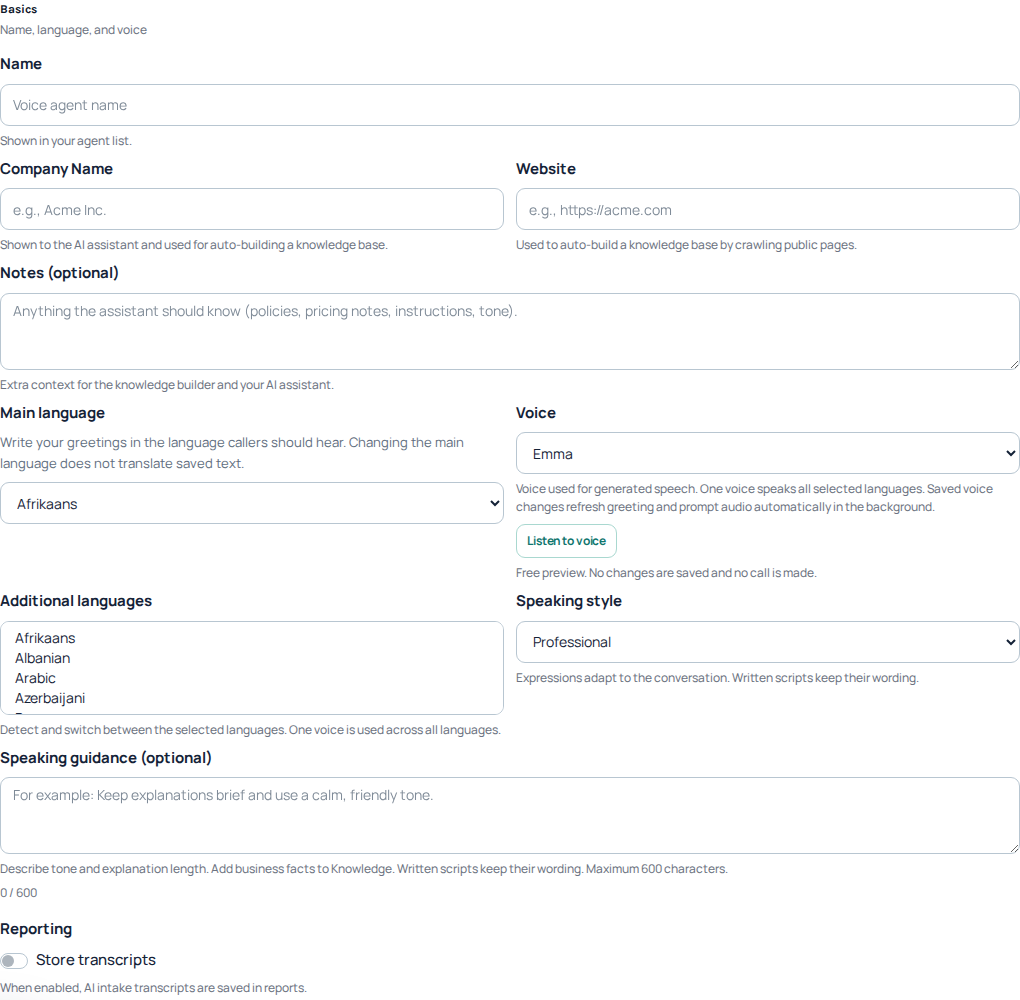
Open AI Voice Agent Studio. Select the agent you want to prepare or use New Agent to begin. In Basics, review its name, company, website and notes.
Choose the main language, additional languages, voice and speaking style. Speaking guidance controls tone and explanation length; business facts belong in Knowledge.
Review saved wording when changing language
Changing the main language does not translate saved text. Check greetings and prompts in the language callers should hear. One selected voice is used across the selected languages.
Prepare accurate business knowledge
Open AI Assistant to review the Knowledge Base. Use information entries for business facts and question-and-answer entries for recurring questions. The interface also provides a CSV template, import/export and search.
Keep entries concise, current and consistent. Check enabled states and remove outdated or test-only information from the content intended for live callers. Review any website-derived material rather than assuming it is ready to publish.
The portal says to apply knowledge changes with Update or Publish. Check the resulting state after completing your intended changes.
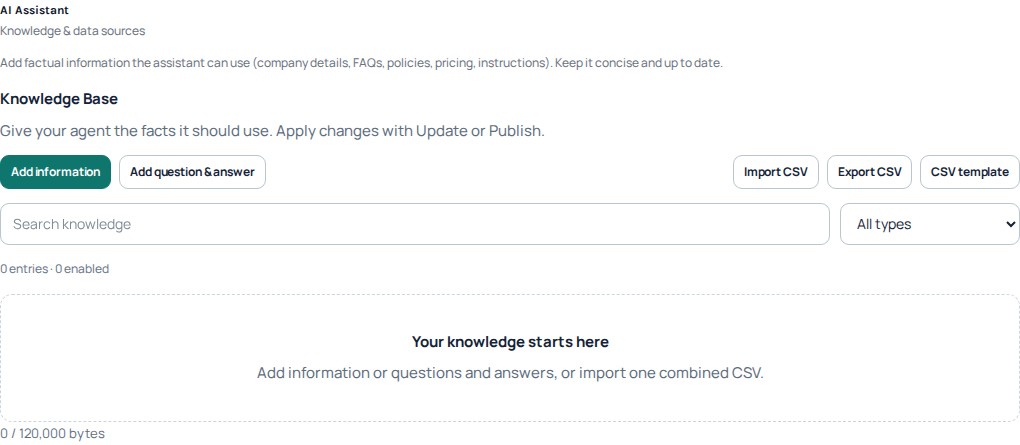
The Knowledge Base offers information and question-and-answer entries, search and CSV tools. This new agent has no knowledge entries yet; the empty state is not evidence of a published assistant. Open the image for a larger view.
Plan the call path and handoff
Use Call Flow to define how a caller moves through the experience. Plan the greeting, assistant or menu step, and the destination used when a person needs help from your team.
Check every configured transfer destination and any external integration before sending customer calls through it. A webhook step needs a working receiving application; adding the step alone does not create that integration.
Review hours and reporting
In Basics, review Business Hours and the after-hours flow. Check what callers will hear when the business is closed as well as during working hours.
Store transcripts controls whether AI intake transcripts are saved in reports. Choose deliberately and review the information your team needs to retain; do not treat this setting as a promise of a complete recording of every call.
Review before attaching live calls
- Check current business facts and the enabled knowledge entries.
- Review greeting wording, languages and voice.
- Check menu choices, transfers and the after-hours path.
- Review reporting choices and any external integration.
- Check the agent’s published state before assigning an inbound number.
The Phone Numbers area states that publishing is required before attaching incoming numbers. Plan the change with your team, then test the incoming route and handoff before relying on it for customer calls.
Worked example: a business receptionist
Start with a narrow job: answer questions about opening hours and services, then transfer callers who need a person. Prepare a reachable SIP line or queue before building the handoff.
- In Basics, name the agent, select the language and voice, and write a short greeting such as: Welcome to our team. How can I help?
- In AI Assistant, add Knowledge Base entries for actual opening hours, services and contact details. Add a question-and-answer entry for a frequent question. Avoid invented prices or promises; tell the assistant what to do when an answer is unknown.
- In Call Flow, connect the greeting to the assistant or menu. Add the supported transfer step to the prepared team destination and review what happens when there is no input or the caller cannot be transferred.
- Set Business Hours and review the after-hours path. Do not send closed-hours callers to an unattended destination without a useful fallback.
- Review each branch and its destination, then save and apply the agent with Update or Publish as offered. Resolve validation errors and confirm the published state before attaching the incoming number. An authorized real-call check is still needed to confirm ringing and two-way audio.
- In Phone Numbers, configure an active number to use the published agent or IVR. Review the selected number and save.
Acceptance checklist before customer calls
- Call the number with permission; check the greeting, language and two common questions.
- Ask a question outside the knowledge base and confirm that the agent does not invent an answer.
- Request a person and check that the correct team destination rings and audio works after transfer.
- Check the after-hours and no-input branches, and inspect the report afterward.
- After changing knowledge or the flow, apply the update and repeat the affected checks. A saved draft is not proof that callers hear the change.
Real calls and enabled analysis can incur charges. Review current pricing and reporting choices. Collect a public call reference for unexpected behavior; remove secrets and unnecessary personal data from knowledge entries.
Go deeper without duplicating your setup
Review each branch and its configured destination before applying the change. An authorized real-call check is needed to confirm ringing and two-way audio.
Prepare the receptionist for questions it cannot answer
An AI receptionist needs an honest fallback as well as a good greeting. In the agent's speaking guidance and knowledge, distinguish approved business facts from instructions about tone. Do not ask it to invent a price, availability or appointment confirmation when the necessary information is absent.
For example: “If the answer is not in the approved information, explain that you need a colleague to help. Do not confirm a booking or a payment.” Adapt that instruction to your business and configure the corresponding handoff in Call Flow. Wording that promises a transfer is not a substitute for a working transfer destination.
Check the human handoff before attaching a live number
- Identify the team or destination responsible for the handoff and confirm that it is reachable during the intended hours.
- Review the Call Flow path from the greeting to the assistant and then to the human destination.
- Review what happens when the team is closed or the destination does not answer. Make the fallback consistent with your actual service.
- Save and apply the intended agent changes with the offered Update or Publish action, then verify the resulting state.
- During an authorized test, ask a normal question, an unanswered question and a direct request for a person. Check the actual path and outcome for each.
- Inspect the resulting conversation and report. Correct missing knowledge or flow behavior before directing ordinary customer traffic to it.
A useful acceptance check is concrete: the greeting identifies your business, an approved question gets the correct answer, an unknown question is not invented, and a request for a person follows the intended handoff. Also check an after-hours scenario separately; weekday success does not prove the closed-hours path.
Use the dedicated knowledge, call-flow and business-hours guides already linked in this article for their detailed controls. A website field is not a promise of continuous automatic knowledge synchronization. Native calendar booking, cloned voices or other unconfigured integrations should not be promised merely because the assistant can discuss them.
Follow publishing progress and audio preparation
- Confirm the selected Voice Agent and review the changes you intend to apply.
- Use Update or Publish as offered. Resolve validation errors before submitting again.
- Watch the status and publishing progress. Queued or running work is not the same as a finished update.
- Read any publish error shown. Keep its wording rather than repeatedly pressing Publish.
- Return to the same agent and check its resulting state and saved changes before assigning new incoming traffic.
Greeting and prompt audio can continue preparing in the background. The Portal’s progress notice explains that you can close it and return later. Closing that notice is not a request to cancel the work. Likewise, changing a voice can refresh saved greeting and prompt audio without translating the words you already wrote.
Check language, wording and audio together
After changing the main language or voice, inspect the actual greeting and prompt text. One selected voice is used across the selected languages; selecting another language does not automatically rewrite the stored greeting. Wait for relevant preparation to finish before judging the resulting audio.
If publishing fails, check the visible reason, missing flow destinations and invalid fields. Keep unsaved work in view while resolving the issue. A selected agent, a saved editor value and a published agent are different checkpoints. Do not attach a number merely because the agent’s name appears in the list.
Verify the customer path after the update
At an appropriate time, make an authorized call to the configured incoming number and check the greeting, an ordinary answer, an unknown question and the human handoff. Verify after-hours behavior separately. Real calls can incur charges; publishing success alone is not evidence that an external destination answers or an integration completes its task.
For a persistent preparation or publish problem, send Support the agent reference, time, visible status and error. Do not include private knowledge entries or integration credentials unless a secure, specific request requires them.
Reviewed 10 October 2026 against the current IllyVoIP Portal and implementation. Available controls depend on account permissions and service state.
Preview a voice before applying it
Use the voice sample when choosing how the assistant should sound. It lets you compare the selected catalog voice without changing the agent callers currently hear. The sample is not a test call, a translation of your greeting or confirmation that your entire flow works.
- Open the intended Voice Agent in Studio and select Basics. Check the agent name before editing. You need permission to manage Voice Agents; view-only access does not enable preview or editing controls.
- Choose Main language, then select an offered Voice. Use the current list rather than a voice identifier from an old screenshot.
- Select Listen to voice once. Wait for the loading message. When the audio player appears, listen for pace, pronunciation and clarity through the output device you intend to use.
- Use Cancel to stop the current sample. Selecting a different voice or main language also cancels the previous preview. Start the next sample only after choosing the new combination.
- Review your own greeting and prompts separately. If the choice is suitable, finish the intended edit through Update or Publish as offered. Wait for completion and reopen the agent to verify the saved selection.

If playback is ready but silent, check the audio player, browser sound permission and output device. If the preview reports a rate limit, wait for the displayed retry interval; repeated clicks do not improve the result. A generation failure does not prove the voice was applied. Keep the selection visible and retry only after resolving the message.
Cancel stops this preview; it does not reverse a previously completed agent update. Conversely, listening to a sample does not apply your pending edits. After changing the live voice, check the prepared greeting and a permitted real conversation independently, including the human handoff.
Reviewed 12 October 2026 against the current IllyVoIP controls, implementation and applicable references. Available options depend on account permissions and service state.