
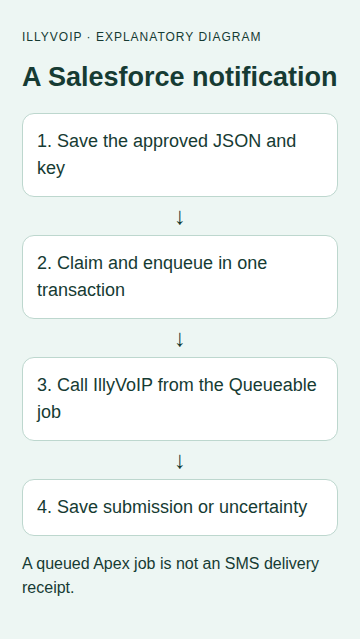
This guide builds a small Salesforce integration that sends one approved SMS notification through IllyVoIP. Salesforce stores a frozen request, claims it in one transaction and performs the HTTP callout in a Queueable job. Your API key stays in Salesforce credential configuration.
The example is intended for a Salesforce developer and a trusted integration administrator. It is custom Apex, not an installed IllyVoIP AppExchange package. Develop it in a sandbox and run your org’s tests before deployment.
Before you start
You need an IllyVoIP account with SMS sending available, sufficient balance, an API key and a sender permitted for the destination. Sign in to the Portal and open account settings, then the API tab. Keep the key in the integration’s server-side secret store. A SIP password is not an API key. Confirm the recipient has agreed to this notification and use a number you control for initial acceptance testing.
This is a custom integration with the IllyVoIP SMS API. The external application does not acquire a native IllyVoIP connector by following these steps. A successful submission returns message references; delivery remains a separate outcome.
1. Create the notification object
Create a custom object with API name SMS_Notification__c. Use an auto-number record name. Add these fields with the exact API names.
| Field | Type and use |
|---|---|
| Request_Key__c | Text(128), unique. Store one stable business-event key using letters, digits, colon, period, underscore or hyphen; 8–128 characters. |
| Payload__c | Long Text Area. The approved JSON containing from, one to recipient and message. |
| Status__c | Text(20). Use READY, CLAIMED, SUBMITTED, REVIEW or UNCERTAIN. |
| Message_Id__c | Text(255). Returned IllyVoIP message reference. |
| Http_Status__c | Number(3,0). HTTP status when available. |
Restrict editing and class execution to your integration administrator or controlled automation identity. Freeze the request key and payload after READY is claimed. A unique key prevents creation of two records for the same event; choose a business ID that does not change when a user presses a button again. This class is not a public endpoint and does not provide a general end-user permission layer.
2. Configure credentials without putting a key in Apex
- In Salesforce Setup, create an External Credential using Custom authentication and a Named Principal.
- Add an authentication parameter for the IllyVoIP API key. Store its secret value in the principal configuration.
- Add a custom header named
X-Api-Key. Use Salesforce’s credential formula field selector to reference that authentication parameter, following the linked API-key header instructions. The formula must reference your actual external credential and parameter names. - Create a Named Credential with developer name
IllyVoIP_API, URLhttps://api.illyvoip.comand that External Credential. Do not substitute an OAuth Bearer header for X-Api-Key. - Grant the running integration user access to the external credential principal through a permission set. Check the Named Credential allows the callout and that any generated Authorization header is unnecessary for this Custom API-key configuration.
A missing principal permission and an invalid IllyVoIP key are different problems. Verify the Salesforce credential configuration before changing the key. Do not paste secret values into Apex, debug logs or notification records.
3. Add the asynchronous sender
Create this Apex class. The start method locks the record, moves READY to CLAIMED and enqueues the job in the same transaction. The private constructor keeps callers on that claim path. The later Queueable transaction performs its callout before its result update.
public with sharing class IllySmsJob implements Queueable, Database.AllowsCallouts {
    private Id notificationId;
    private IllySmsJob(Id recordId) { notificationId = recordId; }

    // Restrict execution to the trusted integration administrator/automation.
    public static Id start(Id recordId) {
        SMS_Notification__c row = [SELECT Id, Status__c, Request_Key__c,
            Payload__c FROM SMS_Notification__c WHERE Id = :recordId FOR UPDATE];
        if (row.Status__c != 'READY')
            throw new IllegalArgumentException('Notification is not ready');
        if (String.isBlank(row.Request_Key__c) ||
            !Pattern.matches('[A-Za-z0-9:._-]{8,128}', row.Request_Key__c))
            throw new IllegalArgumentException('Invalid saved request key');
        Map<String,Object> payload = (Map<String,Object>)JSON.deserializeUntyped(row.Payload__c);
        List<Object> recipients = (List<Object>)payload.get('to');
        if (recipients == null || recipients.size() != 1 ||
            String.isBlank((String)payload.get('from')) ||
            String.isBlank((String)payload.get('message')))
            throw new IllegalArgumentException('Review the saved payload');
        row.Status__c = 'CLAIMED';
        update row;
        return System.enqueueJob(new IllySmsJob(recordId));
    }

    public void execute(QueueableContext context) {
        SMS_Notification__c row = [SELECT Id, Status__c, Request_Key__c,
            Payload__c FROM SMS_Notification__c WHERE Id = :notificationId];
        if (row.Status__c != 'CLAIMED') return;
        String outcome = 'UNCERTAIN';
        String messageId;
        Integer httpStatus;
        try {
            HttpRequest request = new HttpRequest();
            request.setEndpoint('callout:IllyVoIP_API/api/v1/sms/messages');
            request.setMethod('POST');
            request.setHeader('Content-Type', 'application/json');
            request.setHeader('Idempotency-Key', row.Request_Key__c);
            request.setBody(row.Payload__c);
            request.setTimeout(15000);
            HttpResponse response = new Http().send(request);
            httpStatus = response.getStatusCode();
            outcome = 'REVIEW';
            Map<String,Object> body = (Map<String,Object>)JSON.deserializeUntyped(response.getBody());
            List<Object> ids = (List<Object>)body.get('queued_message_ids');
            if (httpStatus >= 200 && httpStatus < 300 && body.get('status') == 'success' &&
                String.valueOf(body.get('queued_count')) == '1' &&
                ids != null && ids.size() == 1 && ids[0] instanceof String) {
                outcome = 'SUBMITTED';
                messageId = (String)ids[0];
            }
        } catch (Exception error) {
            // Do not log credentials, payloads or trigger another Queueable job.
            outcome = 'UNCERTAIN';
        }
        row.Status__c = outcome;
        row.Message_Id__c = messageId;
        row.Http_Status__c = httpStatus;
        update row;
    }
}
The with sharing declaration applies record sharing; it does not replace your object, field and class permission design. Keep this example restricted to trusted integration administration. If you expose it to ordinary users through Flow, a controller or an API, add the corresponding authorization, CRUD/FLS and input-validation layer before doing so.
4. Create an approved record and dispatch it
Use a notification for an event your business has already approved. In sandbox code, construct JSON with Salesforce’s serializer rather than concatenating recipient or message strings. Supply your own approved values; this example intentionally has no callable destination.
// Run only after replacing these values and approving the paid test.
Map<String,Object> payload = new Map<String,Object>{
    'from' => 'YOUR_PERMITTED_SENDER',
    'to' => new List<String>{'YOUR_APPROVED_INTERNATIONAL_NUMBER'},
    'message' => 'Your approved notification text'
};
SMS_Notification__c notice = new SMS_Notification__c(
    Request_Key__c = 'appointment:YOUR_STABLE_EVENT_ID',
    Payload__c = JSON.serialize(payload), Status__c = 'READY');
insert notice;
Id asyncJobId = IllySmsJob.start(notice.Id);
// Save asyncJobId in your restricted operational record for monitoring.
Approve the exact sender, recipient and text before dispatch. A queue acceptance is not yet an HTTP acceptance. Use Salesforce’s Apex Jobs view and the notification record together: a failed job can leave CLAIMED even if the remote API accepted the SMS before a later Salesforce update failed.
5. Test the transaction boundaries in your org
- Create a test class using
HttpCalloutMock. Assert POST, the Named Credential endpoint, the stable Idempotency-Key header and the frozen JSON body. - Return HTTP 200 with status success, queued_count 1 and one nonempty queued_message_ids value. Run Test.startTest, start the notification, then Test.stopTest; verify SUBMITTED and the saved message ID.
- Repeat with HTTP 403, malformed JSON and a thrown CalloutException. Confirm REVIEW or UNCERTAIN, without another Queueable send.
- Call start again for a claimed or submitted record and confirm it is rejected. Attempt a duplicate Request_Key__c record and confirm Salesforce’s uniqueness constraint rejects it.
- Test the running user’s actual credential access in sandbox, then approve one live SMS to an internal recipient and check delivery separately.
The sample requires compilation and tests against the custom fields in your Salesforce org. Local source review cannot establish your org’s permissions, Named Credential setup or deployed Apex behavior.
Read the result and recover carefully
| State | What to do |
|---|---|
| SUBMITTED | Keep the returned message ID and check its delivery outcome through the Portal or documented SMS status workflow. Do not send again because a recipient has not yet replied. |
| REVIEW | The HTTP response did not meet the expected acceptance contract. Check authentication, sender permission, balance, recipient format and the response category before deciding on a next action. |
| ATTEMPTING, CLAIMED or UNCERTAIN | The process may have stopped after a paid request reached the service. Reconcile using the saved request identity, timing and available SMS records. Do not clear the record or generate another key to force a retry. |
The API’s idempotency key supports request identity, but your durable record is still necessary. Do not assume an unlimited retention period or that a changed message belongs to the same request. Keep the frozen payload and its key together. If a genuinely new notification is approved, give that business event its own identity.
Keep operational logs free of keys and complete message bodies. Store recipient data only where authorized, limit access and retain the records needed to investigate duplicate or uncertain sends. Removing a dispatch record while its source event can run again removes your local duplicate protection.
Related guides and official references
- developer.salesforce.com — reference
- trailhead.salesforce.com — reference
- trailhead.salesforce.com — reference
- help.salesforce.com — reference
Reviewed 9 October 2026 against current IllyVoIP implementation and the linked sources. Use your account’s available options and installed software version. Local example checks do not establish a completed live call, delivered SMS or certified third-party integration.