
When a Django application sends a notification about a saved change, the message should not go out for a transaction that later rolls back. Save the intended SMS alongside the business change, then let a worker submit it and retain the result.
This guide uses Django 5.2 LTS transaction concepts and a custom backend integration with IllyVoIP. You need a supported HTTP client, a durable database, an explicit worker/scheduler choice and SMS/API access. Django’s email backend is not an SMS integration.
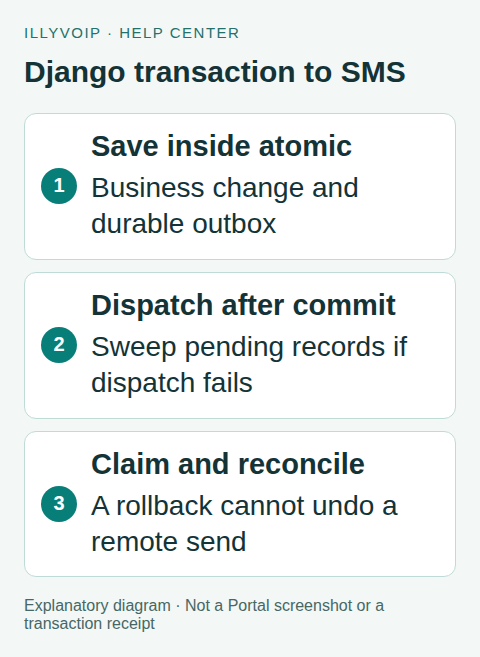
1. Define a notification model
Create an outbox table with a unique business reference, sender, recipient, message text, stable request key, state and timestamps. Store accepted message IDs and safe error details separately. Decide what identifies one occurrence: for example, an appointment reference plus its specific reminder time and recipient.
Use a database uniqueness constraint, not just an application search before insert. Freeze the payload so a later retry does not unexpectedly use changed contact information or message text. Keep only the personal data needed for the intended notification and protect backups and admin access.
2. Write the business change and outbox together
The following sketch shows the transaction boundary. SmsOutbox, queue_notification and the business update are application components you implement, not built-in IllyVoIP or Django functions:
from functools import partial
from django.db import transaction

with transaction.atomic():
    # Save the approved business change here.
    notification, created = SmsOutbox.objects.get_or_create(
        business_ref=event_reference,
        defaults={
            "sender": approved_sender,
            "recipient": international_recipient,
            "message": final_message,
            "request_key": stable_request_key,
            "state": "pending",
        },
    )
    if created:
        transaction.on_commit(partial(queue_notification, notification.pk))
If the transaction rolls back, its new outbox row is not committed and the callback does not run. If the process fails after commit but before queue dispatch, the committed row still exists. Have a periodic sweep enqueue pending rows so that dispatch failure does not silently lose the notification.
on_commit is a callback mechanism, not a durable queue. Avoid making the paid HTTP call directly in the callback and assuming the database can undo it. The remote SMS operation is outside the database transaction.
3. Claim a record in the worker
Atomically claim a pending record using your database’s supported locking or conditional-update strategy. Submitted records should not send again. An uncertain record needs reconciliation, not a new notification. Use a documented lease/recovery policy for interrupted workers.
Do not hold the database lock throughout a long HTTP request. Persist the attempt state, make the bounded request, then update the same record. Design the crash points deliberately: the response could arrive just before the worker dies and saves nothing.
4. Submit the frozen request
Keep the API key in backend configuration. This example uses Requests and performs one attempt from an already claimed record. Install and pin that dependency through your normal application dependency management:
import requests
from django.conf import settings

response = requests.post(
    settings.ILLYVOIP_API_BASE.rstrip("/") + "/api/v1/sms/messages",
    headers={
        "X-Api-Key": settings.ILLYVOIP_API_KEY,
        "Idempotency-Key": notification.request_key,
        "Accept": "application/json",
    },
    json={
        "from": notification.sender,
        "to": [notification.recipient],
        "message": notification.message,
    },
    timeout=(5, 20),
)
http_status = response.status_code
result = response.json()
Import settings from django.conf in the containing module. Configure Production as https://api.illyvoip.com; Sandbox has a separate paired URL/key. The connect/read timeout tuple is a client choice, not a total delivery deadline. Handle transport errors and malformed/non-JSON responses around this fragment.
5. Record acceptance, failure or uncertainty
Inspect the HTTP status and API result together. A successful submission returns accepted queued_message_ids; preserve them and inspect any rejected recipient information. For this single-recipient workflow, do not mark submission complete without its accepted reference.
Use the same 8–128-character supported Idempotency-Key with the unchanged body when the endpoint’s retry rules permit a retry. A connection failure or timeout after submission may leave the outcome unknown. Keep the original record/key and investigate rather than changing the key to force another request.
Correct validation or permission errors before resubmission. Respect a documented rate-limit delay. Later delivery updates belong to the accepted message ID; an outbox state of submitted does not mean delivered.
6. Test the transaction and worker behavior
Mock the HTTP client and use synthetic contract responses. Test a rollback, successful commit, failed queue dispatch recovered by the sweep, duplicate job, worker crash, timeout and later reconciliation. Test non-ASCII text and JSON escaping without sending messages.
Django’s TestCase.captureOnCommitCallbacks() can help inspect commit callbacks. Choose transaction-aware tests when checking actual commit behavior; do not assume a callback ran merely because a test created a row inside a test transaction.
A real acceptance test is a separate deliberate action using an eligible sender and authorized recipient. Review segmentation and charges before doing it. Never point an automated test suite at the Production send endpoint.
Frequently asked questions
Can a database rollback cancel an SMS? No. Once a remote operation has happened, rolling back local data cannot reverse it.
Does a unique business reference guarantee delivery? No. It controls intended work; submission and delivery still have their own outcomes.
Related guides and references
- Send a CSV recipient list with Python and IllyVoIP
- Send an SMS with the IllyVoIP API and track delivery
- Build appointment SMS reminders with IllyVoIP
- Official reference: docs.djangoproject.com
- Official reference: api.illyvoip.com
- Official reference: requests.readthedocs.io
Reviewed 9 October 2026 using current IllyVoIP implementation and official references. Check your installed version and account options before applying settings. Examples do not certify a physical device or completed live integration.