
Use Node-RED’s HTTP Request node to submit an approved SMS to IllyVoIP. Keep the business notification in durable storage before it enters the sending flow, and preserve its identity when an execution is retried or restarted.
This guide uses the standard Function and HTTP Request nodes in a supported Node-RED installation. It assumes a developer can provide a durable notification store and control access to the editor. It does not require or claim a native IllyVoIP node.
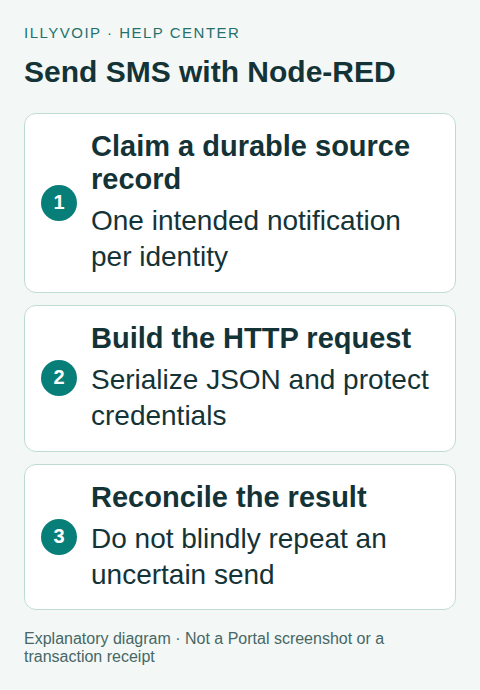
1. Design the stored notification
Create one record containing your business-event ID, approved sender, one international recipient, final message text and request key. Atomically claim the record for dispatch before passing it into the flow. Persist its exact payload and state outside the execution’s temporary msg object.
Default memory context is lost on restart. File-backed context also needs its persistence and concurrency behavior understood; choosing it does not automatically produce a transactional queue. Use a database/service that enforces unique business notifications if more than one worker or flow can dispatch.
Keep the source event separate from the delivery outcome. A repeated sensor update or webhook must not automatically create another SMS for the same incident.
2. Keep the API key out of exported flows
Provide ILLYVOIP_API_KEY through the runtime’s approved environment/secret mechanism. Restrict editor access and deployment permissions. Do not put the key in an Inject node, exported Function source or a shared Debug screenshot.
Use a separate runtime configuration for Sandbox, including its own key and base URL. A Production HTTP Request sends a real billable message. Keep the initial trigger manual until the safe fixture tests pass.
3. Build the request in a Function node
Pass the already claimed record as msg.notification. The following Function-node body validates its shape and serializes the request. It is not the durable claim operation itself:
const record = msg.notification; // Already claimed in your durable store.
if (!record || typeof record.request_key !== 'string' ||
    !/^[A-Za-z0-9:._-]{8,128}$/.test(record.request_key) ||
    !Array.isArray(record.to) || record.to.length !== 1 ||
    typeof record.to[0] !== 'string' ||
    typeof record.from !== 'string' || !record.from ||
    typeof record.message !== 'string' || !record.message) {
    node.error('Invalid claimed notification', msg);
    return null;
}
const apiKey = env.get('ILLYVOIP_API_KEY');
if (!apiKey) {
    node.error('SMS integration credential unavailable', msg);
    return null;
}
msg.headers = {
    'Content-Type': 'application/json',
    'X-Api-Key': apiKey,
    'Idempotency-Key': record.request_key
};
msg.payload = JSON.stringify({
    from: record.from, to: record.to, message: record.message
});
return msg;
The saved record’s to value is an array even with one recipient. JSON serialization preserves quotations, backslashes and line breaks correctly. Recipient validity, sender eligibility, balance and availability still require the API’s actual result and your normal pre-send review.
4. Configure HTTP Request
- Connect the Function node to HTTP Request.
- Set the method to POST.
- Set the fixed URL below.
- Choose the return mode that parses a JSON object.
- Keep TLS verification enabled and configure an appropriate bounded timeout.
https://api.illyvoip.com/api/v1/sms/messagesThe node uses the constructed headers and payload. Do not allow an untrusted input message to choose a different destination URL while carrying the API key. Avoid connecting the complete outgoing message to a Debug node; it contains the credential and recipient data.
5. Classify the result
Check msg.statusCode and the parsed body. For the single-recipient example, require API success and the expected accepted reference in queued_message_ids. Retain that reference and mark the durable record submitted. Review invalid-recipient results explicitly.
A non-success HTTP result needs classification. A validation rejection is different from a connection error after submission. Use Catch/status handling for runtime and network failures, but do not wire every error back to the sending node in a loop.
Before logging diagnostic output, remove the request credential and restrict the logged fields to your business ID, HTTP classification and safe message reference. A Catch node can receive the original message, so it needs the same privacy discipline.
6. Reconcile uncertainty and follow delivery
When the response is lost, preserve the original key and payload and mark the record uncertain. A new random key can create a second message. Apply the documented SMS replay behavior only to an unchanged operation and within its supported window; delayed recovery needs your durable ledger and message/status investigation.
Track delivery with the documented status endpoint or a separately verified webhook receiver. An HTTP Request node returning success establishes acceptance, not that the recipient read the SMS. Keep downstream actions idempotent too.
7. Test before deploying automatic triggers
Use a mock endpoint or local test harness for valid acceptance, malformed JSON, HTTP rejection, timeout, duplicate trigger and process restart. Confirm that a claimed notification does not become “ready” automatically after an uncertain send. Test text containing quotes and newlines and verify no Debug output exposes the key.
When you choose an authorized live test, review destination, sender, segments and cost first. Send to one number you control, retain the accepted ID and inspect delivery separately. Enable the real trigger gradually and monitor unexpected volume.
Frequently asked questions
Can an Inject node send the same sample repeatedly?
It can trigger executions, so design the durable identity to distinguish a new intended message from replaying an old one.
Does redeploying the flow cancel an accepted SMS?
Do not assume so. Reconcile accepted work using its message record.
Related guides and references
- Send SMS from n8n with the IllyVoIP API
- Send a CSV recipient list with Python and IllyVoIP
- Official reference: cookbook.nodered.org
- Official reference: api.illyvoip.com
Reviewed 8 October 2026 using current IllyVoIP implementation and official references. Check your installed version and account options before applying settings. Examples do not certify a physical device or completed live integration.