
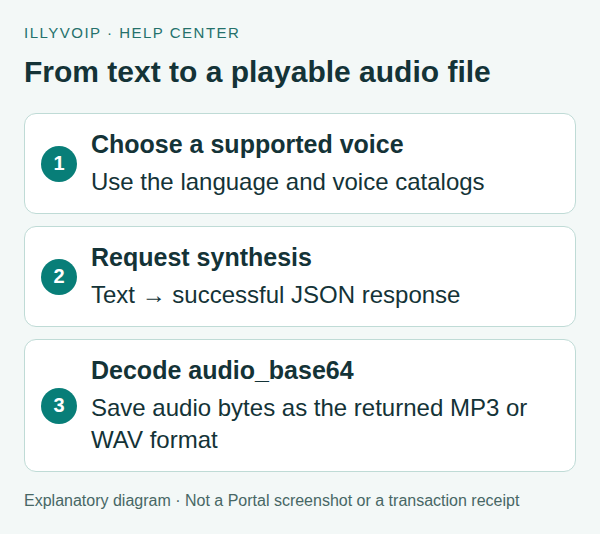
The IllyVoIP Text-to-Speech API turns text into an audio file. Read the supported language and voice catalogs, send a synthesis request, then decode audio_base64 from the successful response. Saving the JSON response with an .mp3 extension does not create a playable MP3.
This guide covers standalone audio generation. Playing speech into an active Voice API call uses a different operation and call-control session.
1. Prepare a private server-side environment
The examples use a terminal with cURL and a server-side API key supplied through the ILLYVOIP_API_KEY environment variable. Keep the key out of browser code, screenshots and source control. Follow the API quickstart to reveal your key using the Portal’s verification prompts. Examples are templates, not records of a completed transaction; replace placeholders deliberately before running them.
You also need jq to build JSON and Python 3 for the decoding example. Confirm account access and balance before synthesis. Submitted text is billed per character under the current speech pricing; listing a voice does not make synthesis free.
2. Read the language and voice catalogs
Use the standalone speech_api context. First request languages:
curl --silent --show-error --fail-with-body --get \
  'https://api.illyvoip.com/api/v1/tts/languages' \
  -H "X-Api-Key: ${ILLYVOIP_API_KEY:?Set ILLYVOIP_API_KEY}" \
  --data-urlencode 'context=speech_api' > tts-languages.json
Choose a returned language code, set it as TTS_LANGUAGE, and request its voices:
curl --silent --show-error --fail-with-body --get \
  'https://api.illyvoip.com/api/v1/tts/voices' \
  -H "X-Api-Key: ${ILLYVOIP_API_KEY:?Set ILLYVOIP_API_KEY}" \
  --data-urlencode 'context=speech_api' \
  --data-urlencode "language=${TTS_LANGUAGE:?Choose a catalog language}" \
  > tts-voices.json
Read the returned voices list. Use its exact voice key as TTS_VOICE, not an invented display name. Catalog options can change; do not assume every language has the same voices.
3. Choose output settings and prepare the text
| Option | Current constraint |
|---|---|
| Text | At most 2,000 characters per synthesis request. |
| Format | WAV or MP3. |
| Sample rate | An integer from 8,000 through 48,000 Hz. |
| Channels | 1 for mono or 2 for stereo. |
Match the output to the application that will play it. For example, a telephony application may have different requirements from a media player. Do not assume a supported synthesis format is accepted by every downstream product.
Write your text to a UTF-8 file named speech.txt. Review punctuation, names and any personal information before submitting it. Do not treat a longer document as one request; splitting it requires your application to handle each generated file and its cost separately.
4. Generate the audio
The following example requests an MP3. It performs a paid synthesis action when run with valid account access.
jq -n --rawfile text speech.txt \
  --arg language "${TTS_LANGUAGE:?Choose a catalog language}" \
  --arg voice "${TTS_VOICE:?Choose a catalog voice}" \
  '{text:$text,language:$language,voice:$voice,format:"mp3",sample_rate_hz:22050,channels:1}' \
  > tts-request.json
curl --silent --show-error --fail-with-body \
  'https://api.illyvoip.com/api/v1/tts/synthesize' \
  -H "X-Api-Key: ${ILLYVOIP_API_KEY:?Set ILLYVOIP_API_KEY}" \
  -H 'Content-Type: application/json' \
  --data-binary @tts-request.json > tts-response.json
Stop if the HTTP request failed. Read the error body instead of trying to decode it as audio. On success, expect status, voice, mime_type and audio_base64. The standalone response does not require a numeric charge field; check the applicable pricing and account billing separately.
5. Decode the response and save the file
Save this Python code as save_audio.py next to the response, then run python3 save_audio.py:
import base64
import json
from pathlib import Path

response = json.loads(Path("tts-response.json").read_text())
if response.get("status") != "success":
    raise SystemExit("Synthesis did not succeed; inspect the response.")
mime = response.get("mime_type", "").lower()
extensions = {"audio/mpeg": ".mp3", "audio/mp3": ".mp3",
              "audio/wav": ".wav", "audio/x-wav": ".wav",
              "audio/wave": ".wav", "audio/vnd.wave": ".wav"}
if mime not in extensions:
    raise SystemExit("Unexpected audio MIME type; inspect the response.")
audio = base64.b64decode(response["audio_base64"], validate=True)
if not audio:
    raise SystemExit("The audio response was empty.")
output = Path("speech" + extensions[mime])
with output.open("xb") as handle:
    handle.write(audio)
print(f"Saved {output.name}")
The script refuses to overwrite an existing file. Rename or move a previous output deliberately before running it again. Play the saved audio locally and check that the wording, voice and format fit your intended use before putting it into a customer-facing workflow.
6. Resolve common problems
- Unknown voice or language: refresh the correct catalog and use an exact returned value.
- Text too long: shorten it or design separate requests; do not assume only the beginning was accepted.
- Unplayable file: check HTTP status, JSON status, MIME type and base64 decoding before changing audio settings.
- Timeout or uncertain result: retain the request details. The service documents duplicate-charge protection, but that is not a promise that every repeated or changed request is free. Avoid uncontrolled retry loops.
Frequently asked questions
Can I use any voice name?
No. Use a voice returned by the current catalog for the selected context and language.
Does this play audio into a live call?
No. This endpoint returns an audio file. Live speech uses the Voice API call-control workflow.
Why does my saved file contain JSON?
You saved the API response directly. Decode its successful audio_base64 value to obtain the audio bytes.
Related guides and reference
For current endpoint parameters and examples, use the IllyVoIP developer resources and public API specification.
Instructions reviewed on 8 October 2026. Available controls and service options depend on your account. Use the current values shown in your Portal.
Keep the language and voice selection together
For standalone text-to-speech, request the language catalogue with context=speech_api. Each language has a machine-readable language value and a display label; send the value, not the translated label. The response also supplies default_language.
- Read the current language list and choose one returned value. Do not assume that a language supported by recognition is also supported by synthesis.
- Request the voices catalogue with that language and the same context. Read its returned
language,default_voiceand thevoicevalues invoices. - Confirm that the returned language is the one you intend to use. If the catalogue resolves a different language or has no suitable voice, stop and choose from the current supported options.
- Keep the chosen language, context and exact voice identifier together in the synthesis request. A friendly display name is not necessarily the accepted identifier.
- When the language changes, reload its voices and clear an earlier incompatible selection. If requests return out of order, discard a voice response for a language the user no longer selected.
Recover from a stale saved voice
A saved integration can outlive a catalogue choice. If synthesis rejects the language or voice, refresh both catalogues and compare the exact submitted values. Ask the user to choose a replacement when the change affects pronunciation or the intended voice; do not silently switch to an arbitrary first entry.
Use the default values returned for the same context when a default is appropriate. Do not hard-code a voice copied from a screenshot or assume the Voice API speak/gather catalogue is identical to standalone Speech API. Keep catalogue caches scoped to their context and language.
Check the generated result
After one deliberately submitted synthesis request, decode and validate the returned audio as described above. Listen to a short representative passage before producing a larger set: names, abbreviations and numbers may need clearer wording. A successful HTTP response establishes that the request returned successfully, not that every word was pronounced as intended. Synthesis can incur charges; refreshing the read-only catalogue does not require generating another audio file.
Related guides
Reviewed 12 October 2026 against the current IllyVoIP controls, implementation and applicable references. Available options depend on account permissions and service state.