
Use POST /api/v1/stt/transcribe to transcribe a supported MP3 or WAV file through the IllyVoIP Speech-to-Text API. Upload the file as multipart form data, then read the returned text, language and duration_ms.
This is a standalone file-upload workflow. To transcribe an existing IllyVoIP call recording from Call Reports, use that feature’s own guide and controls instead.
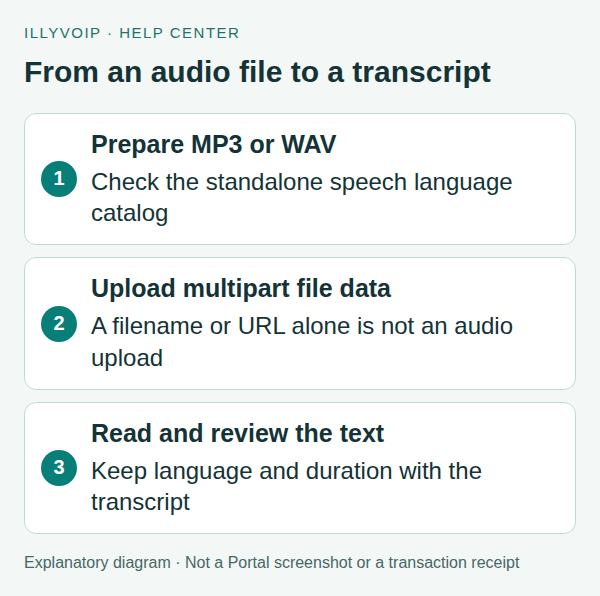
1. Prepare the account and audio
The examples use a terminal with cURL and a server-side API key supplied through the ILLYVOIP_API_KEY environment variable. Keep the key out of browser code, screenshots and source control. Follow the API quickstart to reveal your key using the Portal’s verification prompts. Examples are templates, not records of a completed transaction; replace placeholders deliberately before running them.
Use an MP3 or WAV file you are authorized to upload, with speech you can check against the resulting transcript. Renaming an unsupported file extension does not convert its audio format. Keep the file and returned transcript in private storage.
Transcription is billed per started audio minute under the current speech pricing. Check the applicable rate and your account balance before sending a file. For example, a recording slightly longer than one minute spans two started minutes; this describes billing units, not a price quotation.
2. Check supported languages for standalone speech
curl --silent --show-error --fail-with-body --get \
  'https://api.illyvoip.com/api/v1/stt/languages' \
  -H "X-Api-Key: ${ILLYVOIP_API_KEY:?Set ILLYVOIP_API_KEY}" \
  --data-urlencode 'context=speech_api' > stt-languages.json
Read default_language and the returned languages entries. At this review date, the public standalone STT reference lists en-US. Check the catalog before specifying a language; do not infer language support from TTS voices or a different Voice API context.
You can omit the optional language hint to use the default. An unsupported language code should be corrected rather than retried unchanged. This tutorial does not promise automatic transcription of every language or dialect.
3. Upload one file
Set AUDIO_FILE to the local path of your MP3 or WAV and STT_LANGUAGE to a supported catalog value. The following request is billable when processed:
curl --silent --show-error --fail-with-body \
  'https://api.illyvoip.com/api/v1/stt/transcribe' \
  -H "X-Api-Key: ${ILLYVOIP_API_KEY:?Set ILLYVOIP_API_KEY}" \
  --form 'context=speech_api' \
  --form-string "language=${STT_LANGUAGE:?Choose a supported STT language}" \
  --form "file=@${AUDIO_FILE:?Set the MP3 or WAV file path}" \
  > stt-response.json
Let cURL set the multipart content type and boundary. Do not force Content-Type: application/json for this upload or send a local filename as if it were the audio contents. To use the default language, remove the entire language form option.
4. Read and save the transcript
A successful response has status: success. Its text field contains the transcript, while duration_ms is the audio duration in milliseconds. That duration is not a currency amount. The documented response does not require a numeric billing field.
Save this code as save_transcript.py and run it after the HTTP request succeeds:
import json
from pathlib import Path

result = json.loads(Path("stt-response.json").read_text())
if result.get("status") != "success":
    raise SystemExit("Transcription did not succeed; inspect the response.")
text = result.get("text")
if not isinstance(text, str):
    raise SystemExit("The response did not contain a text transcript.")
with Path("transcript.txt").open("x", encoding="utf-8") as output:
    output.write(text)
print("Language:", result.get("language"))
print("Duration in milliseconds:", result.get("duration_ms"))
print("Saved transcript.txt; review it against the recording.")
The script refuses to replace an existing transcript. Review names, numbers and technical terms against the recording before using the result in customer records or decisions. A successful request indicates processing success, not a guarantee that every word is accurate.
5. Understand what this endpoint does not return
The documented result is a transcript with language and duration. Do not build an integration that assumes speaker labels, word-level timestamps, subtitles, sentiment, translation or real-time streaming fields unless a separate current endpoint explicitly documents them.
An empty or unexpected transcript needs investigation of the input and response. Check whether the file contains audible speech, whether its format is supported, and whether the chosen language matches the supported options. Do not treat an empty transcript as proof that a call had no audio in both directions.
6. Handle errors and retries carefully
| Problem | Check first |
|---|---|
| Authentication failure | The current server-side API key and account access. |
| Upload or format error | The real file format, readable local path and multipart upload field named file. |
| Language validation error | The speech_api language catalog. |
| Timeout or uncertain result | The original request details and any returned reference before sending again. |
The service documents automatic duplicate-charge protection, but a new upload or changed request must not be assumed free. Avoid retry loops around paid uploads. If the outcome is unclear, preserve the time, file characteristics and error/reference for Support without putting the audio or API key into a public ticket attachment.
Frequently asked questions
Can I send a URL instead of a file?
This endpoint documents a multipart file upload. A URL string is not a substitute for uploading the audio bytes.
Is this the same as a Call Reports transcript?
No. This workflow accepts a file you upload. Call Reports has a separate recording-transcription workflow.
Can I assume all Voice Agent languages are supported here?
No. Check the standalone speech_api catalog.
Related guides and reference
For current endpoint parameters and examples, use the IllyVoIP developer resources and public API specification.
Instructions reviewed on 8 October 2026. Available controls and service options depend on your account. Use the current values shown in your Portal.