
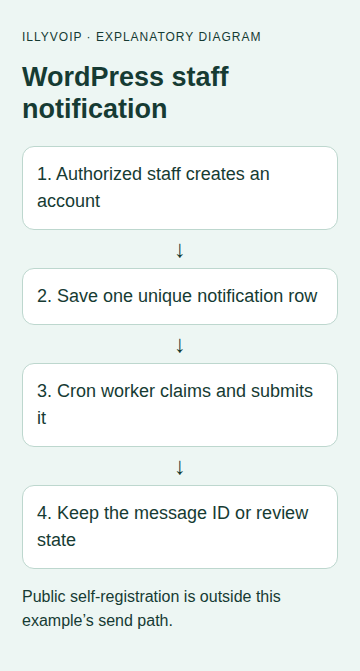
This walkthrough adds an IllyVoIP SMS notification when an authorized WordPress staff member creates a user account. The message goes to one configured staff number and contains only a record reference. A background job handles the HTTP request so registration does not wait for the SMS service.
This is a small custom plugin you maintain. It does not depend on WooCommerce or a form plugin, and it is not an official plugin installation. Public self-registration is excluded by the capability check. An account record being created does not establish that its owner is verified or trustworthy.
1. Prepare the WordPress and IllyVoIP prerequisites
Use a staging WordPress installation, administrator access to install a plugin and a developer who can review PHP and the database table. You need IllyVoIP SMS sending enabled, a permitted sender, sufficient balance and an API key from the Portal’s account settings API tab. Review the fixed staff recipient and notification purpose before enabling any paid test.
The example uses WordPress’s user_register hook, HTTP API, scheduling functions and database wrapper. It targets one normal site. Network-wide multisite activation, bulk user imports and third-party account-creation hooks need their own design and tests; do not assume they have the same lifecycle or staff identity.
2. Store private configuration
Place the following configuration in the site’s protected wp-config.php configuration area before WordPress loads. Replace the placeholders using your deployment’s secret-management process. Keep this file out of source-control exports and public backups.
define('ILLY_NOTICE_API_KEY', 'YOUR_PRIVATE_API_KEY');
define('ILLY_NOTICE_FROM', 'YOUR_PERMITTED_SENDER');
define('ILLY_NOTICE_TO', 'YOUR_APPROVED_INTERNATIONAL_NUMBER');
The recipient must include + and the country code. Do not make these values editable by anonymous visitors or copy the key into JavaScript, a shortcode or a page builder. This plugin does not provide a settings screen.
3. Install the custom plugin
Create wp-content/plugins/illy-staff-notice/illy-staff-notice.php and save this code. Review it in staging before activation.
<?php
/**
 * Plugin Name: IllyVoIP Staff Account Notice (custom example)
 * Description: Queue one fixed-recipient notice for an account created by authorized staff.
 * Version: 1.0.0
 */
if (!defined('ABSPATH')) exit;
function illy_notice_table() { global $wpdb; return $wpdb->prefix . 'illy_staff_sms'; }
add_filter('cron_schedules', function ($s) {
    $s['illy_minute'] = ['interval'=>60, 'display'=>'Every minute']; return $s;
});
register_activation_hook(__FILE__, function () {
    global $wpdb;
    require_once ABSPATH . 'wp-admin/includes/upgrade.php';
    $table = illy_notice_table(); $charset = $wpdb->get_charset_collate();
    dbDelta("CREATE TABLE $table (
        id bigint unsigned NOT NULL AUTO_INCREMENT,
        job_key varchar(64) NOT NULL,
        payload longtext NOT NULL,
        state varchar(20) NOT NULL,
        message_id varchar(191) NULL,
        http_status smallint NULL,
        created_at datetime NOT NULL,
        PRIMARY KEY  (id),
        UNIQUE KEY job_key (job_key)
    ) $charset;");
    if (!wp_next_scheduled('illy_notice_tick'))
        wp_schedule_event(time()+60, 'illy_minute', 'illy_notice_tick');
});
register_deactivation_hook(__FILE__, function () { wp_clear_scheduled_hook('illy_notice_tick'); });
add_action('user_register', function ($user_id) {
    global $wpdb;
    // Public self-registration does not meet this staff authorization check.
    if (!current_user_can('create_users')) return;
    foreach (['ILLY_NOTICE_FROM','ILLY_NOTICE_TO','ILLY_NOTICE_API_KEY'] as $name)
        if (!defined($name) || !constant($name)) return;
    if (!preg_match('/^\+[1-9][0-9]{6,14}$/', ILLY_NOTICE_TO)) return;
    $key = hash('sha256', 'staff-account:' . get_current_blog_id() . ':' . (int)$user_id);
    $payload = wp_json_encode(['from'=>ILLY_NOTICE_FROM, 'to'=>[ILLY_NOTICE_TO],
        'message'=>'A staff-created account record is available for review. Reference ' . (int)$user_id . '.']);
    if ($payload === false) return;
    $table = illy_notice_table();
    $wpdb->query($wpdb->prepare(
        "INSERT IGNORE INTO $table (job_key,payload,state,created_at) VALUES (%s,%s,'READY',%s)",
        $key, $payload, current_time('mysql', true)));
});
add_action('illy_notice_tick', 'illy_notice_send_one');
function illy_notice_send_one() {
    global $wpdb;
    if (!defined('ILLY_NOTICE_API_KEY') || !ILLY_NOTICE_API_KEY) return;
    $table = illy_notice_table();
    $row = $wpdb->get_row("SELECT * FROM $table WHERE state='READY' ORDER BY id LIMIT 1");
    if (!$row) return;
    $claimed = $wpdb->query($wpdb->prepare(
        "UPDATE $table SET state='ATTEMPTING' WHERE id=%d AND state='READY'", $row->id));
    if ($claimed !== 1) return;
    $response = wp_remote_post('https://api.illyvoip.com/api/v1/sms/messages', [
        'timeout'=>10, 'redirection'=>0,
        'headers'=>['Content-Type'=>'application/json','X-Api-Key'=>ILLY_NOTICE_API_KEY,
                    'Idempotency-Key'=>$row->job_key], 'body'=>$row->payload
    ]);
    $state = 'UNCERTAIN'; $message_id = null; $http = null;
    if (!is_wp_error($response)) {
        $http = wp_remote_retrieve_response_code($response);
        $body = json_decode(wp_remote_retrieve_body($response), true);
        $ids = is_array($body) ? ($body['queued_message_ids'] ?? null) : null;
        $state = 'REVIEW';
        if ($http >= 200 && $http < 300 && ($body['status'] ?? '') === 'success'
            && ($body['queued_count'] ?? null) === 1 && is_array($ids) && count($ids) === 1
            && is_string($ids[0]) && $ids[0] !== '') {
            $state = 'SUBMITTED'; $message_id = $ids[0];
        }
    }
    $wpdb->update($table, ['state'=>$state, 'message_id'=>$message_id, 'http_status'=>$http], ['id'=>$row->id]);
    // A failed result update leaves ATTEMPTING. Never automatically reset it.
}
4. Activate and check the queue before dispatch
- Activate the plugin in staging. Verify that the table with your WordPress prefix and suffix
illy_staff_smsexists and that job_key has a unique index. - Keep outbound HTTP mocked or blocked during the first queue test. As an authorized staff member, create one test account using your usual admin workflow.
- Inspect the resulting row locally. Confirm the frozen sender, fixed recipient, minimal message and READY state.
- Repeat the hook for that same user in a development test. The unique key must keep one row.
- Test a public self-registration separately. It must not enqueue a notification through this hook.
The plugin is deliberately scoped to the create_users capability. A command-line import without an authenticated staff user may enqueue nothing. Conversely, custom application code that creates accounts while running as an authorized staff user can meet the check. Review all account-creation paths in your installation before enabling this notice.
5. Understand when the worker runs
Activation schedules a WordPress cron event every minute. WP-Cron depends on the site’s scheduling environment and normally on requests to the site; it is not a guaranteed wall-clock delivery schedule. If timely processing matters, configure your established system scheduler to run due WordPress events and avoid creating a second unrelated dispatcher.
One run claims at most one READY row using a conditional update. Competing workers cannot both claim that same row. The HTTP request has a ten-second timeout and no redirects. Once a request is attempted, a later worker never automatically selects it again.
Monitor the age and count of READY rows and alert on stale ATTEMPTING rows. A missing cron event, low site traffic or a database write error can delay notifications. The minimal example has no queue dashboard; use a restricted database administration view or add a staff-only operational screen before wider use.
6. Test acceptance and failure behavior
With a mocked HTTP response, confirm that an accepted response saves one message ID and SUBMITTED. Return an HTTP error or malformed body and confirm REVIEW. Simulate a network timeout and confirm UNCERTAIN. Simulate a database result-update failure and confirm that the existing ATTEMPTING row is not resent.
Then approve one paid test to the configured staff phone. Check the IllyVoIP submission reference and delivery result separately. SUBMITTED means the API accepted the message; it does not prove handset delivery. Do not create many new user accounts to investigate a delivery problem, because each is a new business event.
7. Operate, stop and recover the integration
For REVIEW, inspect the HTTP status and your sender, account permissions, balance and recipient. For UNCERTAIN or stale ATTEMPTING, reconcile the saved key, payload and timestamp against available SMS records before deciding on any replacement. Do not reset the row to READY as a routine recovery shortcut.
Deactivating the plugin clears its scheduled event but retains the table. An already running worker may finish. Reactivation resumes READY work, so inspect queued rows before re-enabling it. Do not delete historical rows while the same source events can recur. After restoring a backup or cloning a site, disable outbound messaging until old queue state is reconciled; an older database backup can forget completed attempts.
The example does not include automatic retry, delivery callbacks, a consent database or rate-based event suppression. Add these only through a reviewed extension that preserves event identity and distinguishes a new approved notification from recovery of an uncertain one.
Related guides and official references
Reviewed 9 October 2026 against current IllyVoIP implementation and the linked sources. Use your account’s available options and installed software version. Local example checks do not establish a completed live call, delivered SMS or certified third-party integration.