
Zabbix can submit an SMS notification to IllyVoIP through a custom webhook media type. This uses the HTTP SMS API; it is different from Zabbix’s GSM-modem SMS media type. IllyVoIP does not supply a built-in Zabbix connector in this walkthrough.
The steps use the current Zabbix 7.4 webhook documentation. You need permission to administer media types/actions, outbound HTTPS access from the Zabbix server, an IllyVoIP API key and an allowed SMS sender. Start with one approved recipient and a nonproduction monitoring event.
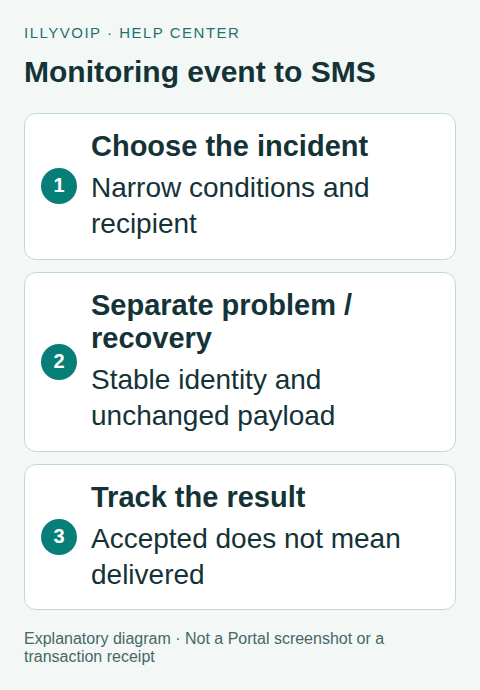
1. Define what deserves an SMS
Choose a narrow action condition, such as a specific host group and serious severity. Set recipient availability periods and escalation behavior deliberately. Avoid sending every repeated check result. Decide separately whether recovery should send another message; it is a different notification with a different identity.
Keep alert text brief and useful: service, problem/recovery state and a safe incident reference. Do not include passwords, private stack traces or sensitive URL tokens. Review destination coverage, sender rules, balance and segmentation before enabling a real action.
2. Create a custom webhook media type
Open Alerts → Media types → Create media type, name it IllyVoIP SMS — problem, and select Webhook. Add parameters for api_key, to, sender, message, event_id and phase. Configure the intended script timeout and connection requirements for your installation.
Store the key through your supported secret-management convention and restrict who can view or edit the media type. A secret macro does not make every downstream log, test dialog or administrator unable to see a value. Never print the parameter object or request headers in debug output.
3. Map a stable business event
Map to to {ALERT.SENDTO}, message to {ALERT.MESSAGE} and event_id to {EVENT.ID}. Set sender to your approved sender and phase to the literal problem. Use the originating problem event ID as the stable incident identity for both problem and recovery, with a separate phase for each notification. For recovery messages, clone the completed media type as IllyVoIP SMS — recovery and change its fixed phase parameter to recovery.
Check macro expansion in your Zabbix version and in both operation contexts. Do not assume a recovery-event macro is populated in a problem operation. For multiple recipients, use a separate notification identity per recipient; adapt the key below to include a stable non-sensitive recipient identifier. The minimal example assumes one recipient for each event/phase.
In Users → Users, open the intended recipient and add the appropriate types on the Media tab, with the authorized international number in Send to. Give that user the required read access to the monitored hosts. In the trigger action, select the problem type for the problem operation and the recovery type for the recovery operation; do not use “all media” for both. Configure the corresponding message templates and availability periods. Keep the action disabled until the controlled tests pass.
4. Add the HTTP submission script
The following script illustrates one submission. It uses Zabbix’s HttpRequest object and JSON serialization. The key is stable for an unchanged event/phase notification:
var p = JSON.parse(value);
if (!p.api_key || !p.to || !p.sender || !p.message ||
    !/^[0-9]+$/.test(String(p.event_id)) ||
    !/^(problem|recovery)$/.test(p.phase)) {
    throw 'Missing or invalid notification parameters';
}
var key = 'zabbix-' + p.event_id + '-' + p.phase;
var request = new HttpRequest();
request.addHeader('Content-Type: application/json');
request.addHeader('X-Api-Key: ' + p.api_key);
request.addHeader('Idempotency-Key: ' + key);
var result = request.post('https://api.illyvoip.com/api/v1/sms/messages',
    JSON.stringify({to: [p.to], from: p.sender, message: p.message}));
var status = request.getStatus();
if (status < 200 || status >= 300) {
    throw 'SMS submission requires review; HTTP ' + status;
}
var parsed;
try { parsed = JSON.parse(result); } catch (e) {
    throw 'Uncertain SMS response; reconcile before resending';
}
if (parsed.status !== 'success' || !Array.isArray(parsed.queued_message_ids) ||
    parsed.queued_message_ids.length !== 1 || !parsed.queued_message_ids[0]) {
    throw 'SMS submission not confirmed; review the response privately';
}
return JSON.stringify({submission: 'accepted', event: p.event_id, phase: p.phase,
    message_id: parsed.queued_message_ids[0]});
Keep the exact destination, sender and message unchanged when replaying that notification. If action text includes a changing timestamp or repeated-event counter, persist the original payload outside the script or remove the unstable field. Reusing the key with changed content is not a safe retry strategy.
The example returns an acceptance marker, not a delivery receipt. Retain the returned message_id in your operational record and use the SMS status API for delivery tracking. Never treat the Zabbix action log alone as proof the handset received the SMS.
5. Control retries and uncertain outcomes
For initial testing, configure a single delivery attempt in the media type’s retry controls. A thrown script error can otherwise cause automatic attempts. A timeout after submission is uncertain: the SMS may already have been accepted. Inspect the IllyVoIP message record before issuing a new notification.
If you later enable bounded retries, they must preserve the exact payload and key and remain within IllyVoIP’s documented idempotency behavior. Durable incident tracking is needed for delayed replays outside that protection. Do not rely on a media-type script’s local variables as a persistent deduplication database.
6. Test before widening the action
- Run local script fixtures with a mock HTTP object: valid acceptance, invalid parameters, non-JSON response, HTTP error and uncertain transport failure.
- In Zabbix’s test interface, replace macros with reviewed test values and submit to one authorized number. This can incur charges.
- Check the accepted message record and its later delivery status separately.
- Trigger one controlled problem and recovery. Confirm their different identities and expected recipients.
- Replay the event processing without creating a new business notification, then verify the action’s escalation and attempt limits.
Only broaden the action after the notification volume and recovery behavior match your intent. Keep a quick way to disable that SMS operation without disabling monitoring itself.
Frequently asked questions
Do I need a modem?
Not for this HTTP integration. The Zabbix server needs access to the IllyVoIP API.
Can every failed check send a text?
That is usually noisy and can be expensive. Use incident-level conditions and deliberate escalation rules.
Related guides and references
- Send sms api track delivery
- Send sms n8n
- Official reference: www.zabbix.com
- Official reference: api.illyvoip.com
Reviewed 8 October 2026 against current IllyVoIP source and official documentation. Configuration examples are not evidence of a completed hardware or live integration test. Use the current options and limits available to your account.