
DID नंबर ऑर्डर करें और incoming calls सेट करें
यह गाइड DID नंबर लेने और incoming को SIP line, international phone या external SIP system तक भेजने के लिए है।
DID (Direct Inward Dialing) क्या है?
यह बिना अलग physical line के VoIP तक calls पहुँचाने वाला नंबर है। लोगों या departments को नंबर देकर सामान्य telephone networks से calls ले सकते हैं।
चरण 1: खाते में लॉगिन करें
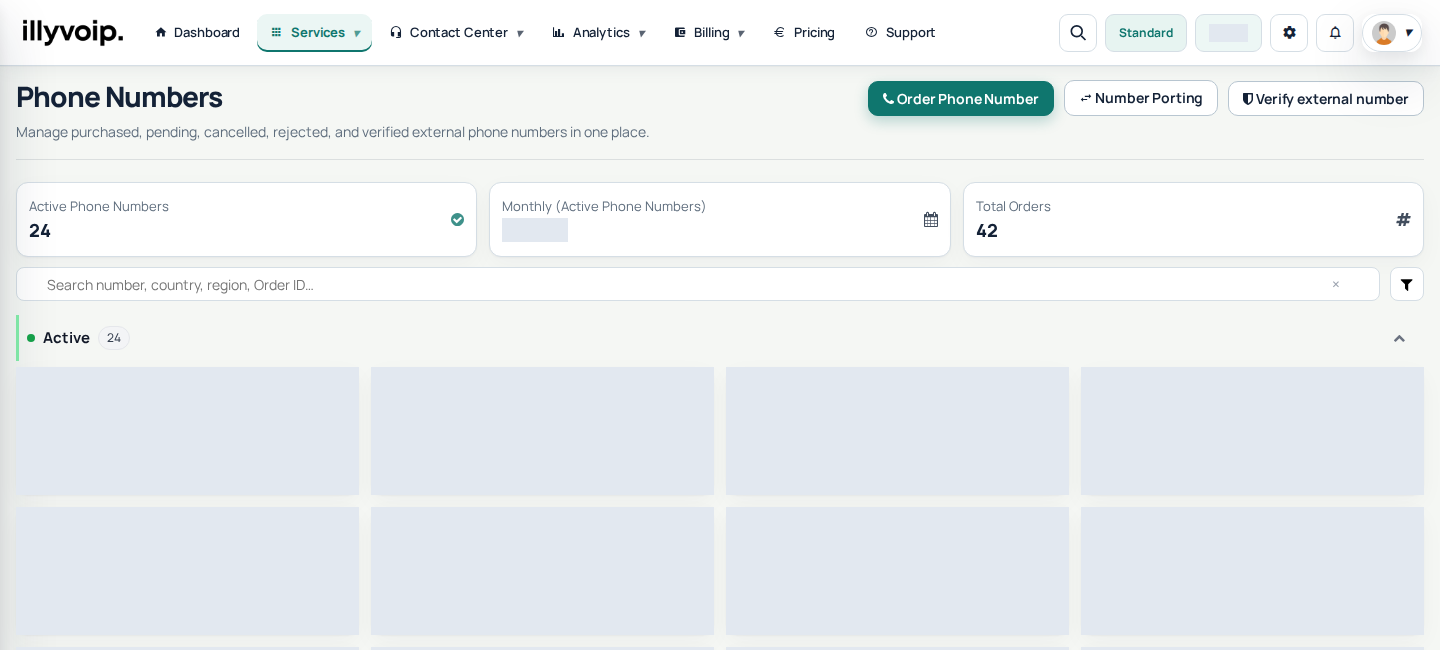
खोलें Services → Phone Numbers और चुनें Order Phone Number। माँगा verification और agreement पूरा करें।
चरण 2: DID चुनें
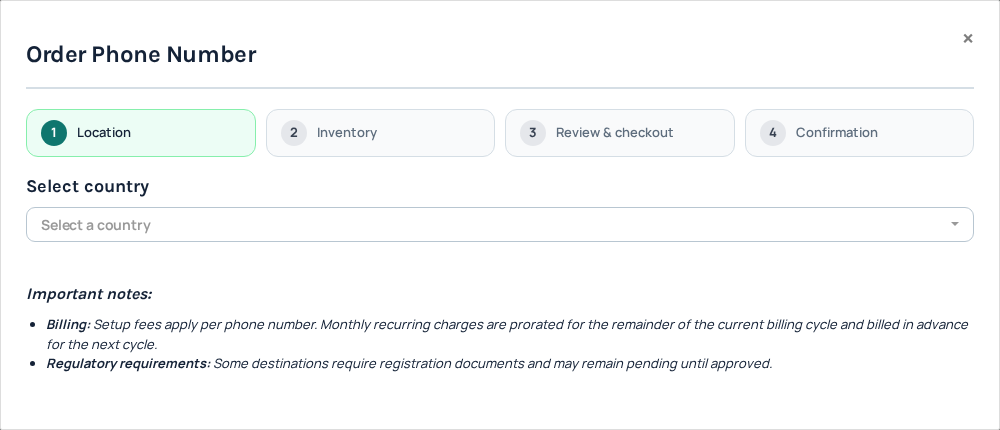
देश, प्रकार और उपलब्ध region चुनें। Product के अनुसार stock से चुनें या allocation माँगें। Order request active नंबर नहीं है।
Setup, monthly, incoming minute, billing increments और connected call की connection fee देखें। Address/documents destination पर निर्भर हैं। Wizard की जानकारी भरें और order से पहले total देखें।
दस्तावेज़, समीक्षा और activation
कुछ orders automatic, कुछ staff/regulatory review से activate होते हैं। Phone Numbers में track करें और माँगे documents दें। Active दिखने तक incoming पर निर्भर न रहें।
DID configure करें
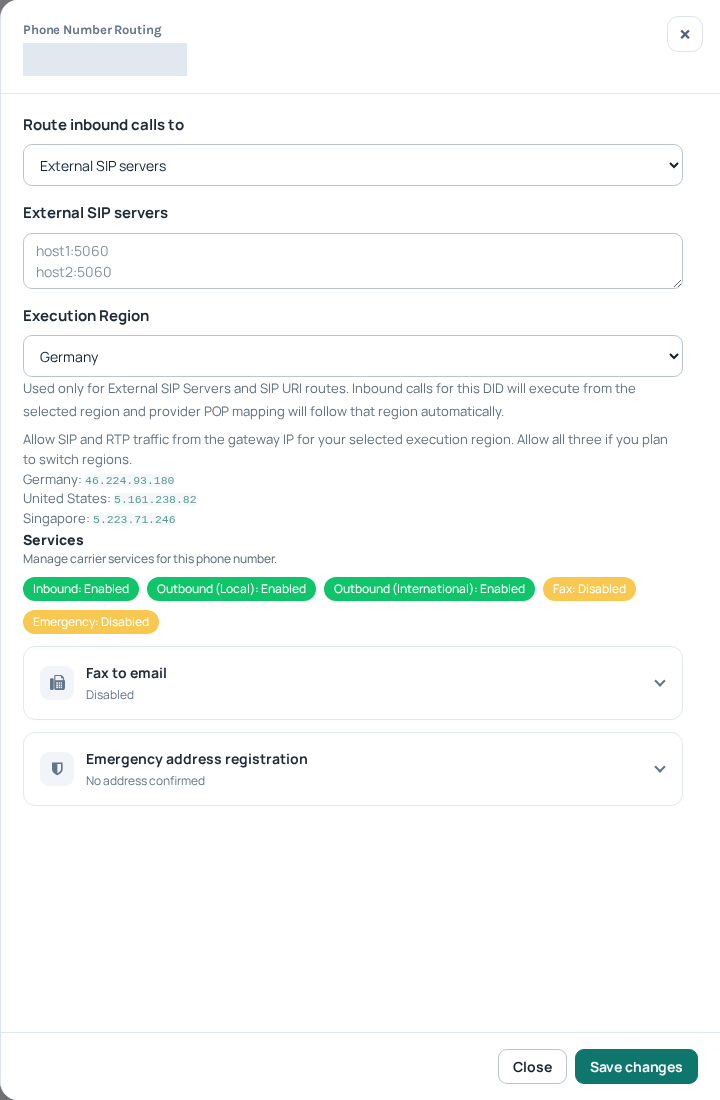
Active नंबर में चुनें Configure। Assigned destination देखें, route चुनकर save करें। Softphone registration अपने-आप नंबर की route नहीं बदलता।
Routing विकल्प
- SIP extension: receiving identity चुनें और उसके वर्तमान SIP settings से device configure/register करें।
- International number: बताए destination पर forward करें। Outgoing forwarding leg का अतिरिक्त शुल्क हो सकता है।
- External SIP server: supported PBX details भरें और वहाँ inbound matching/network access सेट करें। Current form मानें, screenshots के पुराने IP नहीं।
दूसरे incoming destinations
- Queue: तैयार team queue चुनें, SIP lines members जोड़ें और waiting/no-answer behavior देखें।
- Voice agent / IVR: published flow चुनकर business hours और handoff paths जाँचें।
- Voice API Control: तभी लें जब application documented API/events से incoming संभालने को तैयार हो।
- SIP URI: destination की supported URI चुनें और वहाँ inbound matching तथा network access जाँचें।
नंबर और account में उपलब्ध विकल्प ही लें। Destination तैयार करें, route save करें और पूरा incoming path टेस्ट करें। Active नंबर का destination फिर भी गलत या offline हो सकता है।
Extra features नंबर/destination पर निर्भर हैं। CNAM, emergency registration या अन्य विकल्प माँगने से पहले fees और approval देखें।
नंबर टेस्ट करें
दूसरे फोन से active DID पर कॉल करें। सही जगह ring, दोनों तरफ़ audio और report जाँचें। Failure पर Support को नंबर और public reference दें। Renewal और usage के लिए balance रखें।
मौजूदा नंबर सँभालें
Phone Numbers में सही नंबर ढूँढकर Configure चुनें। बदलने से पहले dialog का नंबर जाँचें। Current destination देखें, line/queue/route चुनें, save करके बाहर से टेस्ट करें। Active नंबर और reachable destination अलग ज़रूरतें हैं।
Renewal और cancellation
Monthly price, renewal और balance देखें। Incoming usage और connection fee किराये से अलग हैं; forwarding का outgoing charge हो सकता है। पर्याप्त funds रखें।
Active नंबर की cancellation confirmation वर्तमान billing cycle के अंत पर बंद करने का समय तय करती है; तब तक चलता है। Confirmation और status पढ़ें। Pending order cancel करने पर request बंद और processing के अनुसार reservation release होता है। नंबर वापस मिलना निश्चित न मानें। Duplicate order की जगह Support से पूछें।
Optional services
- CNAM: जहाँ उपलब्ध हो outgoing name माँगें और update fee देखें। यह Caller ID verification नहीं और हर network में नाम दिखने की गारंटी नहीं। Request देना applied update नहीं है।
- Fax: केवल जहाँ दिया हो वहाँ निर्देशानुसार लें। Voice route बदलने से पहले incoming पर असर देखें।
- Emergency registration: supported जगह address/contact देकर review देखें। Address submitted/approved का मतलब emergency calling चालू होने का प्रमाण नहीं। Support से पुष्टि करें; routine test के लिए emergency call कभी न करें।
नंबर pending हो तो
Request में missing documents/address/activation देखें। जवाब दें और active का इंतज़ार करें। देर हो तो फिर order न करें। Progress रुके तो reference/status Support को दें; identity documents सार्वजनिक न करें।
अलग शुल्कों को मिलाए बिना तुलना करें
समान देश/type/region तुलना करें। Setup शुरुआती, rental monthly, minute/increments usage के लिए हैं। Connection fee हो तो हर eligible connected call का अलग शुल्क है, दूसरा setup/monthly नहीं। Final quote देखें, headline price को अनुमानित duration से न गुणा करें।
जो नंबर on request हो वह submission बाद allocate होता है, तुरंत stock selection नहीं। Stock न होना हमेशा technical fault नहीं। Manual documents review हो सकती है; accepted order activation नहीं। पुराना working नंबर नई खरीद के सभी requirements पूरे होने का प्रमाण नहीं।
Auto-renewal और corrections
हर नंबर की setting देखें। Off करने पर confirmed cycle expiry पर बंद होगा और नंबर हमेशा खो सकता है। On करना पर्याप्त balance का विकल्प नहीं। बदलाव के बाद status/renewal देखें, अस्पष्ट या missing action पर Support से पूछें।
Address/documents सुधारने के लिए existing order का requested action खोलकर वहीं submit करें। Corrected file के लिए नया order न बनाएँ। Identity documents secure process में रखें।
Optional steps देखें caller name, emergency address और fax। Eligible promotions के लिए अलग free-number claim workflow है।