
Identify what is restricted
A login verification request, a failed password, a restricted communication use case and a disabled account are different situations. Read the exact notice. Do not delete an account or create another one just to bypass a verification or service restriction.
- You forgot your password: use the password-reset process.
- A login needs verification: complete the method shown for that attempt. Never approve an unfamiliar sign-in or give someone its code.
- A particular service or activity needs review: use Communication reviews when directed; approval applies to the scope shown, not automatically to every service.
- The account is disabled: use the appeal option if offered, or contact Support.
Submit an appeal
The account appeal form asks for the account identifier, password and an explanation. Enter the password only in the secure form—not in your explanation or a support message. Describe the legitimate activity and relevant facts. Submission requests review; it does not immediately restore service or guarantee approval.
Closing your own account
The account owner's Security settings include a Danger zone for account deletion. This is a serious access-ending action, not a temporary logout. Review numbers, ongoing work, billing and any information you need before proceeding; ask Support if the effect on a service or balance is unclear.
- Open Account settings → Security and read the deletion warning.
- Confirm the current password and review the final confirmation.
- Proceed only if you intend to end access. Wait for the result; an error or unfinished operation is not a completion confirmation.
Account closure is not a promise that every historical record is immediately erased. Contact Support about data requests or any retained records. To remove one employee rather than the entire owner account, use agent management instead.
See password recovery, Communication reviews and Support.
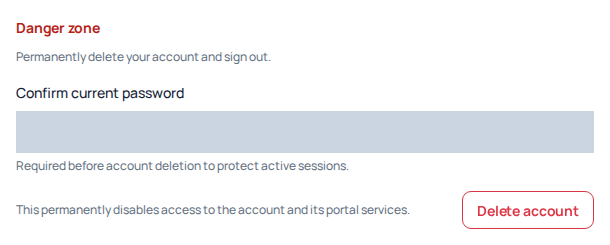
The Danger zone warns that deletion disables access to the account and its Portal services. The password field is hidden. The deletion control was not used; this screen illustrates closure, not an appeal or a service-restriction decision. Open the image for a larger view.