
You can use an IllyVoIP Voice API call to ask a customer to confirm an appointment. Your application must own the appointment data, contact authorization and update rules. IllyVoIP supplies call control and keypad collection; this is a custom integration, not a built-in calendar connector.
Run Voice API requests on your backend with X-Api-Key authentication and JSON bodies. Use the API base https://api.illyvoip.com. Persist a separate Idempotency-Key for each paid call or prompt action and reuse that action’s key while its outcome is pending. Calling and speech can incur charges. Examples use placeholders and describe application logic; they are not records of completed calls.
1. Prepare a confirmation job on your backend
- Select an appointment your application is authorized to contact about.
- Store its internal ID, current revision, intended telephone number and a unique confirmation-job reference.
- Check the contact preference, calling time and account permissions before scheduling a paid attempt.
- Define what Confirm, Need help, no input and a failed call mean in your own workflow.
Use a neutral prompt that does not reveal private appointment details to an unverified person. Possession of the telephone or pressing a key is not strong identity verification. For sensitive appointments, direct the person to an authenticated channel or use your approved verification process before disclosure.
2. Create one tracked outbound call
Use the documented create-call endpoint, POST /api/v1/voice/call-control/calls, with the permitted sip_user_id, destination to and eligible from value. Set recording only when deliberately required and authorized. Supply the required idempotency key and persist the returned call-control reference against the confirmation job.
If a create response is lost, reconcile the same attempt and idempotency identity. Do not generate a fresh key merely because a browser timed out. A pending request is not permission to place a duplicate paid call. Follow call status and wait for the answered state before asking for input.
3. Collect a simple keypad choice
Send a gather request to POST /api/v1/voice/call-control/gather for the active answered call. Choose an available Voice API voice if your request supplies a voice option. A Voice Agent voice selection is not automatically the same API context.
{
  "call_control_id": "YOUR_CALL_CONTROL_ID",
  "input": "dtmf",
  "prompt_text": "This is an appointment confirmation call. Press 1 then hash to confirm, or 2 then hash if you need help.",
  "timeout_ms": 10000
}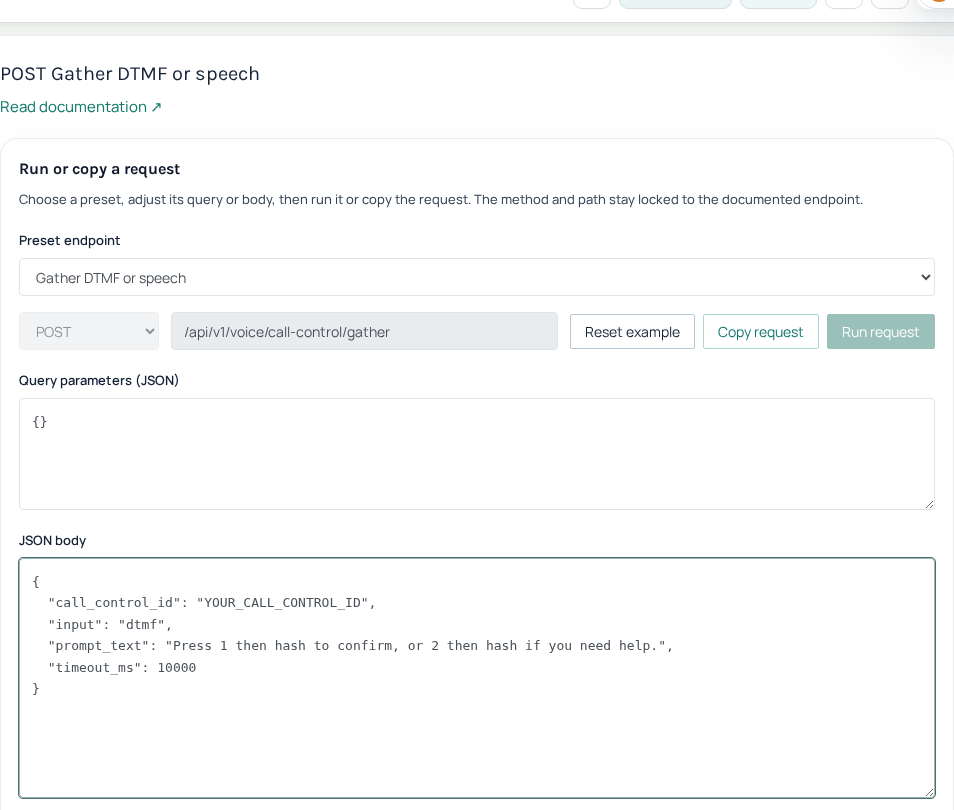
On HTTP and API success, verify input is dtmf and read digits, not transcript. Read the actual returned gather result. Interpret the collected digits, timeout and failure separately. In this example only the complete value 1 confirms and 2 requests assistance; values such as 11 are invalid. Do not treat the absence of an error as confirmation.
4. Apply the business update transactionally
- Reload the appointment using the job’s internal appointment ID.
- Check that it still belongs to the same authorized workflow and has not been canceled, moved or replaced.
- Compare its current revision with the revision selected for the call.
- For a valid 1, atomically record confirmation only if that revision is still eligible.
- Store the processed result so a repeated response cannot confirm or notify twice.
If the appointment changed during the call, do not confirm the new appointment based on the old prompt. Record a review-needed outcome. A 2 should create the agreed assistance task, not silently cancel the booking. Timeout, invalid input and disconnect should remain distinct outcomes with a bounded retry policy.
5. Speak the outcome and end cleanly
After the business transaction succeeds, use the speech endpoint to acknowledge the outcome accurately. Do not announce confirmation before the database update succeeds. For the final /api/v1/voice/call-control/speak request, include call_control_id, the approved text and wait_for_playback_completion: true, supported by the current implementation. Await its completed result before posting the same control ID to /api/v1/voice/call-control/hangup. Follow playback completion before issuing hangup; a request accepted for processing does not prove the caller heard the entire message. Check call status after an uncertain result rather than sending an uncontrolled sequence of commands.
6. Test without contacting customers first
Use local fixtures for duplicate results, a changed appointment revision, invalid digits, timeout and a lost create response. Verify that none triggers a second booking update or automatic paid call. Then arrange an authorized end-to-end test with an approved number, checking caller ID, keypad input, final appointment state and the call record. Keep API keys, full telephone numbers and private appointment data out of logs.
Related guides
Reference
Current instructions and technical reference: IllyVoIP API documentation.
Reviewed 12 October 2026 against the current IllyVoIP controls, implementation and applicable references. Available options depend on account permissions and service state.