
Create an outbound call with POST /api/v1/voice/call-control/calls, save its call_control_id, and follow its state before playing a notification. A successful create response means the request was accepted; it does not mean someone answered.
This guide is for a backend developer placing an expected notification call to an authorized destination. You need API access, a usable SIP identity, sufficient balance and a caller ID permitted for that account. Calling and text-to-speech can incur separate charges. This is not a predictive dialer or proof that a human heard a message.
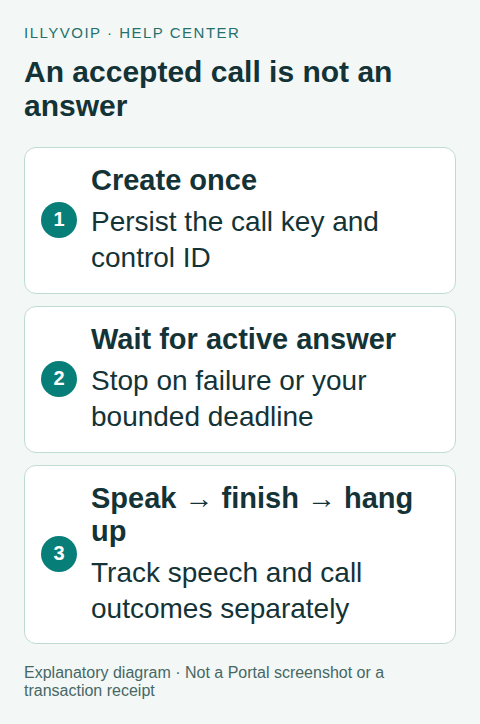
1. Prepare the request and recovery record
Save your own notification reference, chosen SIP identity, destination, caller ID, exact request and a unique idempotency key before calling the API. Use X-Api-Key authentication and Content-Type: application/json for the POST requests below. Keep the key on the server.
The create endpoint requires Idempotency-Key. Reuse it only for the identical logical call request. Changing the key after a timeout can place another call. A second intended notification needs a different key and an explicit business decision.
2. Create the call once
POST this body to https://api.illyvoip.com with path /api/v1/voice/call-control/calls, replacing each placeholder with a current account value:
{
  "sip_user_id": "YOUR_PUBLIC_SIP_IDENTITY",
  "to": "AUTHORIZED_INTERNATIONAL_DESTINATION",
  "from": "YOUR_PERMITTED_CALLER_ID",
  "record": false
}
If you omit sip_user_id, the endpoint uses the main SIP identity; specify it when your application must use a particular line. Recording is disabled in this example. Enabling it requires your own appropriate recording workflow and permissions.
Read both the HTTP outcome and JSON body. Save call_control_id immediately, along with state and any reconciliation_pending flag. A failed state is not an answered call. Reconciliation pending means follow this existing call, not create another one.
3. Wait for answer, with a deadline
POST the saved control ID to /api/v1/voice/call-control/status:
{"call_control_id":"YOUR_RETURNED_CALL_CONTROL_ID"}Read state, call_status, terminal, answered_at and failure_reason. Continue only when the current response establishes an active answered session. Stop on a terminal result; do not send speech to an ended call. Poll with a bounded delay consistent with account limits and a deadline chosen for your notification workflow.
If your deadline expires while the session is still live, deliberately end it through the hangup endpoint rather than abandoning an open call. An answered timestamp does not distinguish a person from an answering machine. Do not record “customer acknowledged” without an explicit response mechanism.
4. Speak the notification
Choose a current Voice API voice by listing TTS languages and voices with context=voice_api. Do not copy a standalone speech voice without checking this context. You may omit the voice to use the current default.
POST this body to /api/v1/voice/call-control/speak with a separate persisted Idempotency-Key for this speech action:
{
  "call_control_id": "YOUR_RETURNED_CALL_CONTROL_ID",
  "wait_for_playback_completion": true,
  "text": "Hello. Your requested update is ready. Please check your account for the details."
}
Keep the notification short. The current text limit is 2,000 characters. The response includes an opaque call-scoped media reference and any tts_charge, including its public transaction reference. Do not interpret the media value as a public download URL or reuse it across calls.
The example sets wait_for_playback_completion=true, supported by the current call-control implementation, so playback completion is awaited. Without it, the default can return before the audio finishes. Wait for the speech action to complete before deliberately hanging up; do not issue both requests concurrently. If the request returns voice_request_pending, retain the same key and reconcile it. Only voice_request_closed establishes the unsuccessful paid request is settled so a new request may use a new key. A content-review response requires the account review process; approval does not replay the old request.
5. End the session and record the outcome
POST the control-ID body to /api/v1/voice/call-control/hangup when your completed workflow should end the call. If the recipient already hung up, read the terminal status and finish your record rather than treating that as permission to redial.
Store the notification reference, control ID, answer/end timestamps, safe failure reason and available charge references. Keep call outcome separate from speech usage and customer acknowledgement. A completed API action is not evidence of a person understanding the notification.
Troubleshooting and acceptance checks
- Call creation rejected: inspect account access, destination, caller ID, balance and the returned reason.
- Accepted but never answered: follow call status and its terminal reason. Do not loop over create requests.
- Speech rejected: check text length, voice context and review requirements; preserve the action key.
- Interrupted response: reconcile the saved call/action rather than starting over.
First test your state handling with fixtures for answered, busy, failed, terminal and uncertain outcomes. An authorized real call is needed to check audio and recipient experience; this article does not claim that live test has been performed for your account.
Frequently asked questions
Can I play a recorded file instead?
The playback endpoint supports the documented media or audio URL inputs. Verify its current format, retrieval and completion requirements before replacing speech; do not send a local filename as though the server could read your computer.
Does HTTP 200 prove the message was heard?
No. Track the call and action states, and design an explicit acknowledgement step if your application needs one.
Related guides and official references
Reviewed on 8 October 2026 against the current IllyVoIP implementation and available official documentation. Examples use placeholders and are not evidence of a completed live transaction. Check your account’s current availability and prices before executing paid requests.
Check backend readiness before creating the call
Use the owner-authenticated GET /api/v1/voice/backend/status endpoint when your application needs to distinguish a ready Voice API backend from a degraded or unavailable service. This is a read-only preflight; it does not reserve capacity or authorize the destination.
curl --fail-with-body \
  -H "X-API-Key: $ILLYVOIP_API_KEY" \
"https://api.illyvoip.com/api/v1/voice/backend/status"- Read the HTTP result and parse the JSON. Keep transport errors separate from a valid status response.
- Check
backend_status. The current values areoperational,degradedandunavailable. - For an unavailable backend, postpone new work and retain its original job identity. For a degraded result, follow the returned message and your application’s policy rather than starting an unbounded retry loop.
- When operational, continue with the existing line, caller-ID, destination and balance checks before the call-creation request.
The envelope can say status: success because the readiness query succeeded while backend_status says the calling service is unavailable. Checking only the envelope would make your application treat an outage as readiness. Conversely, a readiness-check timeout is an unknown result; it is not proof that a call was created or that the service is healthy.
Readiness can change between this check and the create request. Keep the durable idempotency key and recovery procedure described above even after an operational response. Never replace a timed-out call creation with a new logical job simply because a later readiness check succeeds. The original call may already exist.
What readiness does not check
It does not establish your line’s eligibility, account credit, permitted caller ID, destination policy, recipient availability or successful audio. A subsequent call can still fail for those reasons. For Support, retain the readiness time and returned customer-facing message, then the call-creation time and reference if one was returned. Keep the API key out of diagnostic output.
Reviewed 12 October 2026 against the current IllyVoIP controls, implementation and applicable references. Available options depend on account permissions and service state.