
Build a programmable “Press 1 for Sales, 2 for Support” menu by gathering DTMF on an active IllyVoIP call, validating the returned digits and starting a tracked transfer. Your application owns the branching logic; the gather request does not automatically create a complete menu.
This guide uses backend API calls. If you want to build a menu visually, use the existing Voice Agent Studio phone-menu guide instead. You need API access, a live call-control session, two destinations permitted for your account and a recovery path when neither destination answers.
1. Obtain the active call-control ID
For an incoming call, configure the number’s supported Voice API Control destination, receive and verify the incoming event, and answer while the call is eligible for API answering. Save the returned call_control_id. A public incoming call_id is not interchangeable with the control-session ID used here.
For an outbound session, create the call once and wait until status establishes it is answered and active. Do not start gathering while the destination is only ringing. All requests below use X-Api-Key authentication and JSON bodies.
2. Define a small allowlist of destinations
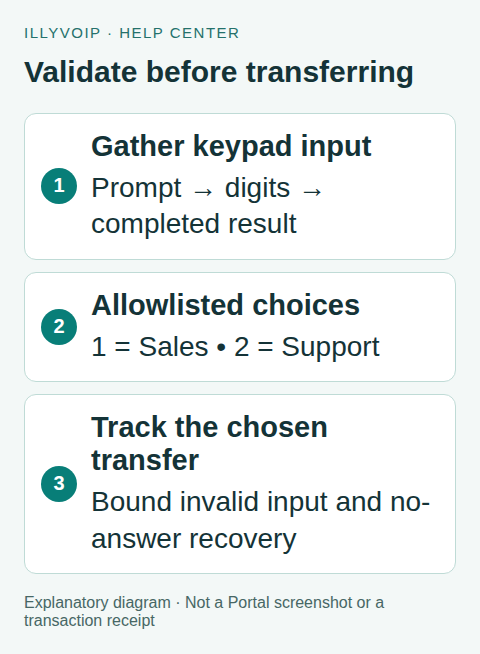
Store Sales and Support destinations on the server. Map exactly 1 and 2 to those choices. Never treat arbitrary keypad input as a phone number to dial. Keep the target type and value together: pstn uses an external destination, while sip_user uses an authorized SIP identity belonging to the account.
Set a maximum number of completed menu attempts, such as two, and decide what to do after silence or repeated invalid input. Your fallback might explain that no selection was received and end the call. It must not loop indefinitely or assume an operator is always available.
3. Request a DTMF selection
POST to https://api.illyvoip.com/api/v1/voice/call-control/gather with a saved Idempotency-Key for this prompt-and-input attempt:
{
  "call_control_id": "YOUR_ACTIVE_CALL_CONTROL_ID",
  "input": "dtmf",
  "prompt_text": "For Sales, press 1 followed by the hash key. For Support, press 2 followed by the hash key.",
  "timeout_ms": 8000
}
The prompt deliberately asks for the hash key to finish input. The documented request does not require an invented one-digit option. Without a terminator, collection can wait for its timeout. Compare the complete returned value; do not accept the first character of a longer invalid entry.
Prompt text incurs TTS usage. If you choose a voice, obtain its current identifier from the TTS catalog using context=voice_api; otherwise the default applies. This DTMF example does not request speech recognition. Keep the prompt short and allow enough response time for your callers.
4. Branch only after a completed result
On HTTP and API success, verify input is dtmf and read digits. Do not read transcript as though this were speech recognition. Use this explicit decision table:
| Result | Application action |
|---|---|
| Exactly 1 | Choose the saved Sales target. |
| Exactly 2 | Choose the saved Support target. |
| Empty digits | No selection; offer the bounded retry or end politely. |
| Any other value | Invalid choice; do not dial the input. |
| Pending or error | Reconcile the action; do not count it as a completed menu attempt. |
For a new completed retry, save a new action key and the new prompt. While voice_request_pending remains unresolved, keep the existing key. A content-review refusal is not an empty keypad selection, and approval does not replay a refused request.
5. Start and follow the selected transfer
POST this shape to /api/v1/voice/call-control/transfer after replacing the saved target. The example uses an account SIP identity, not an arbitrary SIP URI:
{
  "call_control_id": "YOUR_ACTIVE_CALL_CONTROL_ID",
  "target": {"type": "sip_user", "value": "YOUR_SALES_SIP_IDENTITY"}
}
Save transfer_id and follow /api/v1/voice/call-control/transfer-status. A connecting or ringing result is not a completed connection. If the transfer fails or is canceled, inspect terminal, resume_original and the current call status before playing a fallback. Do not issue new media actions merely because a polling deadline elapsed.
6. Check the complete caller experience
Test fixtures for 1, 2, silence, multiple digits, invalid input, a caller hanging up during the menu, a pending gather and a transfer that never connects. Verify only allowlisted targets can be selected and no branch loops forever. Then use authorized live calls to verify keypad detection, prompt timing, target ringing and the fallback audio.
Keep the control ID, gather attempt reference, returned digits and transfer ID with safe timestamps for investigation. Avoid logging keys or unnecessary caller information. If digits are not detected, compare the sending system’s DTMF configuration and observed call evidence before changing global PBX settings.
Frequently asked questions
Does this create a Voice Agent Studio flow?
No. This is application code controlling the API. The visual flow builder is a separate authoring workflow.
Can I collect a long account number with this menu?
This guide validates two fixed choices. A longer input requires its own length, timeout, privacy and validation design against the current API contract.
Related guides and official references
- API access and Playground
- Webhook delivery and verification
- IllyVoIP developer resources
- Build a phone menu in Voice Agent Studio
Reviewed on 8 October 2026 against the current IllyVoIP implementation and available official documentation. Examples use placeholders and are not evidence of a completed live transaction. Check your account’s current availability and prices before executing paid requests.