
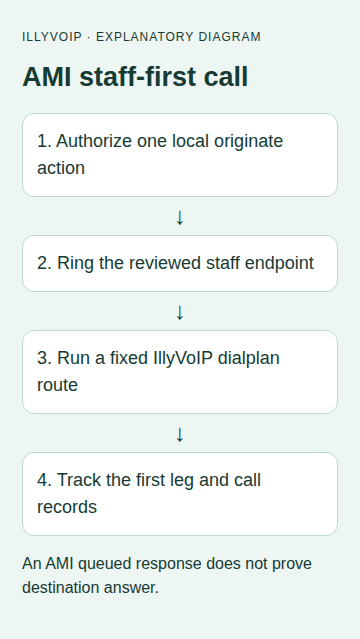
Asterisk Manager Interface, AMI, can start a controlled call on your own PBX. In this example, Asterisk first rings staff extension 100. When that extension answers, a restricted dialplan context calls one approved destination through an existing IllyVoIP trunk.
This provides a simple staff-first calling workflow without giving the script an arbitrary dialplan destination. IllyVoIP supplies the outgoing SIP service; the AMI interface and credentials belong to your PBX. AMI is not the IllyVoIP public HTTP API.
1. Establish a working baseline
Use an Asterisk 22 test environment, a reachable PJSIP endpoint named 100 and a working IllyVoIP PJSIP trunk. Verify an ordinary outbound call with the intended caller ID and destination format before adding automation. Confirm your account permissions, balance and current SIP details in the Portal.
Choose one destination you control and obtain approval for the test. The staff phone can ring before an outgoing paid leg exists. A staff answer, an outgoing answer and a final call charge are different observations.
2. Configure a private AMI account
Merge a dedicated account into manager.conf on your PBX. This example keeps AMI on loopback and limits the account to call events and origination:
[general]
enabled=yes
port=5038
bindaddr=127.0.0.1

[illy-staff-app]
secret=REPLACE_WITH_A_PRIVATE_SECRET
deny=0.0.0.0/0.0.0.0
permit=127.0.0.1/255.255.255.255
read=call
write=originate
Apply configuration through your normal PBX process and verify the account’s effective permissions. Do not grant command, configuration or unrestricted management rights for this example. Originate permission still permits powerful actions: keep the secret restricted to this application and do not expose it to a browser or untrusted user.
The Python client runs on the same host. If you need a remote application, use your established private management network and supported TLS configuration; do not open the plaintext example port to the internet.
3. Add a narrow outbound context
In a configuration file owned by your deployment, add a context like the following. Replace all uppercase placeholders before loading it. For FreePBX-managed installations, use its supported custom dialplan mechanism rather than editing generated files.
[illy-approved-outbound]
exten => s,1,NoOp(Approved staff call)
 same => n,Set(TIMEOUT(absolute)=60)
 same => n,Set(CALLERID(num)=YOUR_PERMITTED_CALLER_ID)
 same => n,Dial(PJSIP/YOUR_APPROVED_DIAL_DIGITS@YOUR_ILLYVOIP_ENDPOINT,30)
 same => n,Hangup()
The destination is fixed in the local dialplan. It must match the format your working IllyVoIP trunk expects. The 30-second Dial timeout limits waiting for the outgoing answer; the 60-second absolute timeout bounds this short test after the staff leg enters the context. Choose a reviewed limit appropriate to the real workflow before production use.
Keep this context outside general inbound routing. Confirm that no arbitrary incoming caller or public web request can invoke the staff-first automation. Loading this example does not create or authorize a caller ID in IllyVoIP.
4. Save the AMI client
The script uses Python’s standard library. Set AMI_USER and AMI_SECRET in a private service environment. Save the following as originate.py. If your staff endpoint is not 100, change the two documented PJSIP/100 references to your own reviewed endpoint before testing.
import json, os, socket, time, uuid
from pathlib import Path

def frame(values):
    if any('\r' in str(v) or '\n' in str(v) for v in values.values()):
        raise ValueError('AMI values cannot contain line breaks')
    return ''.join(str(k)+': '+str(v)+'\r\n' for k,v in values.items()).encode()+b'\r\n'

def start(directory):
    path = Path(directory); path.mkdir(mode=0o700)
    action_id = str(uuid.uuid4())
    (path/'operation.json').write_text(json.dumps({'action_id':action_id,'channel':'PJSIP/100'}))
    def state(s): (path/'state.txt').write_text(s)
    buffer = b''
    attempted = False
    with socket.create_connection(('127.0.0.1',5038), timeout=5) as connection:
        def receive(deadline):
            nonlocal buffer
            while b'\r\n\r\n' not in buffer:
                remaining = deadline-time.monotonic()
                if remaining <= 0: raise TimeoutError('AMI event deadline')
                connection.settimeout(remaining)
                chunk = connection.recv(65536)
                if not chunk: raise ConnectionError('AMI connection ended')
                buffer += chunk
                if len(buffer) > 1048576: raise ValueError('AMI frame too large')
            raw, buffer = buffer.split(b'\r\n\r\n',1)
            return dict(line.split(': ',1) for line in raw.decode().split('\r\n') if ': ' in line)
        try:
            connection.sendall(frame({'Action':'Login','ActionID':'login',
                'Username':os.environ['AMI_USER'],'Secret':os.environ['AMI_SECRET'],'Events':'on'}))
            deadline = time.monotonic()+10
            while True:
                event = receive(deadline)
                if event.get('ActionID') == 'login':
                    if event.get('Response') != 'Success': raise RuntimeError('AMI login rejected')
                    break
            state('ATTEMPTING'); attempted = True
            connection.sendall(frame({'Action':'Originate','ActionID':action_id,
                'Channel':'PJSIP/100','Context':'illy-approved-outbound','Exten':'s',
                'Priority':'1','Timeout':'20000','Async':'true'}))
            deadline = time.monotonic()+90
            unique_id = None
            with (path/'events.jsonl').open('a') as events:
                while True:
                    event = receive(deadline)
                    relevant = event.get('ActionID') == action_id or (
                        unique_id is not None and event.get('Uniqueid') == unique_id)
                    if not relevant: continue
                    keep = {k:event[k] for k in ('Event','Response','ActionID','Uniqueid','Reason','Cause','Cause-txt') if k in event}
                    events.write(json.dumps(keep)+'\n'); events.flush()
                    if event.get('ActionID') == action_id:
                        if event.get('Event') == 'OriginateResponse':
                            unique_id = event.get('Uniqueid')
                            if event.get('Response') != 'Success': state('ORIGINATE_FAILED'); break
                            state('FIRST_LEG_ANSWERED')
                        elif event.get('Response') == 'Error': state('REVIEW_REJECTION'); break
                        elif event.get('Response') == 'Success': state('QUEUED')
                    if event.get('Event') == 'Hangup' and event.get('Uniqueid') == unique_id:
                        state('FIRST_LEG_ENDED'); break
        except Exception:
            state('REVIEW_UNCERTAIN' if attempted else 'NOT_ORIGINATED')
            raise RuntimeError('Review saved operation and PBX before any new call') from None
        # Disconnecting AMI does not hang up the active call.

if __name__ == '__main__':
    import sys
    os.umask(0o077)
    start(sys.argv[1])
5. Place one deliberately approved call
python3 originate.py /private/path/staff-call-operation-001The operation directory is created before the originate action. An existing directory is rejected. The saved ActionID correlates this request with AMI responses; it is not an idempotency key that makes repeated Originate actions harmless.
The client authenticates, requests asynchronous origination, then reads framed AMI messages. It records only selected correlation and outcome fields, avoiding complete caller data and credentials. After a successful OriginateResponse, it follows the first leg’s Uniqueid until its Hangup event or the event deadline.
6. Read each stage correctly
| State | What it establishes |
|---|---|
| QUEUED | AMI accepted the asynchronous action. Neither leg is proven answered. |
| FIRST_LEG_ANSWERED | The staff-side originate succeeded and the context can run. This does not prove the IllyVoIP destination answered. |
| ORIGINATE_FAILED | The first-leg originate reported failure. Review its reason and PBX evidence. |
| FIRST_LEG_ENDED | The tracked staff channel emitted Hangup. Inspect the PBX call records for the outgoing leg and its outcome. |
| REVIEW_UNCERTAIN | The client lost certainty after attempting Originate. Reconcile before placing another call. |
This small client does not reconstruct every bridge, transfer or secondary leg. For complete call accounting, correlate PBX CDR/CEL or your existing call-tracking system with the outgoing IllyVoIP record. A numeric AMI reason is not automatically a SIP response code or a customer billing result.
7. Test and recover without creating extra calls
- Use synthetic AMI frames to verify queued, failed, successful originate and hangup paths without connecting to a PBX.
- Test a rejected login and confirm no Originate is sent.
- On your test PBX, decline the staff call, leave it unanswered and answer it normally. Confirm the outbound leg starts only in the intended answered path.
- Approve one completed call to your controlled destination, check two-way audio and confirm the maximum duration and hangup behavior.
- Interrupt the client and inspect the active PBX channels. Disconnecting AMI does not hang up a call. Use your existing PBX administration procedure if intervention is needed.
If the client times out, keep its operation record. Search the PBX’s event and call history by ActionID where logged, Uniqueid when available, and timestamp. Do not create a new operation directory just to see whether the first call happened. After a restart or log gap, an absent active channel only means that the channel is not active now.
For a production button or CRM action, add authorization, a durable unique business-event record, queue controls and monitoring around this local primitive. Never pass arbitrary Channel, Context or destination values from a public request into AMI.
Related guides and official references
Reviewed 9 October 2026 against current IllyVoIP implementation and the linked sources. Use your account’s available options and installed software version. Local example checks do not establish a completed live call, delivered SMS or certified third-party integration.