
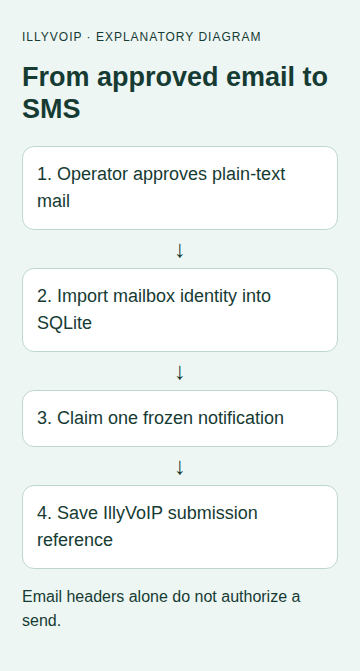
This guide turns a deliberately approved plain-text email into an SMS sent through your IllyVoIP account. You run the adapter on your own server. It reads a private IMAP folder, saves each notification in SQLite and submits one queued item at a time.
For example, an operator can approve a short maintenance notice and move it into Approved-SMS. The adapter sends that text to one fixed, configured on-call number. It does not create an IllyVoIP email address that anyone can mail, and it never takes the SMS recipient from an email header.
Before you start
You need an IllyVoIP account with SMS sending available, sufficient balance, an API key and a sender permitted for the destination. Sign in to the Portal and open account settings, then the API tab. Keep the key in the integration’s server-side secret store. A SIP password is not an API key. Confirm the recipient has agreed to this notification and use a number you control for initial acceptance testing.
This is a custom integration with the IllyVoIP SMS API. The external application does not acquire a native IllyVoIP connector by following these steps. A successful submission returns message references; delivery remains a separate outcome.
1. Create the approval boundary
- Create a dedicated mailbox and an
Approved-SMSfolder. Give only authorized operators permission to place messages there. - Prepare the SMS as a short plain-text message. Remove signatures, quoted conversations, customer details and anything the recipient does not need.
- Review the exact text and intended recipient before moving it to the folder. The example allows up to 500 characters; this is an application limit, not a promise that the message uses one billable segment.
- Keep unreviewed inbound mail in another folder. A visible From address, subject prefix or forwarding rule alone is not authorization to spend SMS credit.
The adapter ignores attachments and does not convert HTML. If your email provider requires OAuth, use its supported IMAP authentication flow rather than weakening the mailbox configuration. The example below uses an application password only where your provider and administrator allow it.
2. Prepare a private Python environment
Use Python 3.11 or later and a maintained Requests release. Create a virtual environment, install Requests and lock the version you validate for deployment. Keep the script, database and environment file outside your web root, readable only by the service account.
python3 -m venv .venv
.venv/bin/python -m pip install requests
Supply these environment variables through your service manager’s protected configuration. Do not put actual values in a shared shell transcript.
| Variable | Purpose |
|---|---|
| IMAP_HOST / IMAP_USER / IMAP_PASSWORD | Your mailbox’s TLS IMAP host and approved credentials. |
| IMAP_FOLDER | Defaults to Approved-SMS. Use a simple folder name without spaces for this example. |
| SMS_TO | One reviewed international number, including + and country code. |
| SMS_FROM | Your permitted IllyVoIP SMS sender. |
| ILLYVOIP_API_KEY | Your private API key. |
3. Save the adapter
Save the following as mail_sms.py. Its identity includes mailbox host, account, folder, UIDVALIDITY and UID. Read-only selection and BODY.PEEK prevent the importer from treating a read flag as a reliable queue checkpoint.
import email.policy
from email.parser import BytesParser
import hashlib, imaplib, json, os, re, sqlite3, sys
import requests

def database(path):
    db = sqlite3.connect(path, timeout=10)
    db.execute('PRAGMA synchronous=FULL')
    db.execute('CREATE TABLE IF NOT EXISTS jobs (job_key TEXT PRIMARY KEY, payload TEXT NOT NULL, state TEXT NOT NULL, message_id TEXT, http_status INTEGER)')
    db.commit()
    return db

def import_approved(db):
    host, user = os.environ['IMAP_HOST'], os.environ['IMAP_USER']
    folder = os.environ.get('IMAP_FOLDER', 'Approved-SMS')
    recipient = os.environ['SMS_TO']
    if not re.fullmatch(r'\+[1-9]\d{6,14}', recipient):
        raise ValueError('Use one approved international recipient')
    with imaplib.IMAP4_SSL(host, timeout=20) as mailbox:
        mailbox.login(user, os.environ['IMAP_PASSWORD'])
        status, _ = mailbox.select(folder, readonly=True)
        if status != 'OK': raise RuntimeError('Approved folder unavailable')
        _, validity = mailbox.response('UIDVALIDITY')
        if not validity or not validity[0]: raise RuntimeError('Missing UIDVALIDITY')
        status, found = mailbox.uid('search', None, 'ALL')
        if status != 'OK': raise RuntimeError('Mailbox search failed')
        for uid in found[0].split():
            identity = [host, user, folder, validity[0].decode(), uid.decode()]
            key = hashlib.sha256(json.dumps(identity).encode()).hexdigest()
            if db.execute('SELECT 1 FROM jobs WHERE job_key=?', (key,)).fetchone(): continue
            status, size = mailbox.uid('fetch', uid, '(RFC822.SIZE)')
            size_line = b' '.join(x for x in size if isinstance(x, bytes))
            match = re.search(rb'RFC822.SIZE (\d+)', size_line)
            if status != 'OK' or not match or int(match[1]) > 65536:
                raise ValueError('Review missing or oversized approved mail')
            status, chunks = mailbox.uid('fetch', uid, '(BODY.PEEK[])')
            raw = next((x[1] for x in chunks if isinstance(x, tuple)), None)
            if status != 'OK' or raw is None or len(raw) > 65536:
                raise ValueError('Review approved mail fetch')
            mail = BytesParser(policy=email.policy.default).parsebytes(raw)
            part = mail.get_body(preferencelist=('plain',))
            if part is None: raise ValueError('Approved mail needs a plain-text body')
            message = part.get_content().strip()
            if not 1 <= len(message) <= 500:
                raise ValueError('Review body: use 1–500 characters')
            payload = json.dumps({'from':os.environ['SMS_FROM'], 'to':[recipient], 'message':message})
            db.execute('INSERT OR IGNORE INTO jobs (job_key,payload,state) VALUES (?,?,?)', (key,payload,'READY'))
            db.commit()

def send_one(db, post=requests.post):
    db.execute('BEGIN IMMEDIATE')
    row = db.execute("SELECT job_key,payload FROM jobs WHERE state='READY' ORDER BY rowid LIMIT 1").fetchone()
    if row is None:
        db.commit(); return 'EMPTY'
    key, payload = row
    db.execute("UPDATE jobs SET state='ATTEMPTING' WHERE job_key=?", (key,))
    db.commit()  # A stopped process must not turn this back into READY.
    state, message_id, status = 'UNCERTAIN', None, None
    try:
        response = post('https://api.illyvoip.com/api/v1/sms/messages', data=payload,
            headers={'Content-Type':'application/json', 'X-Api-Key':os.environ['ILLYVOIP_API_KEY'], 'Idempotency-Key':key},
            timeout=(5,20), allow_redirects=False)
        status = response.status_code
        state = 'REVIEW'
        body = response.json()
        ids = body.get('queued_message_ids') if isinstance(body, dict) else None
        if 200 <= status < 300 and body.get('status') == 'success' and body.get('queued_count') == 1 and isinstance(ids,list) and len(ids)==1 and isinstance(ids[0],str) and ids[0]:
            state, message_id = 'SUBMITTED', ids[0]
    except (requests.RequestException, ValueError, TypeError, AttributeError):
        state = 'UNCERTAIN'
    db.execute('UPDATE jobs SET state=?,message_id=?,http_status=? WHERE job_key=?', (state,message_id,status,key))
    db.commit()
    return state

if __name__ == '__main__':
    os.umask(0o077)
    mode, path = sys.argv[1:]
    with database(path) as db:
        if mode == 'import': import_approved(db)
        elif mode == 'send-one': print(send_one(db))
        else: raise ValueError('Choose import or send-one')
4. Import first, then review the queue
.venv/bin/python mail_sms.py import /private/path/mail-sms.sqlite3Importing does not send an SMS. Inspect the READY rows locally with an authorized SQLite tool and confirm the recipient, sender and exact text. The importer rejects oversized mail and stops on invalid content so the operator can correct it; it does not silently trim a notice. A malformed first message can hold up later imports until you remove it from the approved folder.
Keep the database on a durable local filesystem, with backup and suitable file permissions. Do not place SQLite on a network share or give several hosts independent copies. Moving the same email into the folder again may assign a new UID. Rebuilding a mailbox may change UIDVALIDITY. Pause imports during mailbox migration and reconcile already submitted notices before resuming.
5. Send one deliberately approved item
.venv/bin/python mail_sms.py send-one /private/path/mail-sms.sqlite3This command can incur an SMS charge. It atomically claims one READY row before making one HTTP request. A second worker cannot claim that same row. Once the small test is accepted and delivery is checked, schedule import and send-one at your chosen interval under the same service account. Each invocation sends at most one item, so set an operational queue alert and choose an interval appropriate to the expected workload.
6. Test the failure paths before routine use
- With the HTTP client mocked, import a plain-text fixture twice and confirm one queue row.
- Confirm HTML-only and over-limit content stops for review, and that attachments never become SMS text.
- Simulate a successful response with one message ID; confirm SUBMITTED.
- Simulate a timeout after submission. The row must stay UNCERTAIN and a second send-one must not send it.
- Stop a worker after the claim. Confirm ATTEMPTING requires operator investigation.
- Only then approve one real message to your own recipient and verify both the API reference and delivery result.
Read the result and recover carefully
| State | What to do |
|---|---|
| SUBMITTED | Keep the returned message ID and check its delivery outcome through the Portal or documented SMS status workflow. Do not send again because a recipient has not yet replied. |
| REVIEW | The HTTP response did not meet the expected acceptance contract. Check authentication, sender permission, balance, recipient format and the response category before deciding on a next action. |
| ATTEMPTING, CLAIMED or UNCERTAIN | The process may have stopped after a paid request reached the service. Reconcile using the saved request identity, timing and available SMS records. Do not clear the record or generate another key to force a retry. |
The API’s idempotency key supports request identity, but your durable record is still necessary. Do not assume an unlimited retention period or that a changed message belongs to the same request. Keep the frozen payload and its key together. If a genuinely new notification is approved, give that business event its own identity.
Keep operational logs free of keys and complete message bodies. Store recipient data only where authorized, limit access and retain the records needed to investigate duplicate or uncertain sends. Removing a dispatch record while its source event can run again removes your local duplicate protection.
Related guides and official references
- Send an SMS with the IllyVoIP API and track delivery
- Send SMS from n8n with the IllyVoIP API
- Start with the API, Playground and webhooks
Reviewed 9 October 2026 against current IllyVoIP implementation and the linked sources. Use your account’s available options and installed software version. Local example checks do not establish a completed live call, delivered SMS or certified third-party integration.