
Use a HubSpot workflow to send a specific approved notification through IllyVoIP. This walkthrough uses a custom code action and a small MySQL dispatch table. The table gives repeated workflow runs a shared memory of what has already been attempted.
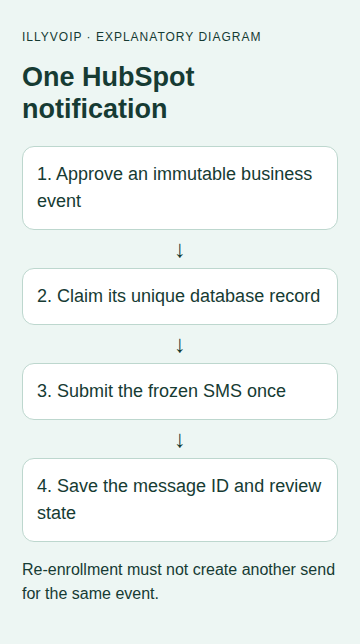
A suitable first use is an appointment notification with an immutable appointment-event ID. Re-enrolling a contact should not send the same event again. A later appointment is a different event and needs a different ID.
Before you start
You need an IllyVoIP account with SMS sending available, sufficient balance, an API key and a sender permitted for the destination. Sign in to the Portal and open account settings, then the API tab. Keep the key in the integration’s server-side secret store. A SIP password is not an API key. Confirm the recipient has agreed to this notification and use a number you control for initial acceptance testing.
This is a custom integration with the IllyVoIP SMS API. The external application does not acquire a native IllyVoIP connector by following these steps. A successful submission returns message references; delivery remains a separate outcome.
1. Check the HubSpot prerequisites
Custom code actions require an eligible HubSpot subscription; the current documentation lists Data Hub Professional or Enterprise. Confirm availability in your account before building the workflow. The action runs in a managed environment with a 20-second execution limit and 128 MB memory limit. The example uses the documented Node.js axios and mysql libraries.
You also need a durable MySQL database reachable from the action environment using certificate-validated TLS. Ask your database administrator to provide a restricted account and appropriate network access. A database open to arbitrary internet clients is not a prerequisite of this tutorial. If your policy cannot support this connection, host the claim-and-send service in your existing backend and call it from the workflow instead.
2. Define one business event
Create or map these action input fields. Use the exact input names in the code.
| Input name | Value |
|---|---|
| notification_id | A stable ID created when the appointment or notification is approved. Keep it unchanged on retries. |
| sms_to | The reviewed international recipient, such as a + country-code number. |
| sms_text | The final message; changes after a claim require review. |
| sms_approved | The exact value APPROVED, set by trusted staff or a controlled approval process. |
Do not use the current timestamp or a fresh random value inside the action as notification_id. Do not let a public form directly set the approval field. Restrict enrollment to the intended event and review re-enrollment settings. This example uses properties as a snapshot: staff must finish editing before approving enrollment.
3. Create the durable dispatch table
Have your administrator create this table in the integration database. Give the action account SELECT, INSERT and UPDATE on this table; routine sending does not need DROP or DELETE. Keep autocommit enabled and do not expire rows while their events can re-enroll.
CREATE TABLE illy_sms_jobs (
  job_key CHAR(64) PRIMARY KEY,
  payload_hash CHAR(64) NOT NULL,
  payload MEDIUMTEXT NOT NULL,
  state VARCHAR(20) NOT NULL,
  message_id VARCHAR(191) NULL,
  http_status SMALLINT NULL,
  created_at TIMESTAMP NOT NULL DEFAULT CURRENT_TIMESTAMP
) ENGINE=InnoDB;
4. Add the secrets and custom code action
Add three secrets to the action: ILLYVOIP_API_KEY, ILLYVOIP_SMS_FROM and SMS_DATABASE_JSON are the names used by the code. The database JSON contains host, user, password and database values supplied by your administrator. Its TLS certificate must be trusted by the action environment.
Choose a Node.js custom code action, map the four inputs, then paste the code below. Configure string output fields named sms_state and sms_message_id.
const mysql = require('mysql');
const axios = require('axios');
const {createHash} = require('crypto');
const hash = text => createHash('sha256').update(text).digest('hex');
exports.main = async (event, callback) => {
  const input = event.inputFields || {};
  const businessId = String(input.notification_id || '');
  const recipient = String(input.sms_to || '');
  const message = String(input.sms_text || '');
  if (input.sms_approved !== 'APPROVED' || !businessId ||
      !/^\+[1-9]\d{6,14}$/.test(recipient) || !message.trim())
    throw new Error('Require an approved event, recipient and text');
  const payload = JSON.stringify({from:process.env.ILLYVOIP_SMS_FROM,
    to:[recipient], message});
  if (!process.env.ILLYVOIP_API_KEY || !process.env.ILLYVOIP_SMS_FROM)
    throw new Error('Configure IllyVoIP secrets');
  const key = hash(JSON.stringify([event.origin.portalId,
    event.origin.actionDefinitionId, businessId]));
  const fingerprint = hash(payload);
  const config = JSON.parse(process.env.SMS_DATABASE_JSON);
  // The database must have a valid certificate trusted by this environment.
  const db = mysql.createConnection({...config, ssl:{rejectUnauthorized:true},
    connectTimeout:3000, multipleStatements:false});
  const query = (sql, values) => new Promise((resolve,reject) =>
    db.query({sql, values, timeout:3000}, (err,result) => err ? reject(err) : resolve(result)));
  let output;
  try {
    let claimed = false;
    try {
      await query('INSERT INTO illy_sms_jobs (job_key,payload_hash,payload,state) VALUES (?,?,?,?)',
        [key,fingerprint,payload,'ATTEMPTING']);
      claimed = true;
    } catch (error) {
      if (error.code !== 'ER_DUP_ENTRY') throw error;
    }
    if (!claimed) {
      const rows = await query('SELECT payload_hash,state,message_id FROM illy_sms_jobs WHERE job_key=?',[key]);
      if (rows.length !== 1 || rows[0].payload_hash !== fingerprint)
        throw new Error('Existing event differs; review instead of resending');
      output = {sms_state:rows[0].state, sms_message_id:rows[0].message_id || ''};
    } else {
      let state = 'UNCERTAIN', id = '', http = null;
      try {
        const response = await axios.post('https://api.illyvoip.com/api/v1/sms/messages', payload, {
          headers:{'Content-Type':'application/json','X-Api-Key':process.env.ILLYVOIP_API_KEY,
                   'Idempotency-Key':key}, timeout:7000, maxRedirects:0,
          validateStatus:() => true
        });
        http = response.status;
        const body = response.data;
        const ids = body?.queued_message_ids;
        const accepted = http >= 200 && http < 300 && body?.status === 'success' &&
          body.queued_count === 1 && Array.isArray(ids) && ids.length === 1 &&
          typeof ids[0] === 'string';
        state = accepted ? 'SUBMITTED' : 'REVIEW';
        if (accepted) id = ids[0];
      } catch (_) { /* Preserve uncertainty; no automatic second send. */ }
      await query('UPDATE illy_sms_jobs SET state=?,message_id=?,http_status=? WHERE job_key=?',
        [state,id,http,key]);
      output = {sms_state:state, sms_message_id:id};
    }
  } finally { db.destroy(); }
  callback({outputFields:output});
};
The primary key is derived from the HubSpot portal, action definition and approved business event. The saved payload hash prevents a changed recipient or text from being silently treated as an unchanged retry. Copying the workflow or replacing the action may change the action definition ID: reconcile existing events before enabling the replacement.
5. Branch on the saved outcome
- For SUBMITTED, copy sms_message_id into the appropriate notification record. Preserve the business event ID alongside it.
- For REVIEW or UNCERTAIN, create an internal review task and stop this send path.
- For an existing ATTEMPTING record, investigate the earlier run. Do not add a delay followed by an unconditional second HTTP send.
- If the custom action itself fails, inspect the dispatch row before re-enrolling. The database claim may already exist even when HubSpot has no outputs.
The action bounds its database and HTTP waits and makes no automatic second API attempt. If HubSpot re-executes an action, the unique database claim blocks another send for the same identity. A late database update failure leaves ATTEMPTING for review; it is not evidence that IllyVoIP rejected the message.
6. Validate with a small controlled workflow
First test with mocked database and HTTP responses in a development harness. Cover duplicate event IDs, changed text, accepted responses, HTTP rejection and transport timeout. Then use one internal test contact with an approved number. HubSpot’s action test can execute real code and send a paid SMS; review the inputs before pressing it.
Check that the second run with the same event makes no second HTTP request, that a changed payload stops for review and that SUBMITTED is never labeled delivered. Verify the real delivery separately before enabling enrollment for your intended audience.
Read the result and recover carefully
| State | What to do |
|---|---|
| SUBMITTED | Keep the returned message ID and check its delivery outcome through the Portal or documented SMS status workflow. Do not send again because a recipient has not yet replied. |
| REVIEW | The HTTP response did not meet the expected acceptance contract. Check authentication, sender permission, balance, recipient format and the response category before deciding on a next action. |
| ATTEMPTING, CLAIMED or UNCERTAIN | The process may have stopped after a paid request reached the service. Reconcile using the saved request identity, timing and available SMS records. Do not clear the record or generate another key to force a retry. |
The API’s idempotency key supports request identity, but your durable record is still necessary. Do not assume an unlimited retention period or that a changed message belongs to the same request. Keep the frozen payload and its key together. If a genuinely new notification is approved, give that business event its own identity.
Keep operational logs free of keys and complete message bodies. Store recipient data only where authorized, limit access and retain the records needed to investigate duplicate or uncertain sends. Removing a dispatch record while its source event can run again removes your local duplicate protection.
Related guides and official references
- Configure HubSpot sync
- Use IllyVoIP calling inside your CRM
- Start with the API, Playground and webhooks
Reviewed 9 October 2026 against current IllyVoIP implementation and the linked sources. Use your account’s available options and installed software version. Local example checks do not establish a completed live call, delivered SMS or certified third-party integration.