
Choose the ringing strategy
Open Queues from Manage queues in Voice Agent Studio. Select an existing queue or use New queue to begin.
Give the queue a recognizable name and review Strategy. The current options are Ring all, Round robin, Least recent, Fewest calls, Random and Linear. Read the strategy description in the portal when selecting it.
Ring all rings agents together. Review the separate Agent availability while ringing setting to decide whether agents already in calls are included.
Plan a queue around how your team answers
For a small team expected to answer together, Ring all is a useful starting point to evaluate. It still depends on eligible queue members, their priority, pause state and device availability. It does not mean every person on your account rings.
For sequential answering, review Linear and the member ordering used by the queue. Round robin distributes attempts through members rather than intentionally ringing everyone together. Read the strategy description and check the resulting behavior with your own membership before routing customer traffic. Do not assume changing the visual order of a list changes every strategy.
- Choose the strategy and review Agent availability while ringing.
- Review each member's SIP identity, priority and paused state. Lower priority values are earlier; 0 is highest. A priority setting does not make an offline device reachable.
- Set Ring timeout for a ringing round and Retry delay for the interval between unanswered rounds.
- Review Recall rounds, Max wait and Max callers together. Choose finite or unlimited behavior intentionally.
- Set wrap-up time for the answering workflow, save and reopen the queue to verify the saved values.
Define the caller’s waiting experience
Ring timeout
How long each ringing round lasts.
Retry delay
The pause between recall rounds when nobody answers.
Recall rounds
Choose unlimited recall or a custom number of rounds.
Max wait
The portal describes 0 as keeping the caller waiting until someone answers.
Max callers
Choose unlimited waiting callers or a custom limit.
Review unlimited waiting deliberately
Unlimited recall keeps retrying even when no agent is online. Decide how your team will handle periods with nobody available before routing customer calls to the queue.
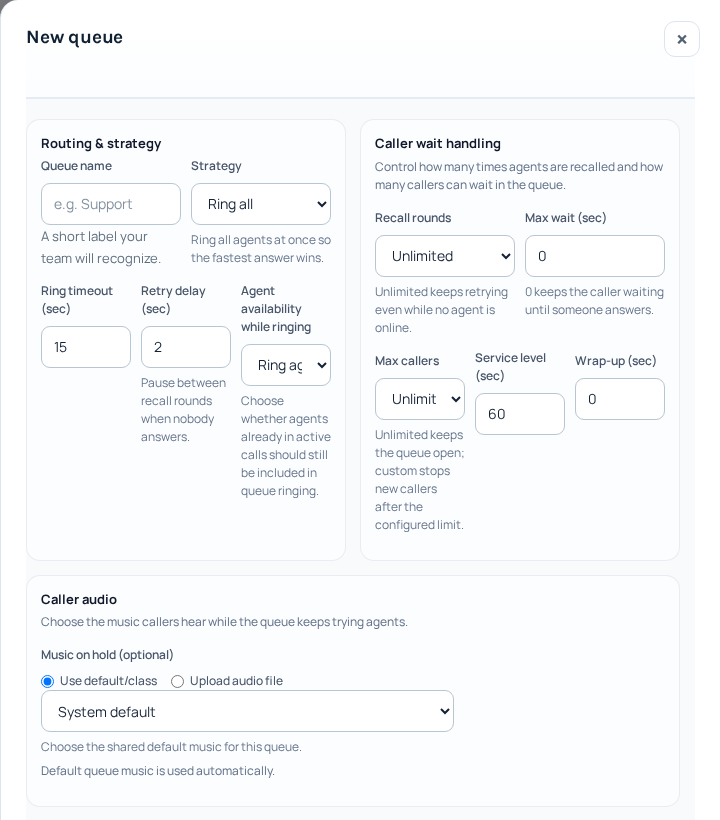
The New queue form separates ringing strategy, caller waiting limits and waiting audio. These are the form’s displayed values, not recommended settings for every team. Review them for your own answering policy before creating a queue. Open the image for a larger view.
Understand timing with an example
An illustrative 15-second ring timeout and 5-second retry delay describe a ringing round and a pause before another attempt. They are not a promise that a caller will be answered within 20 seconds. Other waiting limits, member states and the caller hanging up can affect the outcome.
Wrap-up time gives a member time after a call before another queue call; it is different from the caller's maximum wait. Service-level settings belong to queue reporting and should not be interpreted as a guaranteed response time.
Review audio and wrap-up
Set the queue’s wrap-up time and review the service-level field for your reporting setup. For waiting audio, choose the default music class or the upload option shown in the portal.
Check that the chosen audio and waiting behavior suit the service callers expect. Save the queue settings when your review is complete.
Add the intended SIP lines
The Agents area adds SIP lines as queue members. Select the correct identity, set its priority and add it. The interface describes lower values as earlier priority, with 0 highest.
Review each member’s active or paused state. Confirm the person’s device uses the same SIP identity and is available for calls; adding a name to a queue does not configure their phone.
Connect and check the incoming path
In Phone Numbers, configure an active number to use the intended queue destination. Queue configuration and phone-number routing are separate steps.
Arrange a controlled incoming test once the team is ready. Check ringing, audio, unanswered behavior and what happens when members are unavailable. For a problem, record the time, timezone and Call ID.
Check unanswered behavior before relying on the queue
Arrange an authorized check with an available member, then review what happens when the intended members cannot answer. A finite waiting limit does not, by itself, create an overflow destination or enable an agent mailbox. Inspect the number or Voice Agent flow that leads to the queue and its next steps.
For waiting audio, open the saved queue and use its waiting-music controls. Review the upload result before relying on new audio. Confirm the queue settings and the incoming number destination separately after a change.
Maintain the queue after setup
Review members when agents join, leave or change SIP lines. A member listed in the queue may still be offline, paused or unable to answer. Saving a queue does not automatically route a phone number to it: check the number’s incoming destination separately.
Before removing or replacing a queue, review the numbers and flows that use it and prepare their replacement destination. Do not assume removing members creates an overflow route or enables voicemail. Waiting limits and no-answer behavior must be checked in the actual configuration; test the intended path with an ordinary call you are authorized to make.
Reviewed 10 October 2026 against the current IllyVoIP Portal and service implementation. Available controls depend on account access and service state.
Pause a queue member for a break
Use the member’s pause control when you want to stop offering that queue’s new calls to the member temporarily while keeping the membership and priority. This is different from removing the member, changing the queue strategy or making the SIP device unavailable everywhere.
- Open Queues and select the intended queue. Read its member list and identify the correct SIP member. If the same person belongs to several queues, check each queue separately.
- Find the member’s Paused checkbox and current Active or Paused status. Note the priority so you can confirm it remains unchanged.
- Check Paused once. Wait while the member controls are busy; do not remove and re-add the member to force a result.
- Let the list refresh and confirm the member now reads Paused. If you leave and reopen the queue, confirm the same saved state.
Pausing membership is not an instruction to terminate a conversation already in progress, and it does not establish that a call already offered has been withdrawn. Finish or handle that conversation through the phone’s normal controls. The member can still have other calling responsibilities outside this queue.
Resume the member and verify readiness
- Confirm that the member’s phone is ready to receive calls again.
- Open the same queue and clear Paused for the same member.
- Wait for the refreshed list to show Active. Confirm the priority is still the intended value.
- If calls still do not reach the member, check phone availability, the queue’s routing and member selection rules, and the number’s destination. Active membership alone does not guarantee that this member receives the next call.
If saving the pause state fails
A checkbox can move before the save completes. The Portal refreshes member data after a change and restores the last known state if a mutation fails. Read the error and the refreshed status rather than treating the click as confirmation. If the state is still uncertain, reopen the member list before deciding whether to retry. Keep the queue name, member reference, time and error for Support; do not send the member’s SIP password.
Reviewed 12 October 2026 against the current IllyVoIP controls, implementation and applicable references. Available options depend on account permissions and service state.