
A server-side JavaScript application can upload MP3 or WAV audio to IllyVoIP and save the returned transcript. This walkthrough uses Node.js 24 and its built-in fetch, FormData and Blob support. It does not use the browser's SpeechRecognition API.
1. Prepare account and application access
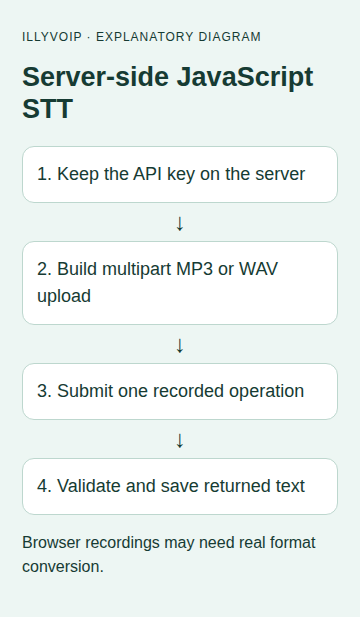
You need an IllyVoIP account allowed to use the speech API, an API key, sufficient balance and permission to process the input. In the Portal, open Account settings → Developer tools and follow the verification prompts for your key. Keep it in your server's secret configuration as ILLYVOIP_API_KEY; do not put it in a browser bundle or commit it to source control.
The examples make real paid requests when run against Production. They make one attempt and preserve its outcome. Test error handling with mocked responses first. A timeout can leave the processing result uncertain; it is not permission to send the same paid job again under a new local name.
Create a private Node.js project and save the module below with an .mjs extension. No separate IllyVoIP npm package is required. The example buffers one file and applies a 20 MiB local ceiling; this is an application choice, not a quoted server upload limit.
2. Inspect the speech language catalog
Read the catalog from your backend. Keep the response's supported language value for the upload, using context=speech_api. Do not substitute Voice Agent language options.
const response = await fetch(
  'https://api.illyvoip.com/api/v1/stt/languages?context=speech_api', {
    headers:{'X-Api-Key':process.env.ILLYVOIP_API_KEY},
    redirect:'error', signal:AbortSignal.timeout(30000)
  });
if (!response.ok) throw new Error(`Catalog HTTP ${response.status}`);
console.log(await response.json());
Choose an authorized file whose speech can be checked against the result. Browser recording often produces WebM or another container. That file is not supported merely because you rename it .wav; convert it through a controlled media process if necessary and confirm the actual format.
3. Save the one-attempt upload module
Save this as transcribe.mjs. It creates the operation directory before the request, so another run using that directory stops locally. The multipart boundary is generated by FormData; do not add a JSON Content-Type header.
import {readFile, stat, mkdir, writeFile} from 'node:fs/promises';
import {basename, extname, join} from 'node:path';
import {createHash} from 'node:crypto';

export async function transcribeOnce(file, language, directory, apiKey,
                                     send = fetch) {
  const mime = {'.mp3':'audio/mpeg', '.wav':'audio/wav'}[extname(file).toLowerCase()];
  const size = (await stat(file)).size;
  if (!mime || size < 1 || size > 20 * 1024 * 1024)
    throw new Error('Use MP3/WAV within the example’s 20 MiB local limit');
  if (!apiKey || !language) throw new Error('Set the API key and catalog language');
  const bytes = await readFile(file);
  const form = new FormData();
  form.set('context', 'speech_api');
  form.set('language', language);
  form.set('file', new Blob([bytes], {type:mime}), basename(file));
  await mkdir(directory, {mode:0o700}); // EEXIST blocks another attempt.
  await writeFile(join(directory, 'request.json'), JSON.stringify({
    language, fileSha256:createHash('sha256').update(bytes).digest('hex')
  }), {mode:0o600, flag:'wx'});
  await writeFile(join(directory, 'state.txt'), 'ATTEMPTING', {mode:0o600});
  try {
    const response = await send('https://api.illyvoip.com/api/v1/stt/transcribe', {
      method:'POST', headers:{'X-Api-Key':apiKey}, body:form,
      redirect:'error', signal:AbortSignal.timeout(90000)
    });
    const raw = await response.text();
    await writeFile(join(directory, 'response.txt'), raw, {mode:0o600});
    await writeFile(join(directory, 'http.txt'), String(response.status), {mode:0o600});
    if (!response.ok) throw new Error('HTTP response needs review');
    const result = JSON.parse(raw);
    if (result?.status !== 'success' || typeof result.text !== 'string')
      throw new Error('Unexpected transcription response');
    await writeFile(join(directory, 'transcript.txt'), result.text,
                    {encoding:'utf8', mode:0o600, flag:'wx'});
    await writeFile(join(directory, 'state.txt'), 'SAVED', {mode:0o600});
    return {language:result.language, durationMs:result.duration_ms};
  } catch (error) {
    await writeFile(join(directory, 'state.txt'), 'REVIEW', {mode:0o600});
    throw new Error('Review the saved operation before any resend', {cause:error});
  }
}
4. Run a deliberate transcription
Set the API key and supported STT_LANGUAGE through private environment configuration. Save this runner as run.mjs beside the module:
import {transcribeOnce} from './transcribe.mjs';
process.umask(0o077);
const result = await transcribeOnce('approved-recording.wav',
  process.env.STT_LANGUAGE, 'stt-job-001', process.env.ILLYVOIP_API_KEY);
console.log('Transcript saved; duration in ms:', result.durationMs);
Run node run.mjs only when ready for a paid Production upload. On success, read the transcript in the job directory and compare names, numbers and technical terms with the recording. A successful HTTP response is not a guarantee of perfect recognition.
5. Preserve uncertainty and local recovery
A fetch abort or timeout means your application stopped waiting. It does not prove IllyVoIP stopped processing. The catch branch marks the operation for review and does not send again. Preserve the original file and its hash, the timestamp and any saved response.
If response JSON was saved successfully but the transcript file could not be written, recover text from that response after review. Do not re-upload audio just to repair a local disk problem. The local directory is not a distributed idempotency store: a multi-worker service needs one durable job owner and a recovery policy.
6. Connect a browser safely
If users upload audio through your website, authenticate them on your backend, authorize the operation and enforce upload/storage limits before making this request. The backend holds the IllyVoIP key and calls the module. Return only the user's allowed transcript/result, never the key or another user's job folder.
Use a job identifier and progress state when processing may outlast a normal web request. A browser refresh must look up the same job, not create another transcription. Keep microphone capture, format conversion, file upload and transcription as separate observable stages.
Troubleshooting and validation
- Module APIs missing: check that the application actually runs on the supported Node version rather than an older system binary.
- Invalid file: inspect the real container and upload field, not just its name.
- Language error: refresh the standalone catalog.
- Malformed JSON or unsuccessful status: inspect the private response; do not treat it as transcript text.
- Directory exists: investigate the prior job instead of choosing a new directory to evade the guard.
Test acceptance, rejection, malformed response, duplicate local invocation and a timeout with a mocked fetch implementation. A real authorized transcription is still needed to evaluate the audio outcome. This guide does not promise streaming, diarization, word timestamps or subtitle output.
Related guides and official references
- Transcribe an audio file with the IllyVoIP Speech-to-Text API
- Start with the API, Playground and webhooks
Reviewed 9 October 2026 against current IllyVoIP implementation and the linked sources. Use your account’s available options and installed software version. Local example checks do not establish a completed live call, delivered SMS or certified third-party integration.