
Choose live or historical information
Open Realtime Operations for activity happening now. Use Performance for historical reporting, and call history to investigate an individual completed call. A live view is not a permanent record of every call.
Understand the live workspace
- Review active calls, waiting callers, available agents and longest wait.
- Use the call view and search to find the activity you need.
- Filter by queue or direction when those controls apply.
- Open a call or agent's details for more context. Available actions depend on your access and the call's state.
Queue waiting counts and active calls describe different things; do not add them together as if they were all connected conversations. A call can end while you are viewing it.
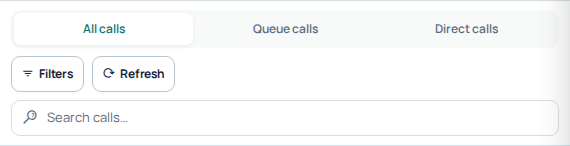
The live workspace offers call-type tabs, search and filters. Use these controls to narrow the current view before investigating an individual call. Open the image for a larger view.
Compare performance fairly
Choose the same reporting period and timezone when comparing totals. Review overall performance or switch to phone-number and agent reports. Check the filters before interpreting a low count; a short period or a selected agent can exclude much of your activity.
Answer rates describe how many calls were answered within the report's scope. Average duration describes a different aspect of activity. Neither metric alone proves audio quality or explains why a specific call failed. Use individual call details for the outcome and available failure explanation.
Choose Daily, Monthly or All time to change the performance summary view. Compare equivalent periods and metrics; this cropped view excludes account totals. Open the image for a larger view.
Investigate a discrepancy
Allow a recently ended call to appear in history, then compare its public reference, time and direction. Send Support those details and the report filters if totals still look wrong. Monitoring controls can affect real calls; use them only when intended and authorized.
Listen, coach and end calls deliberately
Live-call actions depend on your role and permissions. Spy is the listen control; Whisper is for coaching the agent. When joining, select the correct available SIP identity and have its device ready to receive the monitoring connection. These are real call actions, not a recording preview. Use them only when authorized and with the required notices and permissions.
Hang up affects the selected live call. Check the exact row and public call reference before acting; a refreshed list can change while you are looking at it. Do not use monitoring controls to troubleshoot an unrelated customer conversation.
Read reports with their filters
Compare the same period, timezone, agent or phone-number scope and direction. Agent presence is current availability, not proof of billable activity. A phone-number report groups that number’s traffic; an agent report uses its own agent scope. Totals can differ when filters or meanings differ. Use the metric label and call details rather than treating every displayed total as the same denominator.
Where an export is offered, verify its filters and completed status before using the file. For a discrepancy, retain a representative public call reference and the filters; do not send an entire private dataset unnecessarily.
Listen to a live call or coach its agent
Use monitoring only for calls and agents you are authorized to supervise. Check your team's notice and consent arrangements before listening. Access to a reports page does not automatically grant permission to monitor every live call.
- Open Realtime Operations and locate the intended active call using its agent, direction and current details.
- Choose the offered Spy action to listen, or Whisper to coach the agent. Confirm the mode before starting; do not infer an additional Barge mode from these labels.
- Select the SIP identity offered for receiving the monitoring call. Have its authorized device registered and ready to answer.
- Confirm the action once and answer the monitoring call on that device when it arrives.
- Check that you are listening to the intended conversation. When coaching, address the agent and use only the selected mode's intended behavior.
- End your own monitoring leg when finished. The customer's live-call Hang up action is a different operation and can end their conversation.
For example, a supervisor can listen while a new agent handles a support question, then use the offered coaching workflow when guidance is needed. This requires the supervisor's receiving SIP device as well as permission to access that live call; opening the dashboard alone does not supply audio.
If monitoring does not connect
First check whether the customer call is still active. A live row can become stale as a call ends. Then check the selected monitoring identity, its device registration and your access to that call. If the Portal reports that the telephony service is unavailable, repeated clicks do not establish a working monitoring session.
Review any monitoring attempt already received before trying again. Give support the time, selected mode and public call reference where available. Do not send an entire live-call list, SIP password or private audio recording. No customer call was monitored to prepare this guide.
Read Performance Summary step by step
- Open Performance Summary.
- Choose Daily, Monthly or All time. Confirm the selected period before comparing totals.
- Read Total calls, Answer rate, Talk time and Total spend together.
- Use the Performance trend metric selector to choose the measure you want to inspect.
- Compare the chart with the Detailed breakdown below it. Daily and Monthly group results differently; All time provides combined metrics.
Understand answer rate and average talk time
ASR is the answer rate: answered calls divided by the report’s total answered and failed attempts, expressed as a percentage. Average talk time divides recorded talk duration by answered calls. Neither is a measure of whether a customer’s issue was resolved.
For example, 30 answered and 20 failed attempts give a 60% answer rate. If the answered calls total 90 minutes, average talk time is three minutes. These illustrative figures show why a higher answer rate and longer conversations describe different changes.
Check incomplete periods before drawing conclusions. Today’s activity and a completed day, or a partial month and a full month, are not equal observation periods. Duration displays such as 00:30:00 mean thirty minutes. The cost reported here is not a complete statement of all account services.
Move from a trend to the calls behind it
When a point or period looks unusual, open Call Reports for that interval and inspect a representative result. Clear unwanted agent or number filters. Use the dedicated agent and phone-number reports when you need those breakdowns; their scopes can differ from the overall summary. If a chart or summary is unavailable, keep its message and reporting period rather than interpreting missing data as zero traffic.
Detailed reporting guides
Related guides
Reviewed 10 October 2026 against the current IllyVoIP Portal and implementation. Available controls depend on account permissions and service state.