
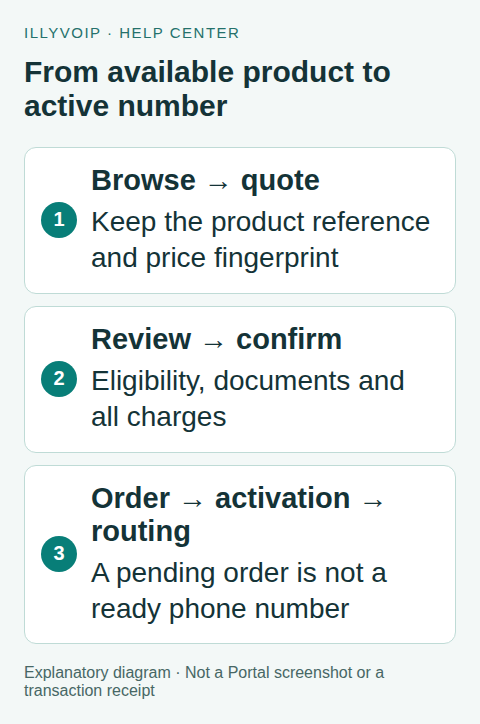
Use the IllyVoIP DID API to browse availability, obtain a current quote and submit an order with that quote’s fingerprint. Keep the order reference and follow its activation state before treating the number as ready for incoming calls.
This guide is for backend developers building an account-specific purchase workflow. You need the account owner’s API access with Phone numbers enabled, sufficient balance and the verified identity and regulatory evidence required for the chosen destination. Browsing and quoting do not buy a number; submitting the order can create a paid obligation.
1. Browse countries and regions
Use X-Api-Key authentication for these GET requests:
/api/v1/dids/catalog/countrieslists available destination countries./api/v1/dids/catalog/regionsaccepts the selectedcountry_isoand returns its region choices./api/v1/dids/numberssearches the chosen country, with an optional returnedregion_code.
Use current returned codes, not translated country names or an invented region. A catalogue entry is not a promise of stock or account eligibility. Keep the API key server-side rather than exposing it in a customer-facing purchase page.
2. Preserve the selected product reference
Search numbers using a request such as this cURL template. Set DID_COUNTRY from the catalogue; add a region only when you selected one.
curl --silent --show-error --fail-with-body --get 'https://api.illyvoip.com/api/v1/dids/numbers' -H "X-Api-Key: ${ILLYVOIP_API_KEY:?Set your API key}" --data-urlencode "country_iso=${DID_COUNTRY:?Select a catalogue country}" --data-urlencode 'limit=20' > number-search.jsonPreserve the opaque product_reference from the selected result. Do not parse it or substitute a supplier ID. Distinguish exact selectable-number inventory from quantity-order products. In a quantity order, an estimated quantity is not a reservation of particular phone numbers.
For quantity-product pagination, follow the returned meta.next_offset while keeping search filters unchanged. Do not apply that offset loop to selectable-number inventory, where it is not supported. This walkthrough uses one quantity-order product; exact-number purchases must retain the same selected numbers and browse mode throughout their quote/order flow.
3. Obtain a fresh quote
POST to /api/v1/dids/orders/quote on the HTTPS API host api.illyvoip.com with JSON and your API key. Use the selected product and current search criteria:
{
  "country_iso": "SELECTED_ISO2_CODE",
  "product_reference": "RETURNED_PRODUCT_REFERENCE",
  "quantity": 1
}
Read data.quote, including currency, quantity, expiry, per-number charges and totals. Save data.quote.fingerprint unchanged; it becomes pricing_fingerprint in the order request. A quote is time-limited, and it does not reserve stock or eligibility.
| Charge | What to explain before confirmation |
|---|---|
| Due now | The quote’s immediate total, including the components actually returned. |
| Monthly rental | The recurring per-number amount and relevant renewal terms. |
| Per-minute usage | Incoming-call usage charged separately from rental. |
| Connection fee | A charge per connected incoming call where applicable; it is not the one-time number setup fee. |
Display any proration and second-month components returned by the quote. Do not reconstruct a lower total from only the setup and monthly fields. Version 2 quotes expose the incoming-call connection fee separately; it is not included in due-now or monthly rental.
4. Check eligibility and collect required evidence
Display data.kyc_eligibility.message. Enable a new purchase only when the returned eligibility is allowed. Restricted issuing-country rules use the issuing country of the approved identity document, not the customer’s residence, nationality, IP address or chosen phone number. A worldwide policy does not remove other identity or destination requirements.
Inspect the selected product’s regulation requirements for documents, address and identity. Use the returned document labels and required address scope. Do not insert fictional evidence or assume all countries accept the same documents. Keep uploaded identity data private and out of logs.
If the requirements are unavailable or eligibility cannot be established, stop before confirmation. The server checks again when accepting the purchase. An account exception to issuing-country rules is not a blanket waiver of identity verification.
5. Submit one confirmed order
After the customer reviews the current quote and requirements, persist a unique Idempotency-Key with the exact purchase request. POST to /api/v1/dids/orders with that header and this minimal quantity-order shape:
{
  "country_iso": "SELECTED_ISO2_CODE",
  "product_reference": "RETURNED_PRODUCT_REFERENCE",
  "pricing_fingerprint": "RETURNED_QUOTE_FINGERPRINT",
  "quantity": 1
}
This minimal body is sufficient only when the selected product does not require additional evidence. Include documented documents, regulation_address and regulation_identity when required. If the quote expires or the selection changes, obtain and display a new quote before a new purchase decision. Do not silently replace the price after confirmation.
On an uncertain network outcome, retain the original key and payload and reconcile the purchase. Do not create another order with a new key just because the first response was lost.
6. Follow activation and configure incoming routing
Save data.order.order_reference, order IDs, requested quantity and fulfilled quantity. A successful response with a pending order is not an active number. Read GET /api/v1/dids/orders and locate the saved order among its returned groups.
Follow the order’s regulation status, action flags, message and rejection reasons. Use the documented document/resubmission workflow when permitted. Do not submit a duplicate purchase to solve a document problem. Once active, configure the intended incoming destination through the supported number controls and verify the receiving system.
Frequently asked questions
Does buying a virtual number enable SMS or OTP?
No such promise follows from a voice-number purchase. Messaging capability, activation and third-party verification acceptance are separate checks.
Can I cancel by deleting my local order record?
No. Local deletion does not cancel a paid order or its renewal. Follow the documented cancellation workflow and verify the resulting state.
Related guides and official references
Reviewed on 8 October 2026 against the current IllyVoIP implementation and available official documentation. Examples use placeholders and are not evidence of a completed live transaction. Check your account’s current availability and prices before executing paid requests.
Choose an exact number instead of a quantity
Use the exact-number flow only when the current catalogue offers selectable numbers for that product. Some products support quantity ordering without letting you choose the digits. A catalogue result is not a reservation, and editing a returned number does not make that number available.
- Browse the current country, region and number type using the numbers endpoint. Keep the opaque
product_referencefrom the chosen result and select only numbers actually returned as available. - Prepare the quote using that product and the exact selected
numbersarray withbrowse_mode=true. Keep the matching country, region and number type. If you include quantity, make it agree with the selection. - Review the quote’s setup and recurring charges, requirements and eligibility. Collect the required documents or address information for this product. Do not assume another country or number type has the same requirements.
- Retain the returned
quote.fingerprint. Send it aspricing_fingerprintin the order alongside the unchanged product and number selection. Use one durable idempotency key for this logical order. - Save the returned order reference and inspect the saved order’s state. Submission is not proof that provisioning or regulatory approval is complete.
Keep the quote and order selection identical
Selection sent for quote and retained for order:
browse_mode: true
product_reference: <opaque value returned by the catalogue>
numbers: [<exact returned number>]
quantity: 1

Order also includes:
pricing_fingerprint: <quote.fingerprint>
Idempotency-Key: <your persisted order key>
This is a field checklist, not a complete JSON request. Use the current endpoint schema for the full request and conditional documents. Do not copy placeholder values into Production.
If stock or the quote changes
A number may become unavailable between browsing and ordering. If the response says the selection or quote is stale, retrieve current availability and obtain a fresh quote. Show the revised number and price to the person approving the order. Do not silently substitute another number, drop exact-selection mode or reuse an old fingerprint with changed input.
If a request times out, first reconcile the original order and follow its idempotency contract. Changing the selection or generating a new retry key while the first order is unresolved can create another purchase. A saved order that is awaiting documents needs its document workflow, not another order submission.
When you cannot reconcile an error, send Support the order reference if available, UTC time and sanitized error. Keep identity documents and account credentials out of ordinary logs.
Related guides
Reviewed 12 October 2026 against the current IllyVoIP controls, implementation and applicable references. Available options depend on account permissions and service state.