
Before you start
Porting moves an existing telephone number from your current carrier to IllyVoIP. It is different from ordering a new number. Availability and required documents depend on the number and country; submitting a request does not guarantee that a number can be transferred.
Keep the existing service active until the transfer is confirmed. Prepare a recent carrier bill and, if requested, a Letter of Authorization. The authorized name, account details and service address should match the current carrier's records.
Submit the request
- Open Number Porting and choose Start porting request.
- In Numbers, enter the numbers you want to transfer, including their country codes.
- In Account, provide the current carrier, authorized name, account number, PIN or passcode where applicable, and the service address. Add the requested documents and preferred date.
- Review the numbers and details, then submit. Moving between wizard steps does not submit the request.
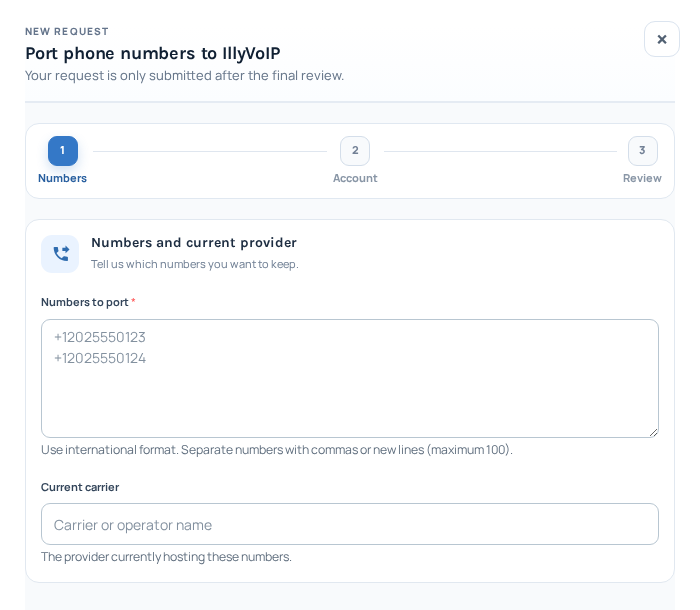
The porting wizard begins with the numbers and current carrier, followed by Account and Review. The example numbers are placeholders, not entered numbers. This blank request has not been submitted. Open the image for a larger view.
Follow the transfer
The request list shows the numbers, status, current carrier, porting date and last update. The preferred date is a request, not a guaranteed completion time. Respond to requests for corrected details or documents so the carrier review can continue.
After completion
Check that the number appears in your phone numbers, review its incoming-call destination and test an incoming call. Contact Support with the porting request reference if the status or timing is unclear. Do not share account PINs in public messages.
Related guides
- How to order a DID Number and start making calls
- How to Read and Understand Your VoIP Call Reports (CDR)
Correct an existing porting request
If more information is requested, open the existing request and use its reply or document controls where offered. Read the reason, correct the relevant details and submit the requested documents through that secure workflow. Avoid creating a second porting request for the same number.
Keep the losing carrier’s service active while review or scheduling is pending. If the requested date changes or a document is rejected, follow the current request status and contact Support with its reference. After a confirmed transfer, check the number’s current monthly and usage pricing, renewal settings and incoming destination—not only whether it appears in the list.