
Use Python's requests library to upload an MP3 or WAV file to the IllyVoIP Speech-to-Text API. The server returns a transcript, language and audio duration. This guide builds the HTTP client itself, including a private operation folder that prevents an accidental second submission.
This is for backend developers using Python 3.11 or newer. It is file transcription, not microphone streaming or the separate Call Reports transcription control. Start with a short recording whose spoken content you can check.
1. Prepare Python and API access
You need an IllyVoIP account allowed to use the speech API, an API key, sufficient balance and permission to process the input. In the Portal, open Account settings → Developer tools and follow the verification prompts for your key. Keep it in your server's secret configuration as ILLYVOIP_API_KEY; do not put it in a browser bundle or commit it to source control.
The examples make real paid requests when run against Production. They make one attempt and preserve its outcome. Test error handling with mocked responses first. A timeout can leave the processing result uncertain; it is not permission to send the same paid job again under a new local name.
python3 -m venv .venv
. .venv/bin/activate
python -m pip install requests
Record the installed dependency version in your application's normal lock file after testing. Keep the working directory private. The client below sets a 20 MiB local input ceiling to bound memory use; that is an example application policy, not a statement of IllyVoIP's current upload allowance. The server also checks the actual upload.
2. Choose a supported language
Request the standalone speech language catalog before submitting audio. Set STT_LANGUAGE to a returned value appropriate for your recording. Use context=speech_api; Voice Agent and Voice API catalogs may differ.
import os, requests
r = requests.get('https://api.illyvoip.com/api/v1/stt/languages',
    headers={'X-Api-Key': os.environ['ILLYVOIP_API_KEY']},
    params={'context':'speech_api'}, timeout=(10,30), allow_redirects=False)
r.raise_for_status()
print(r.json())
Read the catalog's default and language entries. Do not invent a language code because another transcription product supports it. An MP3/WAV extension alone does not prove the file is valid audio; listen privately and confirm it contains speech before uploading.
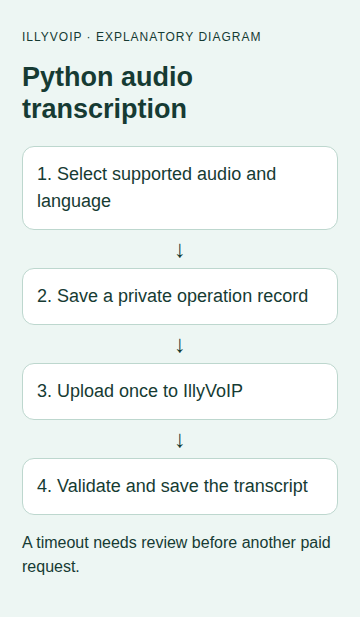
3. Save the one-attempt client
Save this as transcribe.py. It sends the file bytes in a multipart field named file. Let requests generate the multipart boundary; adding a JSON Content-Type header would break this request.
import base64
import hashlib
import json
import os
from pathlib import Path
import requests

ORIGIN = 'https://api.illyvoip.com'

def transcribe_once(audio_path, language, operation_dir, api_key):
    path = Path(audio_path)
    mime = {'.mp3': 'audio/mpeg', '.wav': 'audio/wav'}.get(path.suffix.lower())
    if not mime or not 0 < path.stat().st_size <= 20 * 1024 * 1024:
        raise ValueError('Use an MP3/WAV within this example’s 20 MiB local limit')
    audio = path.read_bytes()
    payload = {'context': 'speech_api', 'language': language}
    def request():
        return requests.post(ORIGIN + '/api/v1/stt/transcribe',
            headers={'X-Api-Key': api_key}, data=payload,
            files={'file': (path.name, audio, mime)},
            timeout=(10, 90), allow_redirects=False)
    result = run_once(operation_dir, {'kind': 'stt', 'language': language,
        'file_sha256': hashlib.sha256(audio).hexdigest()}, request)
    if not isinstance(result.get('text'), str):
        raise ValueError('Missing transcript; review the saved response, do not resend')
    with (Path(operation_dir) / 'transcript.txt').open('x', encoding='utf-8') as f:
        f.write(result['text'])
    return result

def run_once(operation_dir, record, request):
    directory = Path(operation_dir)
    directory.mkdir(mode=0o700)  # Existing directory stops repeat execution.
    (directory / 'request.json').write_text(json.dumps(record), encoding='utf-8')
    (directory / 'state.txt').write_text('ATTEMPTING', encoding='utf-8')
    try:
        response = request()
        (directory / 'response.txt').write_text(response.text, encoding='utf-8')
        (directory / 'http.txt').write_text(str(response.status_code), encoding='utf-8')
        if not 200 <= response.status_code < 300:
            raise ValueError('HTTP result requires review')
        result = response.json()
        if not isinstance(result, dict) or result.get('status') != 'success':
            raise ValueError('API result requires review')
        (directory / 'state.txt').write_text('RESPONSE_SAVED', encoding='utf-8')
        return result
    except Exception:
        (directory / 'state.txt').write_text('REVIEW', encoding='utf-8')
        raise
The operation folder is created exclusively. If it already exists, the function stops before contacting IllyVoIP. Keep the original audio privately alongside your job record: the stored hash identifies its bytes but is not a recoverable copy. Protect the directory and backups because the API response contains the transcript.
4. Run one authorized transcription
Set the key and language through your approved environment configuration. Save this short runner next to the client. Choose a new operation directory only for a genuinely new, authorized job.
import os
from transcribe import transcribe_once
os.umask(0o077)
result = transcribe_once('approved-recording.wav',
    os.environ['STT_LANGUAGE'], 'job-001', os.environ['ILLYVOIP_API_KEY'])
print('Saved transcript; duration in ms:', result.get('duration_ms'))
On success, open job-001/transcript.txt. Check names, numbers and technical terms against the audio. An empty string is a possible returned transcript; inspect the recording and response rather than assuming a server fault. Duration is in milliseconds, not a charge amount.
5. Review errors without duplicate uploads
| Result | Next step |
|---|---|
| Existing operation folder | Inspect its saved outcome; do not delete it merely to force another send. |
| HTTP rejection | Read the private response and correct access, input or language deliberately. |
| Timeout or interrupted connection | Keep the original file, hash, time and operation folder. Reconcile before resubmitting. |
| Response saved but output missing | Recover text from the saved successful JSON after review; do not upload the audio again just to recreate a local file. |
The service has its own duplicate-charge protection, but this client does not assume every repeated or changed request will be free. The folder is a local guard for this single process workflow, not a distributed queue or the server's idempotency contract.
6. Integrate into a larger application
Use an authenticated upload route, storage limits and one owner for each job. Keep permanent API keys on the backend. A job worker should preserve pending and uncertain states across restarts rather than resetting everything to unsent.
Before deployment, check success, invalid JSON, HTTP rejection, a transport failure and output-file failure with synthetic fixtures. An authorized paid test is still needed to assess real audio and transcription quality for your account.
Common questions
Can I upload an audio URL? This endpoint expects multipart file bytes. Downloading or validating a remote file would be a separate, controlled backend step.
Does it return speaker labels or subtitles? Do not assume those fields. This example consumes only the documented transcript, language and duration.
Related guides and official references
- Transcribe an audio file with the IllyVoIP Speech-to-Text API
- Start with the API, Playground and webhooks
Reviewed 9 October 2026 against current IllyVoIP implementation and the linked sources. Use your account’s available options and installed software version. Local example checks do not establish a completed live call, delivered SMS or certified third-party integration.