
To generate speech from Python, choose an IllyVoIP voice, submit text to the synthesis endpoint and decode the returned audio. The result is an audio file you can review and use in your application; it does not automatically play into a live phone call.
This guide uses Python 3.11 or newer and requests. It builds a complete client rather than calling cURL and using Python only to decode a saved response.
1. Prepare a private working environment
You need an IllyVoIP account allowed to use the speech API, an API key, sufficient balance and permission to process the input. In the Portal, open Account settings → Developer tools and follow the verification prompts for your key. Keep it in your server's secret configuration as ILLYVOIP_API_KEY; do not put it in a browser bundle or commit it to source control.
The examples make real paid requests when run against Production. They make one attempt and preserve its outcome. Test error handling with mocked responses first. A timeout can leave the processing result uncertain; it is not permission to send the same paid job again under a new local name.
python3 -m venv .venv
. .venv/bin/activate
python -m pip install requests
Keep the source text, generated audio and responses out of public directories. Review the speech price before generating audio. Do not put a paid synthesis call inside a web-page render, health check or automatic retry loop.
2. Select language and voice from the catalog
Use the standalone speech_api context for both catalog requests. First inspect languages; then fetch voices for a selected language. Set TTS_LANGUAGE and TTS_VOICE to the returned values.
import os, requests
headers = {'X-Api-Key': os.environ['ILLYVOIP_API_KEY']}
url = 'https://api.illyvoip.com/api/v1/tts/languages'
r = requests.get(url, headers=headers, params={'context':'speech_api'},
                 timeout=(10,30), allow_redirects=False)
r.raise_for_status()
print(r.json())
# Stop here, inspect the response and set TTS_LANGUAGE.
# Run the following only after selecting that catalog language:
url = 'https://api.illyvoip.com/api/v1/tts/voices'
r = requests.get(url, headers=headers,
                 params={'context':'speech_api', 'language':os.environ['TTS_LANGUAGE']},
                 timeout=(10,30), allow_redirects=False)
r.raise_for_status()
print(r.json())
For the initial language request, select TTS_LANGUAGE after inspecting its result before running the voices step. A voice from a different provider or Voice API context is not interchangeable. Store a selected catalog identifier rather than guessing a human-readable name.
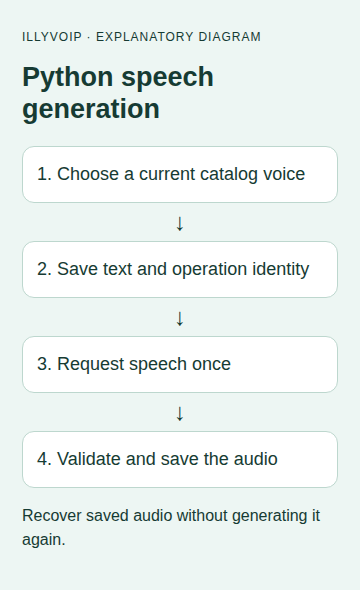
3. Create the Python synthesis client
Save the following as synthesize.py. The example requests mono MP3 at 22,050 Hz. The current API accepts MP3 or WAV, a sample rate from 8,000 to 48,000 Hz and one or two channels; choose the values your consuming application needs.
import base64
import hashlib
import json
import os
from pathlib import Path
import requests

ORIGIN = 'https://api.illyvoip.com'

def synthesize_once(text, language, voice, operation_dir, api_key):
    text = text.strip()
    if not text or len(text) > 2000:
        raise ValueError('Supply 1–2000 characters')
    payload = {'text': text, 'language': language, 'voice': voice,
               'format': 'mp3', 'sample_rate_hz': 22050, 'channels': 1}
    def request():
        return requests.post(ORIGIN + '/api/v1/tts/synthesize',
            headers={'X-Api-Key': api_key}, json=payload,
            timeout=(10, 90), allow_redirects=False)
    result = run_once(operation_dir, {'kind': 'tts', 'payload': payload}, request)
    if result.get('mime_type', '').lower() not in ('audio/mpeg', 'audio/mp3'):
        raise ValueError('Unexpected MIME type; inspect the saved response')
    audio = base64.b64decode(result['audio_base64'], validate=True)
    if not audio:
        raise ValueError('Empty audio; review before any new request')
    with (Path(operation_dir) / 'speech.mp3').open('xb') as f:
        f.write(audio)
    return result

def run_once(operation_dir, record, request):
    directory = Path(operation_dir)
    directory.mkdir(mode=0o700)  # Existing directory stops repeat execution.
    (directory / 'request.json').write_text(json.dumps(record), encoding='utf-8')
    (directory / 'state.txt').write_text('ATTEMPTING', encoding='utf-8')
    try:
        response = request()
        (directory / 'response.txt').write_text(response.text, encoding='utf-8')
        (directory / 'http.txt').write_text(str(response.status_code), encoding='utf-8')
        if not 200 <= response.status_code < 300:
            raise ValueError('HTTP result requires review')
        result = response.json()
        if not isinstance(result, dict) or result.get('status') != 'success':
            raise ValueError('API result requires review')
        (directory / 'state.txt').write_text('RESPONSE_SAVED', encoding='utf-8')
        return result
    except Exception:
        (directory / 'state.txt').write_text('REVIEW', encoding='utf-8')
        raise
The API's current text limit is 2,000 characters. Splitting a document is a separate application feature: each chunk needs its own deliberate request and recovery record. Do not add undocumented SSML markup or assume a file extension changes the returned format.
4. Generate one file and listen to it
Create a UTF-8 text file named speech.txt, review its content, then run:
import os
from pathlib import Path
from synthesize import synthesize_once
os.umask(0o077)
synthesize_once(Path('speech.txt').read_text(encoding='utf-8'),
    os.environ['TTS_LANGUAGE'], os.environ['TTS_VOICE'],
    'speech-job-001', os.environ['ILLYVOIP_API_KEY'])
print('Saved speech-job-001/speech.mp3')
Listen locally before putting the file into a customer-facing workflow. Check pronunciation, pauses, volume and the intended voice. Saving the entire JSON response as an MP3 is not equivalent to decoding audio_base64.
5. Recover from a local failure
The folder preserves the request text and response before audio decoding. If synthesis succeeded but the disk was full or decoding failed, inspect that saved response first. Recover the audio locally when possible; generating it again is unnecessary and may create another paid operation.
An existing folder blocks a repeat attempt. Do not remove this guard to retry a timeout. Keep the original payload and response details and reconcile the outcome. The service's duplicate-charge protection does not turn every new or changed request into a free retry.
6. Handle errors by stage
- Language or voice rejected: refresh the matching standalone catalog and use an exact identifier.
- Text rejected: inspect type, empty content and character length.
- HTTP failure: review the saved status and private body; do not attempt base64 decoding of an error message.
- Unexpected MIME: stop and inspect the response instead of renaming bytes.
- No output after success: inspect local permissions and the saved response before contacting the synthesis endpoint again.
Log job identifiers, safe HTTP outcomes and timing, not the API key or sensitive source text. For Support, provide the operation time and any returned public reference through a private channel.
Common questions
Can I use this in an IVR? The saved audio may be suitable after checking the playback system's format requirements. IllyVoIP Voice API playback is a separate operation with its own call state and media rules.
Does the response prove a live caller heard it? No. This request produces a file. Playback and recipient acknowledgement are separate tasks.
Related guides and official references
- Convert text to speech with the IllyVoIP API and save the audio
- Start with the API, Playground and webhooks
Reviewed 9 October 2026 against current IllyVoIP implementation and the linked sources. Use your account’s available options and installed software version. Local example checks do not establish a completed live call, delivered SMS or certified third-party integration.