
Rotating an IllyVoIP Production API key immediately stops the current key from working. Plan the cutover before using Regenerate API key: there is no old-key overlap window in this workflow. Every integration using that key needs the replacement.
This guide is for the account owner or an authorized administrator responsible for the connected applications. It does not rotate a key for you. If you suspect the key has been exposed, prioritize containment and coordinate the resulting interruption with the people responsible for the integrations.
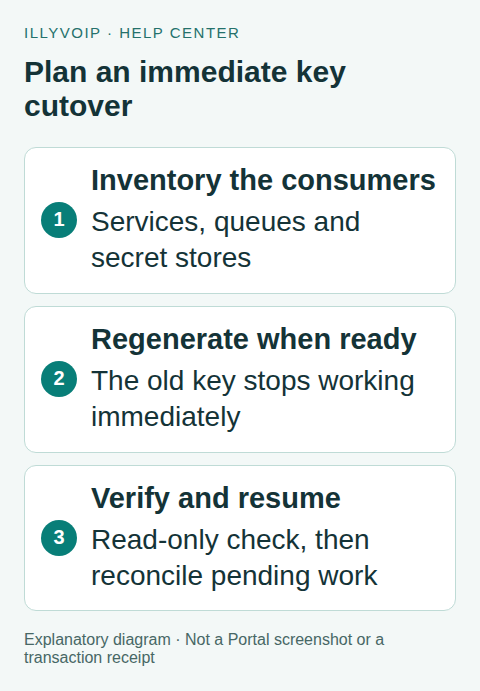
1. Inventory every consumer
List the backend services, scheduled workers, monitoring integrations, deployment secrets and manual tools that use the key. Include forgotten test scripts and disaster-recovery environments. Record who can update each secret, how a worker reloads configuration and how you will confirm recovery.
Separate Production from Sandbox credentials and endpoints. Also distinguish API keys from webhook signing secrets, SIP passwords and short-lived browser tokens. Rotating one credential is not a claim that every other secret has been replaced.
2. Choose a controlled cutover
Arrange a short maintenance window when practical. Pause new side-effecting jobs at the application level, allow in-flight requests to settle, and save their operation identities. Do not delete pending messages or clear an idempotency ledger to make a queue look empty.
Prepare the secret-store locations and deployment procedure before generating the replacement. Avoid putting a key in source control, command history, chat, screenshots or a spreadsheet. A rollback plan should restore application configuration while retaining the new valid key; it cannot revive the old invalidated key.
3. Regenerate through the authorized Portal control
- Sign in to the correct account and open its API settings.
- Confirm whether you are working with the Production key or the separate Sandbox controls.
- Use Regenerate API key only when ready for immediate invalidation of the current key.
- Complete the requested identity verification. Regeneration requires fresh verification even if a recent verification window allowed you to view a key.
- Copy the replacement directly to the approved secret store and close any unnecessary display.
The current UI uses a short verified viewing window; that convenience is not a grace period during which the old key keeps working. Never assume two Production keys remain valid merely because two application deployments are running.
4. Update services and restart only what needs it
Apply the new secret to each inventoried consumer. Some applications read secrets on every request; others load them only when the process starts. Follow the service’s normal reload or deployment procedure and verify that old workers have drained.
Keep logs redacted. Log the deployment version, secret reference/version and result, not the key itself. If a deployment platform exposes secrets in build artifacts or frontend bundles, correct that handling before resuming access.
5. Verify with a read-only request first
From each relevant runtime, make a documented read-only request that the integration is authorized to use—for example its normal rates or catalog lookup. Confirm authentication and expected account-scoped behavior. A successful request from your laptop does not prove a background worker loaded the new secret.
Check failures by class: an authentication failure may mean a stale key or wrong environment; a network failure may be unrelated to the rotation; a permission or validation response requires its own investigation. Do not repeatedly regenerate the key while one stale deployment remains unfixed.
6. Resume work without duplicating actions
Reconcile operations that were in flight during cutover. If a send or call request timed out, the operation may have been accepted before the client lost the response. Use its existing identity and the documented lookup/recovery behavior. Changing the credential does not justify changing the business-operation key and submitting a duplicate.
Resume a small controlled portion of the queue and monitor authentication errors, accepted operations and normal service behavior. Then restore the usual rate. Keep the old credential removed from active configuration and revoke any exposed copies according to your organization’s incident procedure.
7. Close the rotation record
Record the time, affected integrations, new secret-store version, verification outcome and any operations still under review. Do not record the secret value. Remove temporary clipboard or export copies and confirm that recovery instructions reference the current secret location.
If a consumer cannot be restored, keep its side-effecting queue paused and involve its owner. Do not work around authentication by embedding the new permanent key in a browser or sharing an unrestricted account login.
Include API-provisioned SIP clients in the cutover
Some integrations use the SIP bootstrap endpoint to obtain a SIP password derived from the account’s current API key. Rotating or disabling that key revokes those derived credentials as well. A client may therefore need new SIP provisioning, not only a changed HTTP request header.
Before the cutover, identify which clients use API bootstrap and which use the independently managed SIP-line password. Do not assume every desk phone or PBX uses the same credential source. Record the authorized SIP identity, provisioning owner and secure delivery method without recording any password.
Also list browser-token backends. They need the new API key to issue subsequent tokens, but permanent keys must remain server-side. Existing short-lived token and active-call behavior has its own lifecycle; key rotation is not a general-purpose way to end every current call.
Restore a client that uses an API-derived SIP password
- Update the provisioning backend’s API key and confirm it loaded the new secret using an appropriate read-only request.
- Confirm the same SIP identity remains eligible for password bootstrap. Do not switch identities or authentication mode to work around a rejection.
- Request fresh bootstrap settings with the new key through the trusted backend.
- Deliver the derived SIP password and applicable connection settings through the client’s protected provisioning channel.
- Restore registration deliberately and verify the client reports the expected identity and region.
- Check incoming routing and actual calling separately during an authorized acceptance check. Successful registration alone does not prove audio or destination reachability.
Do not change the separately managed SIP-line password merely because an API-derived credential was revoked. Such a change could interrupt unrelated clients. Do not restore a saved old bootstrap response after key rotation; it may contain a revoked SIP password or expired temporary connection credentials.
If one client remains unavailable, keep its affected automation paused and check whether it actually loaded fresh provisioning. Repeated key rotation makes the cutover harder by invalidating the replacement that other consumers may already be using.
Use the current key-management location
Open Settings → Developer tools at the account settings API tab. The API connection panel shows the environment, base URL and locked key controls. The technical reference is now public at IllyVoIP API Docs; opening it does not reveal or rotate an account key.
Keep these three outcomes separate in the rotation record: API authentication restored, API-derived SIP client registration restored, and actual calling verified. Link any remaining failure to the responsible integration owner. See SIP API provisioning for the full bootstrap workflow.
Frequently asked questions
Can I switch back to the old key?
The regenerated Production key replaces the old one immediately. Plan recovery around distributing the current valid credential.
Does rotation cancel an SMS already accepted?
Do not assume so. Authentication controls new requests; reconcile an existing operation through its own status and lifecycle.
Should Sandbox and Production share a secret?
No. Keep their credentials and base URLs separate so a test cannot accidentally become a live action.
Related guides and references
- Api and webhooks quick start
- Webhook delivery
- Official reference: illyvoip.com
- Official reference: api.illyvoip.com
Reviewed 10 October 2026 against current IllyVoIP source and official documentation. Configuration examples are not evidence of a completed hardware or live integration test. Use the current options and limits available to your account.