
An API-controlled call can offer to send a specific information link by SMS. Your application must verify the recipient, record the request and coordinate the separate SMS operation. A caller’s acceptance does not mean every IllyVoIP phone number supports SMS or replies.
Use an authenticated backend and the API base https://api.illyvoip.com. Send X-Api-Key and JSON bodies. Keep credentials out of browser code. Calls, SMS, lookups and speech can incur charges; examples are templates, not completed transactions.
Begin with an eligible incoming call answered through Voice API Control, or a deliberately created outbound call whose status confirms it is answered and active. Retain call_control_id. Persist a separate Idempotency-Key for each paid prompt action and reconcile a pending result with the same key before deciding on a new action.
1. Decide what link and recipient are allowed
- Use an HTTPS link to information the recipient is entitled to access.
- Choose a previously verified customer mobile number, or complete your approved verification workflow.
- Review the permitted SMS sender and destination before offering the message.
- Keep sensitive data out of the URL and use an authenticated destination for private account information.
Do not send automatically to an unverified incoming caller-ID value. Caller ID can be missing, withheld or misleading. Do not invite the person to reply with STOP unless your actual receiving workflow supports inbound replies; use your established web opt-out or support process where relevant.
2. Ask for the specific request
Use /api/v1/voice/call-control/gather with a saved action key and a clear DTMF prompt. For example: “To receive the setup guide at your verified mobile number, press 1 then hash. To continue without a text, press 2 then hash.” Do not read the full private number aloud before the caller is appropriately verified.
On completed success, read input and digits. Exactly 1 requests this link; 2 declines it. Silence, multiple digits or an error are not consent. Apply a small retry limit and preserve a pending action rather than asking the same question repeatedly.
3. Commit one SMS intent
Before sending, store the call reference, accepted prompt version, authorized recipient reference, exact message and unique send-intent ID in your backend. Use a uniqueness rule so replaying the gather result cannot create another send intent. Recheck suppression and recipient eligibility at dispatch time.
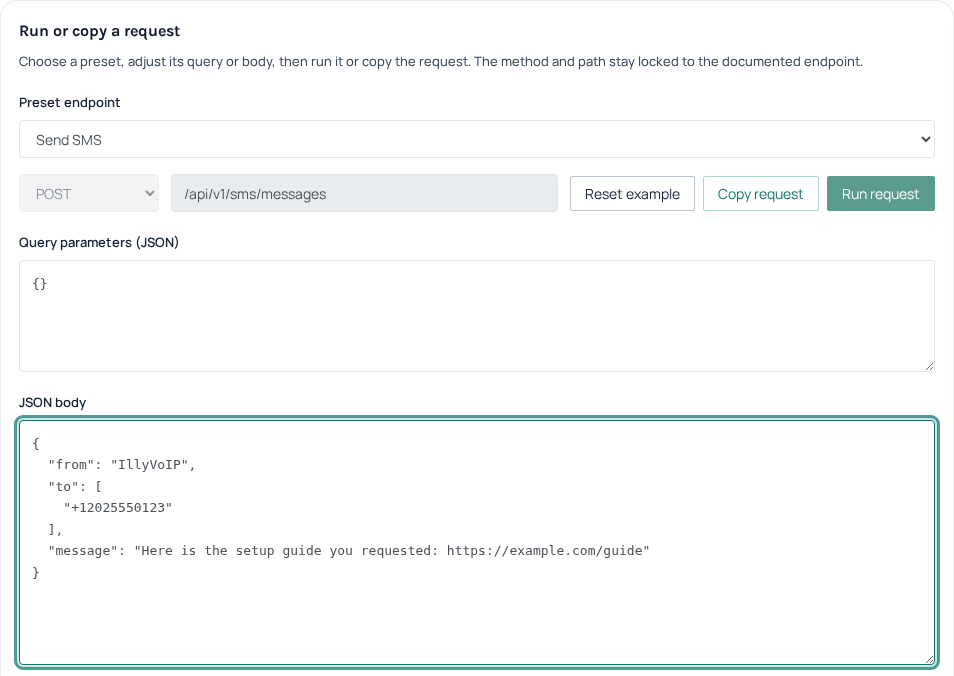
{
  "from": "IllyVoIP",
  "to": ["+12025550123"],
  "message": "Here is the setup guide you requested: https://example.com/guide"
}
The example uses the standard IllyVoIP sender. Use a custom sender only after its approval and availability for your account are confirmed. The number and URL are illustrative; never submit them as a real recipient or customer link. Follow the SMS API guide for POST /api/v1/sms/messages and its current request contract before using this body. Persist a separate SMS Idempotency-Key and reuse its exact payload and key after an uncertain response. Keep it separate from the Voice API prompt-action key.
4. Report submission honestly
- Submit once through your authorized backend.
- Store
queued_message_ids,queued_count,total_costand the HTTP/API outcome against the send intent; inspectinvalid_numbersinstead of assuming acceptance. - If accepted, tell the caller the message was submitted, without guaranteeing delivery.
- If the result is uncertain, reconcile it rather than making another send merely because the call ended.
The phone conversation can finish independently of delivery. Do not hold a caller indefinitely while waiting for a delivery report. If the SMS request fails conclusively, explain the available alternative, such as visiting the public guide or contacting Support, without claiming a text is on its way.
5. Track delivery after the call
Use the documented SMS status or verified delivery-webhook workflow to follow the stored message reference. Deduplicate event handling and distinguish accepted, delivered and failed outcomes. A webhook acknowledgement is not evidence that the customer opened the link. Do not make another paid voice call or SMS solely to reproduce a missing webhook.
6. Test the handoff
Use fixtures for decline, unverified recipient, duplicate keypad results, suppression changing before dispatch, lost SMS response and disconnect after acceptance. Verify each creates at most one intended send. Then arrange an authorized end-to-end test with a permitted sender and test number, checking both the call and actual SMS result.
Related guides
- Build a keypad phone menu with the Voice API
- Send an SMS with the IllyVoIP API and track delivery
- Add a web opt-out link and suppression checks to an IllyVoIP SMS workflow
Reference
Current instructions and technical reference: IllyVoIP API documentation.
Reviewed 13 October 2026 against the current IllyVoIP controls, implementation and applicable references. Available options depend on account permissions and service state.