
Use Webhooks by Zapier to connect an approved business event to the IllyVoIP SMS API. This guide uses a Custom Request action; it does not assume a native IllyVoIP app in Zapier.
You need a Zapier plan that currently includes the webhook features you will use, permission to edit the Zap, an IllyVoIP account with SMS/API access and an authorized recipient. A Zapier test action against Production can send a real billable message. Build with synthetic data or the IllyVoIP Sandbox first.
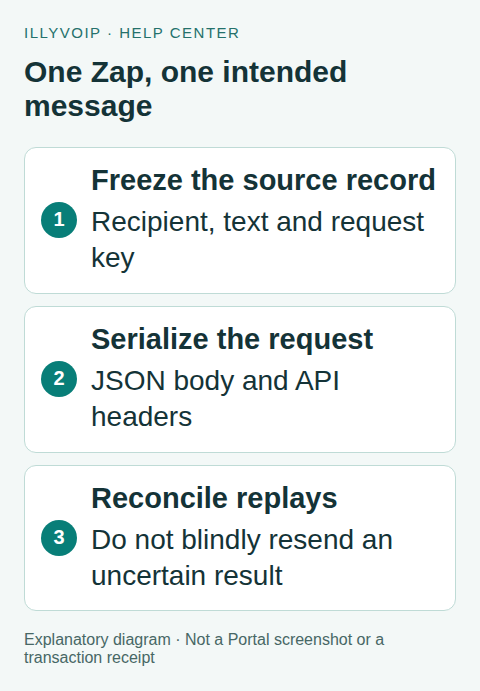
1. Prepare a durable message record
Choose a narrow trigger, such as a reviewed request for a status notification. Have the source application create and persist a record containing event_id, recipient, sender, message and request_key. Freeze the text and key before the Zap sends anything.
The key identifies the intended SMS, not the Zap execution. A replay must use the same key and exact payload. Use a stored UUID or a unique business identifier that meets the current 8–128-character format. Do not generate a new random value in a step that will rerun on retry.
For production traffic, the source must atomically claim each eligible event or otherwise enforce a single dispatch owner. A Zap filter alone is not durable concurrency control. If you cannot guarantee that ownership, keep the Zap manually controlled until your developer adds it.
2. Add the HTTP action
- Add Webhooks by Zapier as the action app.
- Select Custom Request.
- Choose POST and use the full URL shown below.
- Set data pass-through off so the trigger payload is not sent unchanged.
- Provide a reviewed JSON body with the SMS fields.
Request URL:
https://api.illyvoip.com/api/v1/sms/messagesThe resolved request must have this shape:
{
  "from": "YOUR_ALLOWED_SENDER",
  "to": ["YOUR_AUTHORIZED_E164_RECIPIENT"],
  "message": "Your requested update is ready."
}
Map the saved values using Zapier’s field selector. The recipient is an array even for one destination. Keep numbers as text in complete international form. Do not send an order object or all form fields as the message body.
If dynamic message text can contain quotation marks, backslashes or newlines, produce the JSON with a serializer in your source application or a suitable code step. Inserting arbitrary text into a hand-written JSON string can break the request. Inspect the final serialized output, not just the template.
3. Set headers and protect credentials
Add Content-Type: application/json, X-Api-Key with the intended environment’s key, and Idempotency-Key mapped from the frozen record. Leave unrelated Basic Auth fields empty unless the current Zapier interface explicitly requires something else for its own action.
A generic webhook step is not a promise of a separate secret vault. Restrict who can view/edit the Zap and inspect Zapier’s current handling of headers and task history. Do not paste a key into trigger data, public screenshots, exported examples or a shared table. If your organization requires stronger credential isolation, have the Zap call your authenticated backend and keep the IllyVoIP key there.
4. Review before testing
Check the environment, exact destination, allowed sender, message text, encoding/segments and potential charge. Confirm the Zap will process one intended record rather than a collection. A successful Sandbox fixture is a parsing test, not delivery evidence.
When you deliberately run a Production test, inspect the HTTP result and JSON body. Require API success and the expected accepted message ID. Save the queued ID and original event reference back to the durable source record. Do not mark the event delivered just because the action step is green.
5. Track delivery separately
Use the accepted ID as message_id in a GET request to /api/v1/sms/messages/status with the same environment and account authentication. Alternatively, process authenticated IllyVoIP delivery webhooks in a receiver designed to verify signatures and deduplicate events.
Keep polling bounded and delayed. A generic Catch Hook is not automatically a secure signature-verifying receiver; assess raw-body access and verification before using it for trusted updates. Keep submission state, delivery state and billing/refund information separate.
6. Handle failed tasks and replays
Before using Zapier’s replay or automatic retry features, determine whether the prior SMS was accepted. An uncertain timeout is not a safe reason to generate another key. Keep the event in a needs-review state with its original key, payload and any returned IDs.
Correct invalid data only after you understand the earlier result. A genuinely corrected new submission needs an intentional new identity; reusing a key with changed text is also wrong. Retain your durable event guard beyond any API idempotency-retention window rather than relying on indefinite server-side deduplication.
Acceptance checklist
Test valid data, invalid recipient, a quoted/newline-containing message, duplicate trigger, replay, API rejection and lost response using safe fixtures. Verify secrets do not appear in shared task evidence and the event is not claimed twice. Enable the real trigger only after you can reconcile those outcomes.
Frequently asked questions
Can I use Zapier’s own SMS app instead?
That is a different sending service. This workflow deliberately calls IllyVoIP with your account’s sender, rates and delivery records.
Is a paid Zapier plan included in IllyVoIP?
No such entitlement is implied. Check Zapier’s current plan requirements separately.
Related guides and references
- Send sms n8n
- Send sms google sheets
- Send sms api track delivery
- Official reference: help.zapier.com
- Official reference: api.illyvoip.com
Reviewed 8 October 2026 against current IllyVoIP source and official documentation. Configuration examples are not evidence of a completed hardware or live integration test. Use the current options and limits available to your account.