
A SIP 403 Forbidden response means the request was refused. It does not identify the reason by itself. Start by separating a rejected registration from a rejected call, then verify the identity, direction and account evidence that apply to that request.
Use this guide for a SIP phone, softphone or customer-owned PBX connected to IllyVoIP. An HTTP 403 from a website or REST API is a different protocol and needs that workflow's diagnostics.
1. Confirm where the 403 appears
Record the exact message, model/software version, account label and time/timezone. Determine whether it appears while the account connects, only when dialing, or after a particular in-call action.
If your phone registers to an office PBX, the message may be generated by that PBX. Inspect its extension connection separately from the IllyVoIP trunk. Do not copy the Portal password into a phone's SIP password field or change a working trunk to repair an internal extension.
2. Find the failed SIP method
| Failure | Start here |
|---|---|
| REGISTER receives 403 | Selected SIP identity, expected authentication mode and exact server/transport. |
| Registration succeeds; INVITE receives 403 | Call authorization, destination, caller-ID permission and the actual responding leg. |
| A local extension receives 403 | Its PBX endpoint permissions and local request path. |
| The display hides the method | Collect a short authorized SIP log before changing credentials. |
A 401 or 407 challenge followed by success can be normal authentication. A final 403 is a different outcome. Read the sequence, not one isolated line.
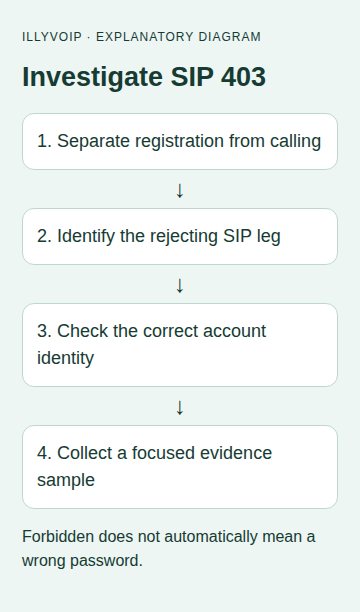
3. For registration, check one complete identity
- Open Services → SIP Lines in IllyVoIP and select the identity used by the affected client.
- Confirm password authentication or the intended IP-authenticated design. An IP-authenticated trunk may intentionally operate without REGISTER.
- Compare the SIP username and separate authentication username, if the device has one. They must refer to the same line.
- Verify the SIP password through the authorized configuration process when evidence suggests a mismatch. Do not reuse a masked placeholder.
- Expand Technical endpoints and match hostname, destination port and transport. Keep an intentionally configured proxy only when the connection requires it.
Do not rotate a shared SIP password repeatedly while other devices still use it. If a provisioned phone overwrites local settings, correct the managed configuration with its administrator. Keep TLS certificate validation enabled; a certificate failure and a SIP refusal are separate stages.
4. For an outgoing call, inspect authorization and digits
Confirm that the PBX selected the expected IllyVoIP trunk. Compare the number entered by the user with the number transmitted after dial-plan transformations. A label on the phone does not select a permitted outgoing caller ID.
In the Portal, review the line's current caller-ID choice, relevant account status, balance and destination/routing availability. Use the actual returned message or Support evidence to decide which check matters. Do not state that a particular fraud rule or balance problem caused 403 without proof.
If only one user or destination is affected, compare it with an existing successful call using the same trunk. Keep customer numbers private. Do not bypass account restrictions, accept all anonymous traffic or expose the PBX administration interface to test a theory.
5. Use a short trace to resolve uncertainty
Capture the failed transaction on a system you administer. Retain the request method, Call-ID, timestamp and received status. Identify whether the visible response arrived from the PBX or the IllyVoIP-facing connection. A proxy can relay another system's response, so this locates evidence rather than proving the original cause.
Where a call record exists, save its public IllyVoIP reference. Where registration failed before calling, provide the registration timestamp instead; do not invent a call reference. Stop diagnostic logging after the relevant interval.
6. Apply only the correction supported by the evidence
If the wrong username is confirmed, correct that username and recheck. If the PBX chose the wrong route, correct the narrowly affected route. If a current account restriction is shown, use its legitimate review/support process. Keep a record of the old value and the observed outcome.
After registration succeeds, check one normal renewal. For an authorized call test, check the rate first and verify answer, two-way audio and expected caller ID. A different error is new evidence, not automatically success.
What to send Support
- Device/PBX version and whether the failure concerns REGISTER or INVITE.
- The affected SIP identity reference, without its secret.
- Time/timezone, exact response and public call reference when available.
- Whether another client or destination works, and the last known working time.
- The recent change and any single correction already attempted.
Should I keep trying passwords? No. Repeated guesses obscure the sequence and can cause further restrictions. Verify the intended credentials through the account's authorized controls.
Can403 be solved by adding credit? Only if actual account/error evidence establishes that requirement. The code alone is not a balance diagnosis.
Related guides and official references
- Fix SIP Registration Failed on an IllyVoIP Phone or PBX
- My SIP phone is registered, but outgoing calls fail
- SIP response codes
- Start with the API, Playground and webhooks
Reviewed 9 October 2026 against current IllyVoIP implementation and the linked sources. Use your account’s available options and installed software version. Local example checks do not establish a completed live call, delivered SMS or certified third-party integration.