
When a phone or PBX shows SIP 500 or 503, first find the request that received the response and the system that sent it. The number alone does not establish whether the problem is in your PBX, on the connection to IllyVoIP or farther along the call path.
This guide is for an administrator investigating a specific registration or call failure. It does not describe a current IllyVoIP incident. Keep a working configuration available and make one evidence-based change at a time.
1. Record the failure before changing settings
Write down the full displayed message, time and timezone, software/model, selected SIP line and direction of the attempt. Record the dialed number privately. If it was a call, find its entry in IllyVoIP Call Reports and retain the public call reference and displayed outcome when available.
A failure before IllyVoIP receives a call may have no matching call record. Its absence does not prove that billing or reporting is broken. Similarly, a PBX's internal call identifier and the Portal's public call reference are not interchangeable.
2. Identify which request failed
| Observed request | Question to answer |
|---|---|
| REGISTER | Did the line fail to register, or did a renewal fail after earlier success? |
| INVITE | Was a new call rejected before answer? |
| A request within an existing call | Was the failure tied to hold, transfer or another action while the original call remained active? |
| Only a PBX summary | Can an authorized SIP log show the response actually received on the relevant leg? |
Do not reset SIP credentials merely because an outgoing INVITE failed. A successfully registered line and an unsuccessful destination call are different observations.
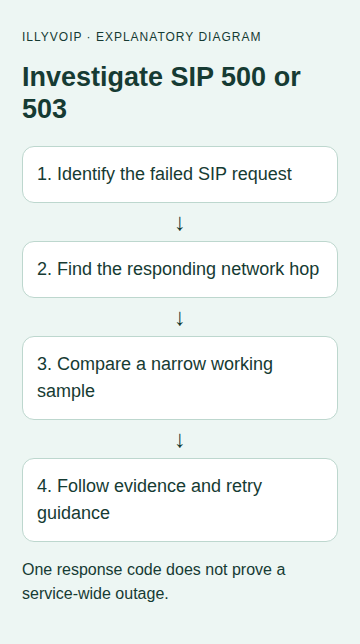
3. Locate the responding hop
Use a short authorized device/PBX log or SIP trace. Match the transaction using its method, Call-ID and sequence information. Record the adjacent system from which the response arrived. A proxy can relay a response, so the visible peer is not necessarily the system where the underlying problem originated.
If a desk phone registers to FreePBX, inspect phone-to-PBX and PBX-to-IllyVoIP separately. A local routing or application failure may be shown to the phone even though no outgoing request reached IllyVoIP. Keep the original log private; authentication headers and negotiated media information can be sensitive.
4. Compare the scope of the problem
Use existing evidence first: one working call and one failed call close in time are often more useful than repeated redials. Compare the SIP identity, destination, selected trunk, request type and last configuration change.
- One destination fails: preserve its exact dialed form and compare a permitted working destination. Do not infer that the whole service is unavailable.
- One PBX fails: inspect its own logs and route selection before changing account-wide settings.
- Many attempts fail at the same time: record the first and last observed times, check published service information and contact Support with a small representative sample.
- The symptom began after a change: compare that change with the previous working configuration. Do not undo unrelated settings.
Any new test call can incur charges. Agree on one controlled destination and a stopping point rather than using automated repeated calls as a diagnostic tool.
5. Interpret retry information cautiously
A 500 response indicates a server-side processing failure for that request. A 503 can indicate temporary inability to serve it, but neither identifies a particular account, network or maintenance cause on its own. Keep the reason text and any Retry-After header with the event.
If retry guidance is present, respect it through the responsible client or administrator. If it is absent, that does not authorize an aggressive retry loop. Follow the normal supported registration retry policy and let Support investigate persistent failures. A failed call attempt is not permission to keep placing paid replacement calls.
6. Check the current IllyVoIP line deliberately
Open Services → SIP Lines and confirm you are looking at the intended identity. Compare its authentication mode and Technical endpoints with the PBX configuration. Use the current hostname, destination port and transport; do not swap regions or replace hostnames with old IP addresses simply to change the error.
For outgoing calls, inspect the account's displayed restrictions, balance, destination/routing choice and permitted caller ID if the returned evidence points there. Do not conclude that one of these is the cause merely because it appears on a checklist. Do not bypass a restriction to get a test through.
7. Verify a correction and close the investigation
After one justified correction, repeat the same bounded check and compare the request sequence and result. A cleared registration indicator does not prove outgoing calls or audio work. For a calling issue, verify answer, two-way audio and the expected caller ID separately.
If the evidence still points beyond your own configuration, provide Support the timestamp/timezone, public call reference if available, SIP method, exact response, affected scope and a working comparison. Include the recent change and its result, without passwords or a full customer traffic dump.
Common questions
Does 503 prove IllyVoIP is down? No. Establish where the response was observed and whether other calls or accounts are affected.
Should I change codecs? Only when media-negotiation evidence supports it. Random codec changes do not explain a server-side failure.
Related guides and official references
- SIP response codes
- My SIP phone is registered, but outgoing calls fail
- Start with the API, Playground and webhooks
Reviewed 9 October 2026 against current IllyVoIP implementation and the linked sources. Use your account’s available options and installed software version. Local example checks do not establish a completed live call, delivered SMS or certified third-party integration.