
Find a response code
Search these common responses by code or description. A code describes a signaling result; it does not identify the complete cause of a problem.
24 responses
Trying
Processing has started.
Ringing
The destination is being alerted.
Session Progress
Call setup is progressing.
OK
The request succeeded.
Moved Permanently
A new permanent address is supplied.
Moved Temporarily
An alternative address is supplied for this attempt.
Bad Request
The request syntax is invalid.
Unauthorized
Authentication is required.
Forbidden
The server refuses the request.
Not Found
The requested user or domain was not found.
Proxy Authentication Required
The proxy requires authentication.
Request Timeout
A response was not produced in time.
Temporarily Unavailable
The destination is currently unavailable.
Busy Here
This destination is busy.
Request Terminated
The request was cancelled or otherwise terminated.
Not Acceptable Here
The proposed session is unacceptable at this destination.
Server Internal Error
An unexpected server condition prevented processing.
Bad Gateway
A downstream response was invalid.
Service Unavailable
Temporary overload or maintenance prevents processing.
Server Time-out
An external server did not respond in time.
Busy Everywhere
The callee is busy at all known destinations.
Decline
The callee declines the request.
Does Not Exist Anywhere
The user does not exist anywhere known to the server.
Not Acceptable
The requested session is not acceptable.
No matching responses
Try a code or a shorter search term.
Definitions summarized from RFC 3261, section 21. This is a selected reference, not a complete registry.
Understanding SIP Response Codes (Status Messages)
Session Initiation Protocol (SIP) is the standard technology used to establish, manage, and end calls over VoIP networks. SIP response codes are three-digit numeric messages sent during a VoIP call to communicate the status of a call between the calling party (UAC—User Agent Client) and the receiving party (UAS—User Agent Server).
Knowing these codes helps you quickly understand the status of your calls, troubleshoot problems, and manage VoIP communications effectively.
Categories of SIP Response Codes
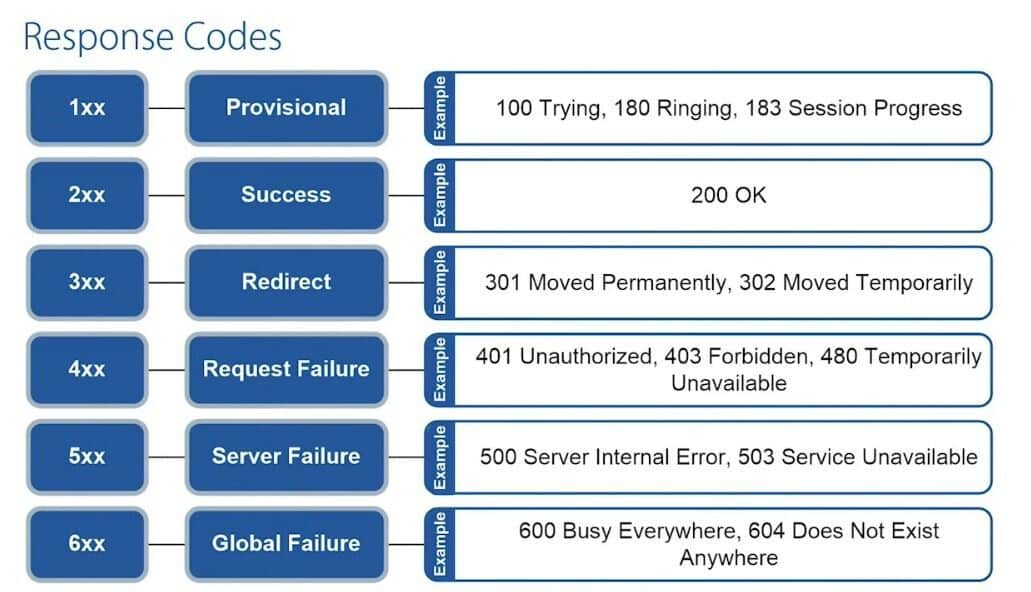
SIP codes are organized into six main categories, identified by their first digit:
1xx– Informational: Request is in progress.2xx– Success: Request completed successfully.3xx– Redirection: Call redirected to another destination.4xx– Client Error: Issue with the request itself.5xx– Server Error: Issue on the server side.6xx– Global Error: Request rejected globally (no other servers will accept the request).
1xx: Informational Responses
These codes indicate the ongoing status of the call:
100 Trying: The request has been received and is being processed.180 Ringing: The user’s phone is ringing or being alerted.181 Call Is Being Forwarded: Your call is redirected to another number.182 Queued: The call is temporarily placed in a queue.183 Session Progress: The call is in progress; the connection is being established.199 Early Dialog Terminated: The call attempt ended before establishing a full connection.
2xx: Successful Responses
These responses confirm the request was successful:
200: The call or action was successful.202 Accepted: Request was understood and accepted, but may not yet be fully processed.204 No Notification: The request succeeded but doesn’t require further notification.
3xx: Redirection Responses
These codes show your call request has been redirected:
300 Multiple Choices: Multiple call routing options available; the caller chooses one.301 Moved Permanently: The requested user has permanently moved to a new address.302 Moved Temporarily: Temporarily forwarded to a different address; the original address is still valid.305 Use Proxy: Calls must be routed through a specific proxy listed in the response.380 Alternative Service: The call failed, but alternative routes are provided in the response.
4xx: Client Error Responses
These codes indicate an issue with the caller's request:
400 Bad Request: Request could not be understood due to bad syntax.401 Unauthorized: Authentication required to complete the call.403 Forbidden: The server understood but refused the request.404 Not Found: The called party’s number does not exist.405 Method Not Allowed: The method used is invalid for the requested address.407 Proxy Authentication Required: Authentication with the proxy is necessary.408 Request Timeout: No timely response was received from the server.415 Unsupported Media Type: Unsupported media type or format.
Additional 4xx codes you might encounter:
402 Payment Required410 Gone413 Request Entity Too Large416 Unsupported URI Scheme420 Bad Extension480 Temporarily Unavailable486 Busy Here: Called party line is busy.487 Request Terminated: Call ended before connection.488 Not Acceptable Here: Request or media type not acceptable.
5xx: Server Error Responses
These codes indicate problems with the server processing the call:
500 Server Internal Error: General unexpected server issue.501 Not Implemented: The server lacks functionality needed for the request.502 Bad Gateway: Invalid response from another server in the network.503 Service Unavailable: Server temporarily overloaded or down for maintenance.504 Server Timeout: No timely response from upstream server.513 Message Too Large: Message exceeds the server’s capabilities.
Additional 5xx codes:
505 Version Not Supported555 Push Notification Service Not Supported580 Precondition Failure
6xx: Global Failure Responses
These responses mean the call cannot proceed to any destination:
600 Busy Everywhere: All possible destinations are busy.603 Decline: The call was declined by the recipient.604 Does Not Exist Anywhere: No destination could be found.606 Not Acceptable: The requested call parameters are not supported by the recipient.
Additional 6xx codes:
607 Unwanted608 Rejected
Why Understanding SIP Codes Matters
- Quickly identify call issues.
- Resolve VoIP problems faster.
- Optimize call routing and handling.
- Reduce downtime and improve call quality.
By familiarizing yourself with these SIP codes, you can efficiently troubleshoot issues, clearly communicate with your support team, and maintain smooth operations.
If you have additional questions about SIP codes or need assistance, please contact our live support or refer to our detailed guides in the IllyVoIP Help Center.