
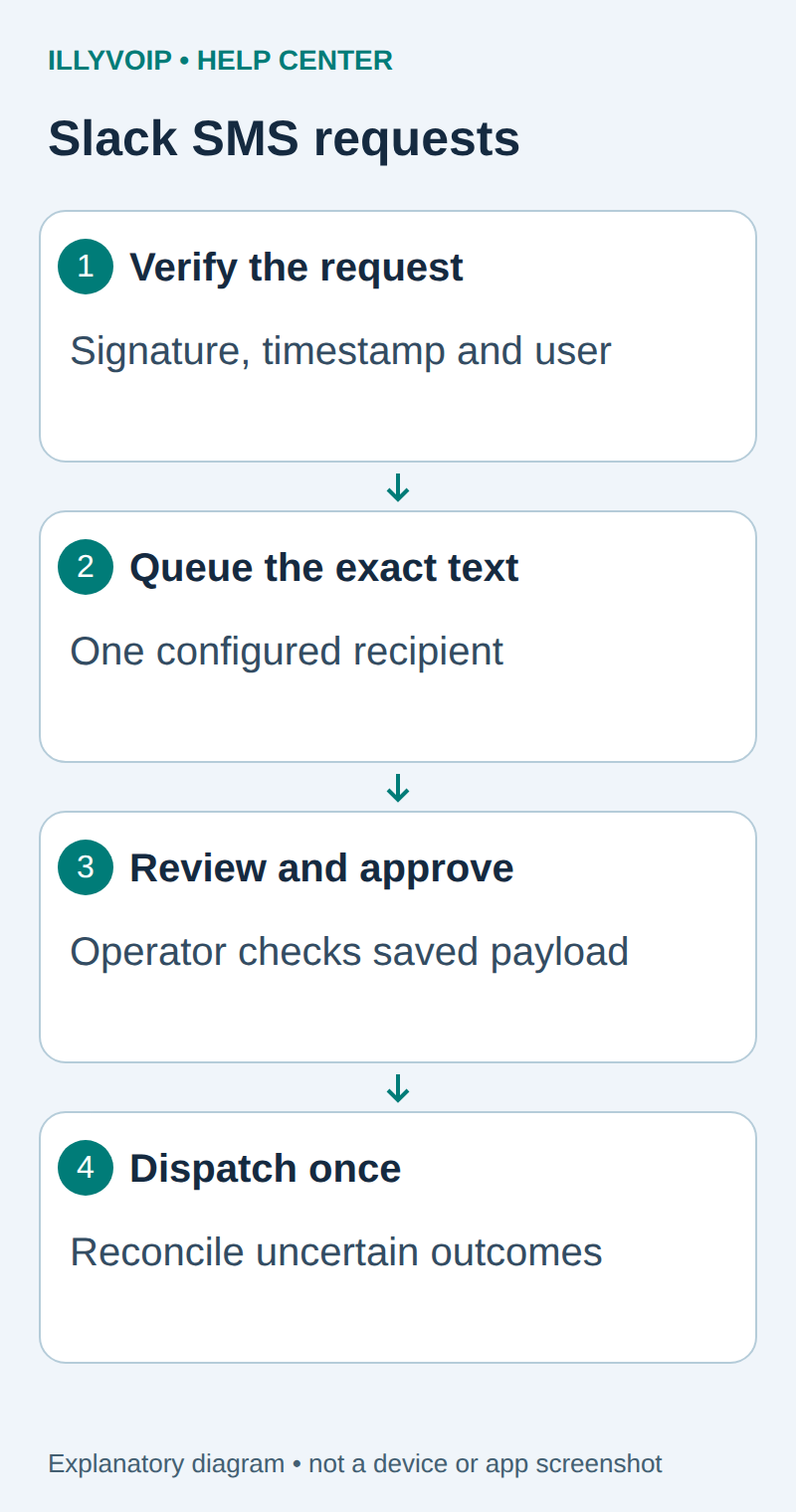
This guide adds a private /illysms command to Slack. An authorized person writes a short notification, and the command queues it for an operator to review. The operator then approves the exact saved message and sends it through IllyVoIP. Slack receives a private acknowledgement with a reference; it does not receive the IllyVoIP API key.
The first version sends to one configured recipient, such as an approved duty phone. It deliberately separates a request made in Slack from the decision to incur an SMS charge. It does not create an incoming-SMS Slack channel or a native IllyVoIP app.
1. Prepare the application and SMS account
You need IllyVoIP SMS access, sufficient balance, a permitted sender and an API key. In the Portal, open Account Settings → Developer tools and the API-key area; the direct account-settings URL uses ?tab=api. Follow the verification prompts before revealing a key. A SIP password is not an API key. Keep permanent keys in a server-side secret store and check the destination’s current SMS price and encoding requirements before a real send.
You need permission to create and install a Slack app in the intended workspace, an HTTPS endpoint you control, Python 3.11 or later and Flask 3.1. Before adding the command, complete the durable outbox setup in the website-form guide: copy its complete outbox.py module, install the stated dependencies, set SMS_DB, SMS_TO and SMS_FROM privately, and run outbox.py init.
The Slack receiver uses the same outbox module; the website form itself is not required. Give this integration its own database and service account unless you have deliberately designed shared ownership. Keep the IllyVoIP API key in the dispatch process, not the HTTP receiver. The module limits new requests to five per rolling hour, accepts up to 500 characters and keeps approved payloads unchanged.
2. Create a private Slack slash command
- Open your Slack app’s configuration and create or select the app belonging to the intended workspace.
- Under Slash Commands, create
/illysms. Use a description such as “Request a reviewed SMS to the duty phone.” - Set its Request URL to the HTTPS address of
/slack/commandson your own receiver. This is not an IllyVoIP URL. - Set the usage hint to a short notification message. The example does not accept a recipient number.
- Install or reinstall the app as required by Slack after command or permission changes, using the workspace’s normal administrator approval process.
Keep the app private to the intended workspace. The receiver below returns its acknowledgement in the HTTP response and does not need a bot token for a later chat.postMessage call. Do not add unrelated messaging scopes just to make this bounded example work.
3. Store the signing secret and allowed identities
| Setting | Value |
|---|---|
| SLACK_SIGNING_SECRET | The app’s current signing secret from its credentials settings. Keep it private. |
| SLACK_TEAM_ID | The exact allowed workspace ID. |
| SLACK_APP_ID | The exact app ID expected in command requests. |
| SLACK_ALLOWED_USERS | A comma-separated list of allowed member IDs without extra spaces. |
| SMS_DB, SMS_TO, SMS_FROM | The private outbox location, one approved recipient and permitted sender. |
Use IDs rather than display names. A valid Slack signature proves which app signed the request; it does not by itself authorize every workspace member to request a paid notification. The receiver checks both the signature and the configured user/workspace/app boundaries.
4. Save the signed-request receiver
Save this as slack_app.py beside outbox.py. It verifies the exact raw body before parsing it, rejects timestamps outside a five-minute window and uses a constant-time signature comparison. Keep the server clock synchronized.
import hashlib, hmac, os, time
from urllib.parse import parse_qs
from flask import Flask, request, jsonify
import outbox
app=Flask(__name__)
app.config['MAX_CONTENT_LENGTH']=8192
SECRET=os.environ['SLACK_SIGNING_SECRET'].encode()
TEAM=os.environ['SLACK_TEAM_ID']
APP_ID=os.environ['SLACK_APP_ID']
USERS=set(os.environ['SLACK_ALLOWED_USERS'].split(','))

@app.post('/slack/commands')
def command():
    raw=request.get_data(cache=False)
    ts=request.headers.get('X-Slack-Request-Timestamp','')
    try:
        if abs(time.time()-int(ts))>300: return 'Expired',401
    except ValueError: return 'Invalid timestamp',401
    expected='v0='+hmac.new(SECRET,b'v0:'+ts.encode()+b':'+raw,hashlib.sha256).hexdigest()
    if not hmac.compare_digest(expected,request.headers.get('X-Slack-Signature','')):
        return 'Invalid signature',401
    try:
        fields=parse_qs(raw.decode('utf-8'),strict_parsing=True,keep_blank_values=True,max_num_fields=40)
        def one(k):
            v=fields.get(k,[])
            if len(v)!=1: raise ValueError('Missing or repeated field')
            return v[0]
        if one('team_id')!=TEAM or one('api_app_id')!=APP_ID or one('command')!='/illysms' or one('user_id') not in USERS:
            return jsonify(response_type='ephemeral',text='This command is not authorized here.'),200
        trigger=one('trigger_id')
        if not trigger: raise ValueError('Missing trigger')
        key='slack-'+hashlib.sha256((TEAM+'\0'+trigger).encode()).hexdigest()
        outbox.enqueue(key,one('user_id'),one('text'))
    except (ValueError,UnicodeError):
        return jsonify(response_type='ephemeral',text='Not queued: check the text, request limit and command configuration.'),200
    except Exception:
        return 'Queue unavailable; contact the operator before repeating the command.',503
    return jsonify(response_type='ephemeral',text='Queued for operator review. No SMS sent. Reference: '+key),200
The operation key combines the workspace and Slack trigger ID. Re-delivery of the same command payload refers to the same row; a changed payload with that identity is rejected. Issuing the command again as a new action normally creates a new trigger ID and therefore a new request. The operator must recognize accidental repeated business notices at review time; transport deduplication cannot determine whether two separately written messages mean the same event.
The receiver performs no external network request before acknowledging Slack. It only verifies and stores the request. Keep this path comfortably within Slack’s three-second acknowledgement window. If storage is unavailable, the endpoint returns an error and tells the requester to contact the operator before repeating the command. No acknowledgement should be interpreted as proof of SMS delivery.
5. Deploy the receiver behind HTTPS
.venv/bin/gunicorn --bind 127.0.0.1:8090 --workers 1 slack_app:appRun it as a supervised service and configure your HTTPS reverse proxy to forward the command path to the loopback listener. Do not expose a debug server. Preserve the unmodified request body and Slack signature/timestamp headers; middleware that decodes and rewrites the form before verification will break signatures.
Disable request-body logging and redact authorization-related values in application and proxy diagnostics. Request payloads can contain private message text and a response_url; this implementation does not use or store that response URL. Keep the receiver’s filesystem and database private and use your normal perimeter request limits.
6. Request, review and approve one notification
- From the permitted workspace and user, enter
/illysms The planned maintenance has finished. - Confirm the private reply says the request is queued for review and that no SMS has been sent.
- Give its reference to the authorized operator through your approved internal process.
- In a private server terminal, the operator runs
.venv/bin/python outbox.py show REQUEST_KEYand reviews the frozen recipient, sender, text and owner ID. This prints sensitive content and must not be copied into a public channel. - Reject an inappropriate or duplicate request with
.venv/bin/python outbox.py reject REQUEST_KEY. For an approved request, use.venv/bin/python outbox.py approve REQUEST_KEY. - With the IllyVoIP key available to the worker, run
.venv/bin/python outbox.py send-one. It dispatches the oldest approved row, not necessarily the last command received.
The final command can incur a real SMS charge. Approval freezes the decision for the stored payload; it does not enable edits to the message or destination. Keep a recorded operating policy for who may approve, and use individual operator authentication if more than one administrator shares this tool.
7. Follow acceptance and handle uncertainty
SUBMITTED means the worker saved the expected one-recipient API acceptance and a message ID. Use that reference to check delivery in IllyVoIP. REVIEW_RESPONSE means the response needs investigation. ATTEMPTING or UNCERTAIN can mean the service accepted the SMS before a response or local write was lost.
Do not delete a row, reset it to Approved or issue the Slack command again to force recovery. Reconcile the original operation using its identity, time and service records. The shared outbox example intentionally has no automatic retry. A Slack notification failure after submission is also not a reason to resend an SMS.
8. Test the command before enabling dispatch
- Send a locally constructed request with an invalid signature and one with an old timestamp: both must be rejected before storage.
- Use a valid signature with an unauthorized workspace, app or user: no sendable row should be created.
- Replay one signed command twice and confirm one row. Change the message under the same trigger ID and confirm rejection.
- Check oversized text, the hourly request cap and a database failure. None should bypass the review process.
- With the HTTP sender mocked, test rejection and a lost response. Confirm the row cannot be automatically sent again.
Only after those checks should an operator deliberately approve one real test to a recipient you control. The published example’s local tests do not establish that your Slack installation, proxy or mobile network has delivered a message.
Related IllyVoIP guides
- Send an SMS with the IllyVoIP API and track delivery
- Check SMS encoding, message parts and converted text before sending
- Verify IllyVoIP webhook signatures in a Node.js receiver
Sources and verification
- Slack: implement slash commands
- Slack: verify signed requests
- Flask deployment guidance
- IllyVoIP API reference
Reviewed 11 October 2026 against current IllyVoIP documentation and the linked primary sources. Use the options available in your own account. Documentation and local checks do not establish a delivered SMS, a completed live call or a certified third-party integration.