
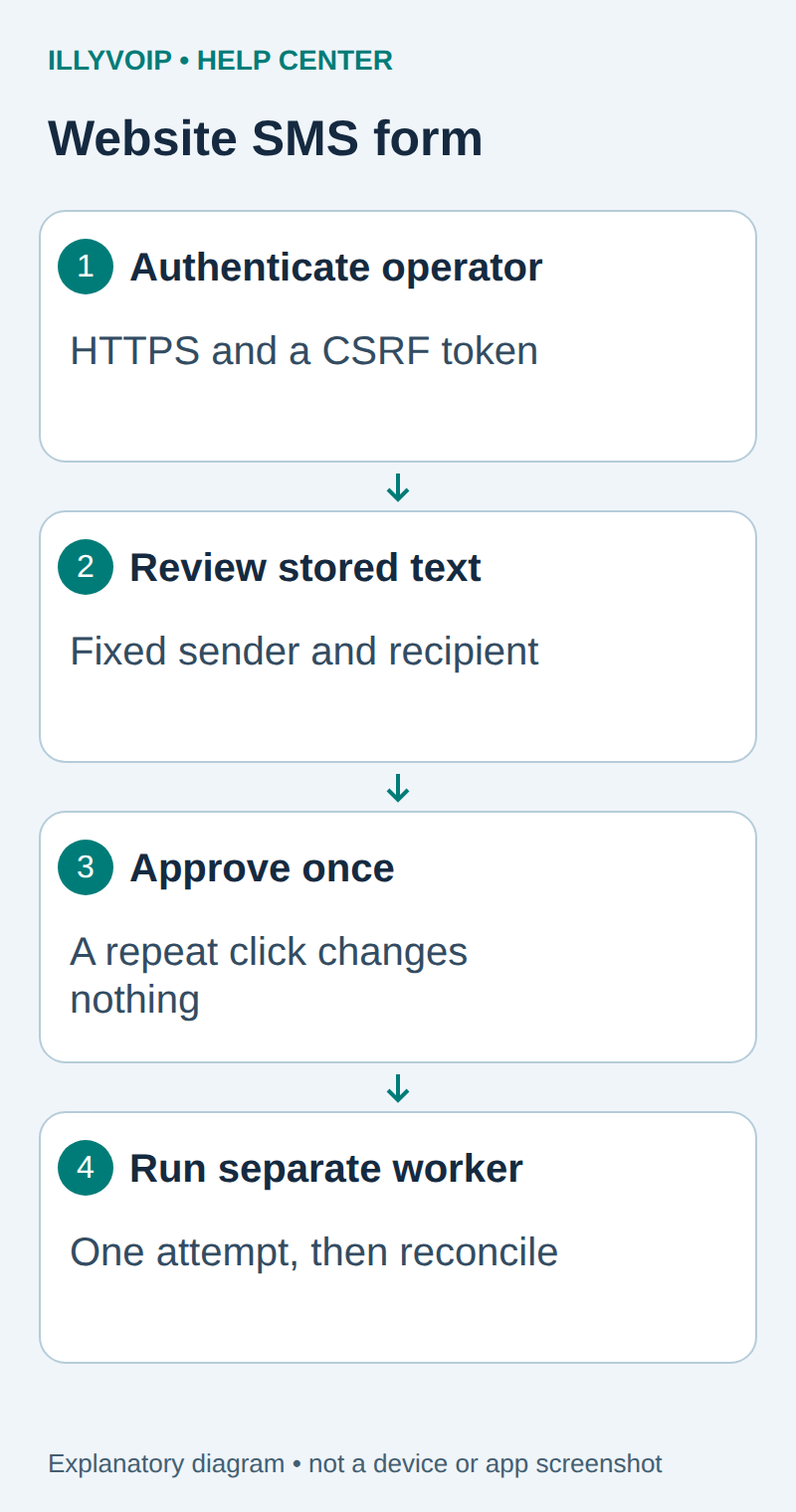
This guide builds a small, protected website form that prepares one IllyVoIP SMS for a fixed recipient. An operator signs in, enters the message and reviews the exact sender, recipient and text before approving it. A separate worker performs the paid HTTP request. Refreshing the review page or clicking Approve twice does not create another dispatch.
The example uses Python 3.11 or later, Flask 3.1 and Requests 2.32. It is intended for a small internal operator tool, not an anonymous public “send SMS” website. For a customer-facing application, integrate the same durable request design with your existing user authorization and recipient-consent system.
1. Prepare the private application
You need IllyVoIP SMS access, sufficient balance, a permitted sender and an API key. In the Portal, open Account Settings → Developer tools and the API-key area; the direct account-settings URL uses ?tab=api. Follow the verification prompts before revealing a key. A SIP password is not an API key. Keep permanent keys in a server-side secret store and check the destination’s current SMS price and encoding requirements before a real send.
Use a dedicated service account, a private local directory and a durable local SQLite file outside the web root. Do not put the database on a network share or run independent copies on several hosts. Create an isolated environment, install maintained releases in these compatible families and lock the exact versions you validate:
python3 -m venv .venv
.venv/bin/pip install 'Flask>=3.1,<3.2' 'requests>=2.32,<3' 'gunicorn>=23,<24'
.venv/bin/pip freeze > requirements.lock| Setting | Purpose |
|---|---|
| SMS_DB | Absolute path to the private SQLite file, shared by the form and worker on this host. |
| SMS_TO / SMS_FROM | One authorized international recipient and a permitted sender. Neither comes from browser input. |
| FORM_USER / FORM_PASSWORD | Dedicated operator credentials. Use a strong unique password of at least 20 characters. |
| FORM_SESSION_SECRET | A separate randomly generated secret with at least 32 characters, kept stable across workers and restarts. |
| ILLYVOIP_API_KEY | Available to the dispatch process only. The form does not need it. |
Supply settings through a protected service environment, not a public .env file or shell transcript. All operators using this compact single-user example share one identity; use an existing individual-login system when you need per-person attribution. Limit the deployment to approved operators and apply HTTPS and authentication-attempt rate limits at the reverse proxy.
2. Save the durable outbox
Save the following as outbox.py. It accepts no browser-supplied destination, limits new requests to five per rolling hour across the database and freezes the payload before approval. The 500-character text limit is an application choice; Unicode and longer messages can still use several billable segments.
import json, os, re, sqlite3, sys, time
from contextlib import contextmanager
import requests

@contextmanager
def db():
    c = sqlite3.connect(os.environ['SMS_DB'], timeout=0.2)
    c.row_factory = sqlite3.Row
    try:
        c.execute('PRAGMA synchronous=FULL')
        yield c
        c.commit()
    except BaseException:
        c.rollback()
        raise
    finally:
        c.close()

def init():
    with db() as c:
        c.execute('''CREATE TABLE IF NOT EXISTS jobs (
          key TEXT PRIMARY KEY, owner TEXT NOT NULL, payload TEXT NOT NULL,
          state TEXT NOT NULL, created REAL NOT NULL, message_id TEXT,
          http_status INTEGER)''')

def enqueue(key, owner, message):
    if not re.fullmatch(r'[a-zA-Z0-9:._-]{8,128}', key):
        raise ValueError('Invalid operation key')
    message = message.strip()
    if not 1 <= len(message) <= 500 or '\x00' in message:
        raise ValueError('Use 1–500 characters without null bytes')
    to = os.environ['SMS_TO']
    if not re.fullmatch(r'\+[1-9][0-9]{6,14}', to):
        raise ValueError('Configure an international recipient')
    payload = json.dumps({'from': os.environ['SMS_FROM'], 'to': [to],
                          'message': message}, ensure_ascii=False)
    with db() as c:
        c.execute('BEGIN IMMEDIATE')
        old = c.execute('SELECT * FROM jobs WHERE key=?', (key,)).fetchone()
        if old:
            if old['owner'] != owner or old['payload'] != payload:
                raise ValueError('Operation already exists with different data')
            return key
        count = c.execute('SELECT count(*) FROM jobs WHERE created>?',
                          (time.time()-3600,)).fetchone()[0]
        if count >= 5:
            raise ValueError('Hourly request limit reached')
        c.execute('INSERT INTO jobs VALUES (?,?,?,?,?,?,?)',
                  (key, owner, payload, 'REVIEW', time.time(), None, None))
    return key

def get(key):
    with db() as c:
        r = c.execute('SELECT * FROM jobs WHERE key=?', (key,)).fetchone()
        return dict(r) if r else None

def decide(key, decision):
    if decision not in ('APPROVED', 'REJECTED'):
        raise ValueError('Invalid decision')
    with db() as c:
        return c.execute('UPDATE jobs SET state=? WHERE key=? AND state=?',
                         (decision, key, 'REVIEW')).rowcount == 1

def send_one(post=requests.post):
    api_key = os.environ['ILLYVOIP_API_KEY']
    with db() as c:
        c.execute('BEGIN IMMEDIATE')
        row = c.execute("SELECT * FROM jobs WHERE state='APPROVED' ORDER BY created LIMIT 1").fetchone()
        if not row:
            return 'EMPTY'
        c.execute("UPDATE jobs SET state='ATTEMPTING' WHERE key=?", (row['key'],))
    state, mid, status = 'UNCERTAIN', None, None
    try:
        r = post('https://api.illyvoip.com/api/v1/sms/messages',
                 data=row['payload'].encode('utf-8'),
                 headers={'X-Api-Key': api_key, 'Content-Type':'application/json',
                          'Idempotency-Key':row['key']},
                 timeout=(5,20), allow_redirects=False)
        status = r.status_code
        b = r.json()
        ids = b.get('queued_message_ids') if isinstance(b, dict) else None
        if (200 <= status < 300 and b.get('status') == 'success'
                and b.get('queued_count') == 1 and isinstance(ids, list)
                and len(ids) == 1 and isinstance(ids[0], str) and ids[0]):
            state, mid = 'SUBMITTED', ids[0]
        else:
            state = 'REVIEW_RESPONSE'
    except (requests.RequestException, ValueError, TypeError, AttributeError):
        pass
    with db() as c:
        c.execute('UPDATE jobs SET state=?,message_id=?,http_status=? WHERE key=?',
                  (state, mid, status, row['key']))
    return state

if __name__ == '__main__':
    os.umask(0o077)
    action = sys.argv[1]
    if action == 'init': init()
    elif action == 'show': print(json.dumps(get(sys.argv[2]), indent=2))
    elif action in ('approve','reject'):
        print(decide(sys.argv[2], 'APPROVED' if action=='approve' else 'REJECTED'))
    elif action == 'send-one': print(send_one())
    else: raise ValueError('Use init, show KEY, approve KEY, reject KEY or send-one')
Initialize it once under the service account with the protected SMS_DB setting already supplied:
.venv/bin/python outbox.py initThe database and its directory must remain private and writable only by the intended service account. Retain records while their source requests could be replayed. Restoring an old backup without reconciling later submissions can remove duplicate protection.
3. Save the form and confirmation page
Save the next file as form_app.py beside outbox.py. The form stores only a request key and CSRF token in its signed browser session; the SMS payload stays in SQLite. Jinja escapes text on the review page. The confirmation uses the stored payload rather than trusting a hidden recipient or message field.
import hmac, json, os, secrets
from datetime import timedelta
from flask import Flask, abort, render_template_string, request, session, redirect, url_for
import outbox
app = Flask(__name__)
app.config.update(SECRET_KEY=os.environ['FORM_SESSION_SECRET'],
    SESSION_COOKIE_SECURE=True, SESSION_COOKIE_HTTPONLY=True,
    SESSION_COOKIE_SAMESITE='Strict', PERMANENT_SESSION_LIFETIME=timedelta(minutes=15),
    MAX_CONTENT_LENGTH=4096)
USER, PASSWORD = os.environ['FORM_USER'], os.environ['FORM_PASSWORD']
if len(PASSWORD) < 20 or len(app.secret_key) < 32:
    raise RuntimeError('Use strong independent form and session secrets')
SHELL = '''<!doctype html><html lang="en"><meta charset="utf-8">
<meta name="viewport" content="width=device-width,initial-scale=1">
<title>Review an SMS</title><style>body{font:16px/1.5 system-ui,sans-serif;margin:20px;max-width:38rem}pre{white-space:pre-wrap;overflow-wrap:anywhere;background:#eef5f4;padding:12px}p{overflow-wrap:anywhere}button{padding:10px;margin:5px 8px 5px 0}textarea{display:block;width:95%;min-height:80px}</style><h1>Review an SMS</h1>
{% if job %}<p>Recipient: {{ payload.to[0] }}; sender: {{ payload['from'] }}</p>
<pre>{{ payload.message }}</pre><p>Request: {{ job.key }}; state: {{ job.state }}</p>
{% if job.state == 'REVIEW' %}<form method="post" action="{{ url_for('decision',key=job.key) }}">
<input type="hidden" name="csrf" value="{{ csrf }}">
<button name="decision" value="APPROVED">Approve this SMS</button>
<button name="decision" value="REJECTED">Reject</button></form>{% endif %}
{% else %}<p>One configured recipient. Submission may incur an SMS charge after approval.</p>
<form method="post" action="{{ url_for('draft') }}">
<input type="hidden" name="csrf" value="{{ csrf }}">
<input type="hidden" name="key" value="{{ key }}">
<label>Message <textarea name="message" maxlength="500" required></textarea></label>
<button>Review exact message</button></form>{% endif %}</html>'''

@app.before_request
def protect():
    a = request.authorization
    if not a or not hmac.compare_digest((a.username or '').encode(), USER.encode()) or not hmac.compare_digest((a.password or '').encode(), PASSWORD.encode()):
        return ('Authentication required',401,{'WWW-Authenticate':'Basic realm="SMS operator"'})
    session.permanent = True
    session.setdefault('csrf', secrets.token_hex(32))
    if request.method == 'POST' and not hmac.compare_digest(request.form.get('csrf','').encode(),session['csrf'].encode()):
        abort(403)

@app.after_request
def headers(r):
    r.headers['Cache-Control']='no-store'
    r.headers['X-Content-Type-Options']='nosniff'
    r.headers['Content-Security-Policy']="default-src 'none'; style-src 'unsafe-inline'; form-action 'self'; frame-ancestors 'none'"
    return r

@app.get('/')
def index():
    session.setdefault('key', 'form-'+secrets.token_hex(16))
    return render_template_string(SHELL, job=None, csrf=session['csrf'],key=session['key'])

@app.post('/draft')
def draft():
    key=request.form.get('key','')
    if key != session.get('key'): abort(409)
    try: outbox.enqueue(key,USER,request.form.get('message',''))
    except ValueError as e: return str(e),400
    return redirect(url_for('review',key=key),303)

@app.get('/review/<key>')
def review(key):
    job=outbox.get(key)
    if not job or job['owner'] != USER: abort(404)
    return render_template_string(SHELL,job=job,payload=json.loads(job['payload']),csrf=session['csrf'])

@app.post('/decision/<key>')
def decision(key):
    job=outbox.get(key)
    if not job or job['owner'] != USER: abort(404)
    try: outbox.decide(key,request.form.get('decision',''))
    except ValueError: abort(400)
    if session.get('key') == key: session.pop('key',None)
    return redirect(url_for('review',key=key),303)
The first POST creates a Review record. The second POST changes only that existing record to Approved or Rejected. A repeated approval has no effect, and a rejected request cannot become approved through another click. To correct a message, reject it and prepare a new form request rather than editing the stored payload after approval.
4. Put the form behind your HTTPS reverse proxy
Run Gunicorn bound to the loopback interface, using a port assigned by your server administrator:
.venv/bin/gunicorn --bind 127.0.0.1:8089 --workers 1 form_app:appUse a supervised service in routine operation. Configure the reverse proxy to forward only this application’s hostname to that loopback listener, serve a valid HTTPS certificate, apply request and authentication rate limits and avoid recording authorization headers or request bodies. Do not expose the application port publicly or use Flask’s debug server in Production.
The cookie is Secure, so ordinary HTTP browser testing will not preserve the session. Test through HTTPS; do not remove the cookie protection to make a public HTTP deployment work. Basic authentication must travel only over HTTPS and is deliberately minimal here. An organization with SSO should replace the single-operator login at the application boundary, retaining CSRF checks and record ownership.
5. Review first; dispatch deliberately
- Open the protected form, sign in and enter a short test message.
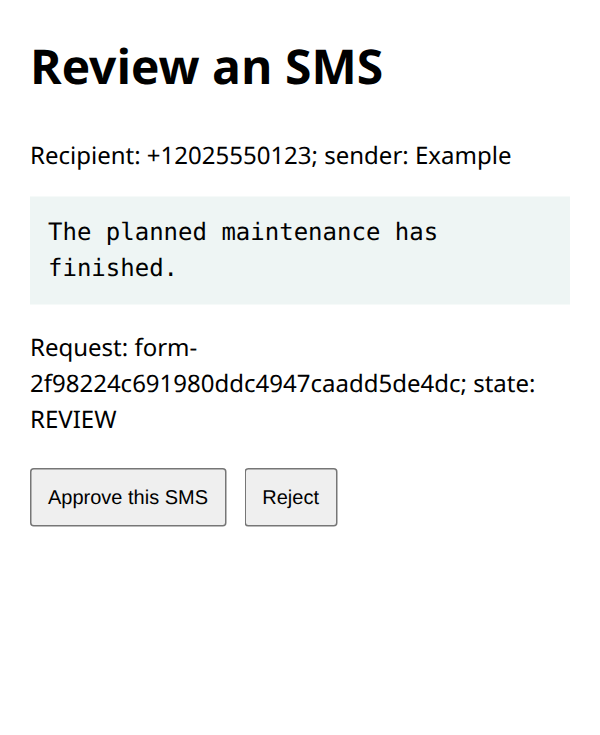
- Select Review exact message. Check the saved sender, recipient, text and request reference.
- Select Approve this SMS only if all values are correct. No paid HTTP request happens in the web process.
- On the server, run
.venv/bin/python outbox.py show REQUEST_KEYin a private terminal if you need to inspect the saved state. This command prints private message content; do not paste its output into shared logs. - With the API key available to the worker, run the command below once to dispatch the oldest approved request.
.venv/bin/python outbox.py send-oneThis last command can incur a real SMS charge. It claims one row inside a database transaction, commits Attempting, and only then makes one HTTP request. A second worker cannot claim the same row. After reviewing local fixtures and one deliberately authorized live test, you may schedule this one-shot command under your service manager. Each invocation processes at most one approved item; monitor the queue instead of assuming it is empty.
6. Read the state before taking another action
| State | Meaning and next step |
|---|---|
| REVIEW / APPROVED | Awaiting a decision or worker. Neither state proves submission. |
| REJECTED | Terminal operator rejection. Prepare a new deliberate request if requirements change. |
| SUBMITTED | The expected one-message acceptance response was saved. Follow the stored message ID to its delivery outcome. |
| ATTEMPTING / UNCERTAIN | The process stopped or no usable response arrived. Reconcile existing SMS records before any further send. |
| REVIEW_RESPONSE | The response did not satisfy the acceptance contract. Inspect its status and available service records; do not reset the row automatically. |
The worker disables redirects and does not automatically retry. Its stable Idempotency-Key provides request identity, but does not justify assuming an unlimited server-side retention period. If the final database write fails after the API accepts the message, Attempting remains an intentional recovery signal. Deleting that row to “unstick” the queue would be unsafe.
7. Verify the boundaries before everyday use
Use a mocked HTTP client to test unauthorized access, a missing CSRF token, HTML-like message text, duplicate approval, the hourly cap, an API rejection and a lost response after submission. Confirm no unapproved record is sent and no uncertain record is automatically reclaimed. Keep the worker disabled while testing the website in a browser.
If a form POST fails, inspect the existing request before retrying with a fresh page. A busy SQLite database should cause the request to stop rather than bypass storage. Check filesystem permissions and a single shared local database. If the review page unexpectedly shows a different sender or recipient, stop dispatch and investigate configuration changes.
The example is a bounded starting point with local failure-path checks. It does not include customer self-service, inbound replies, delivery callbacks, automatic retries, a consent database or a multi-server queue. Add those through reviewed changes that preserve the approval and request identity boundaries.
Related IllyVoIP guides
- Send an SMS with the IllyVoIP API and track delivery
- Send an SMS from PHP with the IllyVoIP API
- Check SMS encoding, message parts and converted text before sending
- Rotate an IllyVoIP API key without losing track of integrations
Sources and verification
- Flask security considerations
- Flask deployment guidance
- Python SQLite documentation
- IllyVoIP API reference
Reviewed 11 October 2026 against current IllyVoIP documentation and the linked primary sources. Use the options available in your own account. Documentation and local checks do not establish a delivered SMS, a completed live call or a certified third-party integration.